What should you do when AI implementation fails in the workplace?
When AI implementation fails in the workplace, leaders should pause the rollout, diagnose where the implementation broke down, rebuild employee trust, clarify what AI should and should not be used for, retrain employees around real workflows, and restart with a smaller pilot before scaling again. In some cases, the right decision is to stop using the AI tool entirely. If the tool is not solving a real business problem, is too expensive for the value it creates, or is causing more rework than improvement, ending the tool is not a failure. Continuing to force a bad AI rollout is a failure.
Most failed AI rollouts do not fail because the technology is completely useless. They fail because the organization rushed into adoption without enough workflow mapping, use case definition, communication, training, quality control, pilot testing, trust measurement, or feedback loops. Employees may stop using the tool, use it only for shallow tasks, quietly work around it, or spend more time correcting AI output than benefiting from it. Leaders may see low adoption and assume employees are resistant, when the real issue is that the tool was never properly connected to the work.
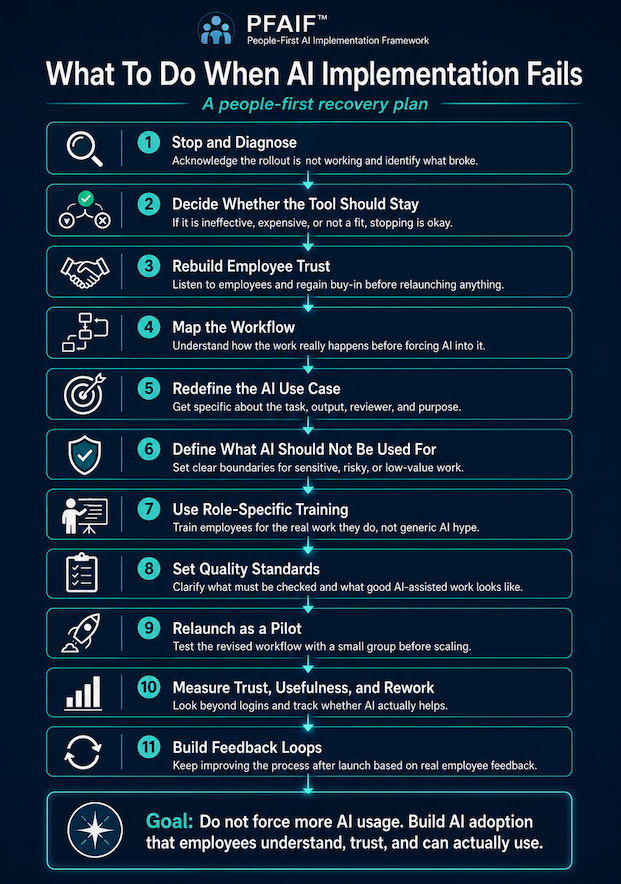
A people-first recovery plan starts by admitting that the rollout is not working as intended. From there, leaders should work backward through the implementation process. They should ask where trust was lost, where employees lacked training, where quality standards were unclear, where the use case was too vague, and where AI was pushed into workflows where it did not belong. The goal is not to force more AI usage. The goal is to rebuild a useful, trusted, and sustainable AI implementation around real business needs and real employee workflows.
AI implementation failure is often quieter than leaders expect
A failed AI implementation does not always look like a disaster. Sometimes it looks like silence. The company launches a new AI platform, holds a few training sessions, sends an internal announcement, and tells everyone this will improve productivity. For the first week, people experiment with it. A few employees seem excited. A few managers mention it in meetings. Then the energy drops off.
Three months later, the software is still being paid for, but only a small group of people use it regularly. Some employees tried it once and never came back. Some use it for basic brainstorming but not for real work. Some are quietly using outside tools instead because the approved tool does not fit their needs. Others avoid AI completely because they do not trust the output or do not want to be blamed if something goes wrong.
That is still an AI implementation failure. It may not be dramatic, but it is expensive and damaging. The organization paid for a tool, created expectations, used leadership attention, and asked employees to change how they work. If the result is shallow adoption and unclear value, the rollout has failed to produce meaningful implementation.
In other cases, the AI tool is being used, but it is not actually helping. Imagine a customer service team that is told to use AI to draft responses. At first, response volume goes up. Leadership sees that as a win. But the customer service representatives are now spending extra time checking whether the AI used the correct policy language, missed customer-specific details, or made promises the company cannot keep. On paper, AI is being used. In practice, it is creating cleanup work.
That kind of failure is especially dangerous because it can look like adoption from the outside. Usage dashboards may show logins, prompts, and generated outputs. But employees know the truth. The tool is not making work better. It is just making work different.
Step 1: Stop defending the rollout and start diagnosing it
The first thing leaders should do when AI implementation fails is stop pretending the rollout is working. Employees can usually tell when leadership is trying to protect the decision instead of understanding the result. If the company keeps pushing adoption while employees are saying the tool is confusing, unhelpful, risky, or time-consuming, trust will erode quickly.
A better approach is to acknowledge the reality directly. Leaders do not need to over-apologize or make the situation dramatic. They simply need to be honest.
For example, a leader might say, “We introduced this AI tool because we believed it could help our team, but we are seeing that the rollout has not created the value we expected. Before we expand it further, we are going to review where it is helping, where it is not helping, and what needs to change.”
That kind of message does two things. First, it shows employees that leadership is paying attention. Second, it creates permission for honest feedback. If employees believe the company has already decided that the AI rollout is a success, they will be less likely to tell the truth. If they believe leadership genuinely wants to understand what happened, they are more likely to explain where the process broke down.
This matters because failed AI implementation is rarely one single problem. It is usually a chain of missed steps. The company may have chosen a tool before mapping workflows. It may have defined the goal as “increase productivity” without identifying a specific use case. It may have trained everyone the same way, even though different roles needed different examples. It may have told employees to use AI without explaining quality standards, review requirements, or boundaries.
The goal of diagnosis is to identify the weak links in that chain.
Step 2: Decide whether the AI tool should be saved at all
Not every failed AI rollout deserves a rescue plan. Sometimes the tool is simply not a good fit. It may be too expensive, too generic, too hard to integrate, too risky, or too disconnected from the company’s real workflows. In those cases, ceasing use of the tool is perfectly okay.
Leaders sometimes keep bad AI tools because they do not want to admit the purchase was a mistake. That is understandable, but it is also how companies turn a small mistake into a long-term cost. Stopping an ineffective AI tool is not anti-innovation. It is responsible management.
For example, imagine a small accounting firm that buys an AI documentation tool because it promises to automate client summaries. After two months, the firm realizes that the tool does not handle the nuance of client-specific tax situations, requires heavy review, and makes staff nervous about accuracy. If the team is spending more time checking the summaries than they would have spent writing them manually, the firm should not force adoption just to justify the purchase. The right move may be to stop using the tool for that workflow and look for a narrower, safer use case.
Before trying to fix a failed rollout, leaders should ask a few blunt questions.
- Is this tool solving a real problem?
- Can we name the workflow it improves?
- Does it save time after review and correction are included?
- Do employees trust it enough to use it in meaningful work?
- Is the cost justified by the value?
- Would we buy this tool again knowing what we know now?
If the answer is no, stop or pause the tool. Learn from it. Move on. The goal is not to have AI everywhere. The goal is to use AI where it actually improves the work.
Step 3: Rebuild employee trust before relaunching AI
When AI implementation fails, employees may not trust the next version of the plan. That is not irrational. If they were asked to use a tool that made their work harder, produced unreliable output, or created confusion about expectations, they will naturally be skeptical when leadership comes back with another AI initiative.
This is why leaders should treat a failed AI rollout as a trust issue, not just a technology issue. Employees may be wondering whether leadership understands their work. They may wonder whether their concerns were ignored. They may worry that AI will be used to judge them, replace them, monitor them, or increase their workload. They may also worry that if AI output is wrong, they will be blamed for trusting it.
A trust recovery process should start with listening. Leaders should talk to the people closest to the work and ask what actually happened. Where did AI help? Where did it slow things down? Where did output quality break down? Where were instructions unclear? Where did employees feel exposed, confused, or unsupported?
For example, a marketing team may say the AI writing tool was useful for early brainstorming but harmful when managers expected publish-ready drafts. A customer service team may say the chatbot helped with simple FAQs but failed on refund policies and edge cases. An operations team may say the AI reporting tool created summaries quickly but missed context that only experienced employees understood.
These details are where the real implementation lessons live. Leaders should not treat employee feedback as complaining. They should treat it as implementation intelligence.
Step 4: Map the workflow before trying again
Many AI rollouts fail because leaders start with the tool instead of the workflow. They buy software, announce access, schedule training, and then tell employees to “find ways to use it.” That approach usually produces shallow experimentation, not meaningful adoption.
A better recovery process starts by mapping the workflow that AI was supposed to improve. Leaders should look at how the work is actually done, not how it appears in a process document. The real workflow includes handoffs, missing information, repeated questions, approvals, judgment calls, exceptions, quality checks, and workarounds employees have built over time.
For example, suppose a home services company introduces AI to help customer service representatives respond to customer inquiries. The rollout fails because employees do not trust the responses. When leadership maps the workflow, they discover the real problem is not response writing. The real problem is that job notes from technicians are incomplete, customer history is spread across multiple systems, and CSRs have to ask follow-up questions before they can respond accurately. In that case, an AI writing tool does not fix the workflow. It just creates polished responses based on incomplete information.
Workflow mapping helps leaders separate the actual problem from the assumed AI solution. It may reveal that AI belongs earlier in the process, later in the process, or not in that workflow at all.
Step 5: Redefine the AI use case
A failed rollout often has a vague use case behind it. “Use AI for productivity” is not a use case. “Use AI for customer service” is not specific enough. “Use AI for content” is still too broad.
A strong AI use case defines the task, the user, the input, the output, the review process, and the business purpose. It also defines when AI should not be used.
A weak use case might be, “Use AI to help the sales team.” A stronger use case would be, “Use AI to draft first-pass follow-up emails after discovery calls, using approved call notes and CRM fields, with the sales representative reviewing and personalizing every message before sending.” That use case is much easier to train, measure, and govern.
Another weak use case might be, “Use AI for HR.” A stronger version would be, “Use AI to summarize employee engagement survey comments into common themes, with HR reviewing the summaries for accuracy and excluding any individual-level employment decisions.”
That version makes the role of AI clearer and reduces the risk of inappropriate use.
When AI implementation fails, leaders should rewrite every use case using this level of specificity. They should ask what problem AI is solving, who will use it, what information it needs, what output it should produce, who reviews it, what quality standard applies, and how success will be measured.
If those questions cannot be answered, the use case is not ready to relaunch.
Step 6: Clearly define what AI should not be used for
One of the most common mistakes in workplace AI adoption is failing to define boundaries. Leaders tell employees where AI might help, but they do not clearly explain where AI should not be used. That leaves employees guessing.
Some employees will avoid AI entirely because they are afraid of using it incorrectly. Others will use AI too broadly and create risk. Both problems come from unclear boundaries.
A company trying to recover from a failed AI rollout should create a simple “use, review, do not use” guide. This guide does not need to be complicated. It just needs to be specific enough to help employees make good decisions.
For example, a company might say AI can be used to draft internal meeting summaries, but those summaries must be reviewed before being shared. AI can be used to brainstorm blog topics, but it cannot publish content without human editing. AI can be used to organize customer feedback, but it cannot make final customer service decisions. AI can help prepare first drafts, but it should not be used for legal, medical, financial, safety, HR, or compliance-sensitive decisions without proper professional review and governance.
This step is important for trust. Employees need to know that leadership is not asking them to blindly rely on AI. They need to know where human judgment remains required.
Step 7: Replace generic AI training with role-specific training
If a failed AI rollout included training, the problem may be that the training was too generic. A one-hour overview of prompt writing may help employees understand what AI can do, but it usually does not teach them how to use AI responsibly in their actual jobs.
Role-specific training is different. It connects AI to real tasks, real risks, real examples, and real quality expectations.
A customer service representative needs training on reviewing AI-generated responses, checking policy language, and avoiding promises the company cannot keep. A marketing employee needs training on brand voice, factual review, originality, and editing. A manager needs training on how to use AI for planning or summarization without turning it into surveillance. A technician may need training on documenting field notes clearly enough for AI-assisted summaries to be useful.
This is where many AI turnarounds either succeed or fail. Employees do not need more hype. They need guided practice. They need to see examples from their own work. They need to know what good AI-assisted work looks like and what mistakes to watch for.
If employees are expected to use AI in real workflows, training should happen inside those workflows.
Step 8: Set quality standards for AI-assisted work
AI can make weak work look finished. That is one of the biggest reasons failed rollouts lose employee trust. The output may be formatted well, written clearly, and delivered quickly, but still be wrong, incomplete, generic, or risky.
A quality standard tells employees what must be true before AI-assisted work can be used. It answers questions like: What has to be checked? Who owns the final output? When is human review required? What kinds of errors are unacceptable? How much correction work is too much? When should an AI use case be paused because the output is not good enough?
For example, if AI is used to draft customer emails, the quality standard might require the employee to verify customer details, policy language, tone, promised next steps, and any pricing or timeline information. If AI is used to summarize meetings, the quality standard might require confirmation of decisions, owners, deadlines, and missing context. If AI is used for content, the standard might require fact-checking, originality review, brand alignment, and human editing.
Without quality standards, employees are left to guess. That creates inconsistent adoption and increases the chance that AI creates more cleanup work than value.
Step 9: Relaunch as a pilot, not a company-wide mandate
If the first rollout failed, the second attempt should be smaller. Leaders should not relaunch the tool across the entire company just because they made a few improvements. They should pilot the revised use case with a limited group of real users.
A good pilot tests the full implementation process, not just the tool. It should test workflow fit, use case clarity, employee training, output quality, trust, time savings, rework, and feedback processes. The pilot group should include employees who will actually use the AI in normal work, not only AI enthusiasts or managers.
For example, instead of telling the entire customer service department to use AI for all responses, a company might pilot one narrow use case with five CSRs for three weeks. The use case might be limited to drafting follow-up messages after completed service calls. During the pilot, the company would measure how long drafts take, how much editing is required, where the AI makes mistakes, whether employees trust the process, and whether customers receive better or faster communication.
At the end of the pilot, leaders should make a real decision. Expand it, revise it, narrow it, or stop it. A pilot is not a formality. It is a decision-making tool.
Step 10: Measure trust, usefulness, and rework
Many companies measure AI adoption by tracking logins, licenses, or usage volume. Those numbers can be useful, but they do not tell the whole story. Employees can use a tool without trusting it. They can generate output without believing it improves their work. They can comply with a mandate while privately thinking the tool is a waste of time.
A better measurement approach looks at trust, usefulness, quality, and rework. Leaders should ask employees whether they trust the output, whether AI saves time after review, whether it improves quality, whether it creates additional correction work, whether they know when not to use it, and whether they would keep using it if it were optional.
This is especially important after a failed rollout. Leaders need to know whether trust is recovering. If employees still believe the tool creates risk or extra work, adoption may remain shallow even if usage numbers improve.
For example, an operations team might show increased AI usage after a relaunch, but employee feedback may reveal that people are using it only for low-value tasks because they do not trust it for anything important. That is useful information. It tells leadership that the problem is not access. The problem is confidence, quality, or use case fit.
Step 11: Build feedback loops after relaunch
AI implementation does not end when the revised tool goes live. This is where many companies fail a second time. They diagnose the problem, revise the use case, run a better training session, relaunch the tool, and then stop paying attention.
A successful turnaround needs feedback loops. Employees need a simple way to report problems, suggest improvements, and explain where AI is helping or hurting. Leadership needs a process for reviewing that feedback, identifying patterns, updating workflows, improving training, and communicating what changed.
This is how trust becomes durable. Employees do not need leadership to promise that AI will be perfect. They need to see that when AI creates problems, the organization responds.
For example, if employees report that AI-generated summaries often miss action items, the company might update the prompt, revise the meeting template, adjust the review checklist, and share the change with the team. That visible loop matters. It shows employees that feedback is not disappearing into a black hole.
A feedback loop turns AI adoption from a one-time rollout into an ongoing improvement process.
A reverse PFAIF diagnosis for failed AI implementation
When an AI rollout fails, leaders can use the People-First AI Implementation Framework in reverse to diagnose what went wrong.
Start with the failure symptoms. Adoption is low. Trust is weak. The tool is expensive. Employees are not using it. Output quality is inconsistent. Rework is high. The business value is unclear.
Then work backward through the implementation system.
- First, look at reinforcement and feedback loops. Did the company have a way to collect and act on employee feedback after launch? If not, problems may have been allowed to grow without correction.
- Next, look at adoption and trust measurement. Did leadership measure whether employees trusted the tool, or only whether they logged in? If trust was never measured, the organization may have confused access with adoption.
- Then review pilot testing. Was the tool tested with real users before scaling, or was it launched broadly based on vendor demos and leadership enthusiasm?
- Next, review quality standards. Did employees know how to check AI output, who owned final approval, and when AI-assisted work was good enough to use?
- Then review role-specific training. Were employees trained for their actual jobs, or did everyone receive the same generic AI overview?
- Next, review change communication. Did leadership explain why AI was being introduced, how it would affect work, and how concerns would be handled?
- Then review use case definition. Was AI tied to a specific task, output, user, and success measure, or was the goal just to “use AI more”?
- Finally, review workflow assessment. Did the company map the real workflow before choosing the tool, or did it try to fit the work around the software?
This reverse diagnosis usually reveals that the failure was not one isolated mistake. It was an implementation system that had missing pieces.
The practical turnaround plan
The simplest turnaround plan is pause, diagnose, rebuild, pilot, and measure.
Pause the rollout if the tool is creating confusion, rework, risk, or cost without clear value. This does not always mean canceling the software immediately. It may mean stopping expansion while leadership reviews what is happening.
Diagnose the failure using the reverse PFAIF approach. Identify whether the issue is workflow fit, unclear use cases, poor communication, generic training, missing quality standards, skipped pilot testing, weak trust measurement, or no feedback loop.
Rebuild the implementation foundation. Map the workflow, narrow the use case, define what AI should and should not be used for, train employees by role, and create quality standards.
Pilot the revised approach with a small group of real users. Measure whether AI fits the workflow, improves quality, saves time after review, and earns employee trust. Measure and improve after launch. Track usefulness, trust, rework, quality, and employee experience. Keep revising the process instead of assuming the rollout is complete.
When AI implementation fails in the workplace, leaders should resist the urge to blame employees or immediately buy another tool. Failed AI adoption is usually a sign that the organization skipped important implementation work. The tool may not have matched the workflow. The use case may have been too vague. Communication may have created anxiety. Training may have been too generic. Quality standards may have been unclear. Pilot testing may have been skipped. Trust may never have been measured. Feedback may never have been used.
The fix is not more pressure. The fix is better implementation.
Regain employee trust. Map the real work. Define specific AI use cases. Clarify what AI should not be used for. Train people around their actual roles. Set quality standards. Pilot before scaling. Measure trust and rework. Build feedback loops after launch.
And when an AI tool does not work, stop using it.
The goal is not to force AI into every corner of the business. The goal is to use AI where it genuinely helps employees do better work. The companies that succeed with AI will not be the ones that push adoption the hardest. They will be the ones that implement AI in ways people understand, trust, and can actually use.