Category: PFAIF

  • What To Do When AI Implementation Fails in the Workplace

    What should you do when AI implementation fails in the workplace?

    When AI implementation fails in the workplace, leaders should pause the rollout, diagnose where the implementation broke down, rebuild employee trust, clarify what AI should and should not be used for, retrain employees around real workflows, and restart with a smaller pilot before scaling again. In some cases, the right decision is to stop using the AI tool entirely. If the tool is not solving a real business problem, is too expensive for the value it creates, or is causing more rework than improvement, ending the tool is not a failure. Continuing to force a bad AI rollout is a failure.

    Most failed AI rollouts do not fail because the technology is completely useless. They fail because the organization rushed into adoption without enough workflow mapping, use case definition, communication, training, quality control, pilot testing, trust measurement, or feedback loops. Employees may stop using the tool, use it only for shallow tasks, quietly work around it, or spend more time correcting AI output than benefiting from it. Leaders may see low adoption and assume employees are resistant, when the real issue is that the tool was never properly connected to the work.

    A people-first recovery plan starts by admitting that the rollout is not working as intended. From there, leaders should work backward through the implementation process. They should ask where trust was lost, where employees lacked training, where quality standards were unclear, where the use case was too vague, and where AI was pushed into workflows where it did not belong. The goal is not to force more AI usage. The goal is to rebuild a useful, trusted, and sustainable AI implementation around real business needs and real employee workflows.
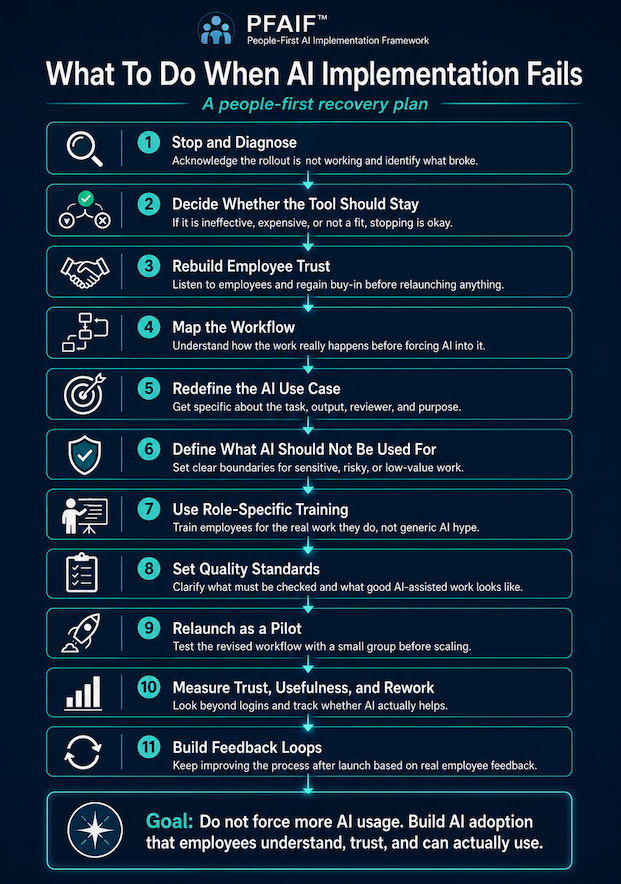
    "What to do when AI Implementation Fails" flowchart

    AI implementation failure is often quieter than leaders expect

    A failed AI implementation does not always look like a disaster. Sometimes it looks like silence. The company launches a new AI platform, holds a few training sessions, sends an internal announcement, and tells everyone this will improve productivity. For the first week, people experiment with it. A few employees seem excited. A few managers mention it in meetings. Then the energy drops off.

    Three months later, the software is still being paid for, but only a small group of people use it regularly. Some employees tried it once and never came back. Some use it for basic brainstorming but not for real work. Some are quietly using outside tools instead because the approved tool does not fit their needs. Others avoid AI completely because they do not trust the output or do not want to be blamed if something goes wrong.

    That is still an AI implementation failure. It may not be dramatic, but it is expensive and damaging. The organization paid for a tool, created expectations, used leadership attention, and asked employees to change how they work. If the result is shallow adoption and unclear value, the rollout has failed to produce meaningful implementation.

    In other cases, the AI tool is being used, but it is not actually helping. Imagine a customer service team that is told to use AI to draft responses. At first, response volume goes up. Leadership sees that as a win. But the customer service representatives are now spending extra time checking whether the AI used the correct policy language, missed customer-specific details, or made promises the company cannot keep. On paper, AI is being used. In practice, it is creating cleanup work.

    That kind of failure is especially dangerous because it can look like adoption from the outside. Usage dashboards may show logins, prompts, and generated outputs. But employees know the truth. The tool is not making work better. It is just making work different.

    Step 1: Stop defending the rollout and start diagnosing it

    The first thing leaders should do when AI implementation fails is stop pretending the rollout is working. Employees can usually tell when leadership is trying to protect the decision instead of understanding the result. If the company keeps pushing adoption while employees are saying the tool is confusing, unhelpful, risky, or time-consuming, trust will erode quickly.

    A better approach is to acknowledge the reality directly. Leaders do not need to over-apologize or make the situation dramatic. They simply need to be honest.

    For example, a leader might say, “We introduced this AI tool because we believed it could help our team, but we are seeing that the rollout has not created the value we expected. Before we expand it further, we are going to review where it is helping, where it is not helping, and what needs to change.”

    That kind of message does two things. First, it shows employees that leadership is paying attention. Second, it creates permission for honest feedback. If employees believe the company has already decided that the AI rollout is a success, they will be less likely to tell the truth. If they believe leadership genuinely wants to understand what happened, they are more likely to explain where the process broke down.

    This matters because failed AI implementation is rarely one single problem. It is usually a chain of missed steps. The company may have chosen a tool before mapping workflows. It may have defined the goal as “increase productivity” without identifying a specific use case. It may have trained everyone the same way, even though different roles needed different examples. It may have told employees to use AI without explaining quality standards, review requirements, or boundaries.

    The goal of diagnosis is to identify the weak links in that chain.

    Step 2: Decide whether the AI tool should be saved at all

    Not every failed AI rollout deserves a rescue plan. Sometimes the tool is simply not a good fit. It may be too expensive, too generic, too hard to integrate, too risky, or too disconnected from the company’s real workflows. In those cases, ceasing use of the tool is perfectly okay.

    Leaders sometimes keep bad AI tools because they do not want to admit the purchase was a mistake. That is understandable, but it is also how companies turn a small mistake into a long-term cost. Stopping an ineffective AI tool is not anti-innovation. It is responsible management.

    For example, imagine a small accounting firm that buys an AI documentation tool because it promises to automate client summaries. After two months, the firm realizes that the tool does not handle the nuance of client-specific tax situations, requires heavy review, and makes staff nervous about accuracy. If the team is spending more time checking the summaries than they would have spent writing them manually, the firm should not force adoption just to justify the purchase. The right move may be to stop using the tool for that workflow and look for a narrower, safer use case.

    Before trying to fix a failed rollout, leaders should ask a few blunt questions.

    • Is this tool solving a real problem?
    • Can we name the workflow it improves?
    • Does it save time after review and correction are included?
    • Do employees trust it enough to use it in meaningful work?
    • Is the cost justified by the value?
    • Would we buy this tool again knowing what we know now?

    If the answer is no, stop or pause the tool. Learn from it. Move on. The goal is not to have AI everywhere. The goal is to use AI where it actually improves the work.

    Step 3: Rebuild employee trust before relaunching AI

    When AI implementation fails, employees may not trust the next version of the plan. That is not irrational. If they were asked to use a tool that made their work harder, produced unreliable output, or created confusion about expectations, they will naturally be skeptical when leadership comes back with another AI initiative.

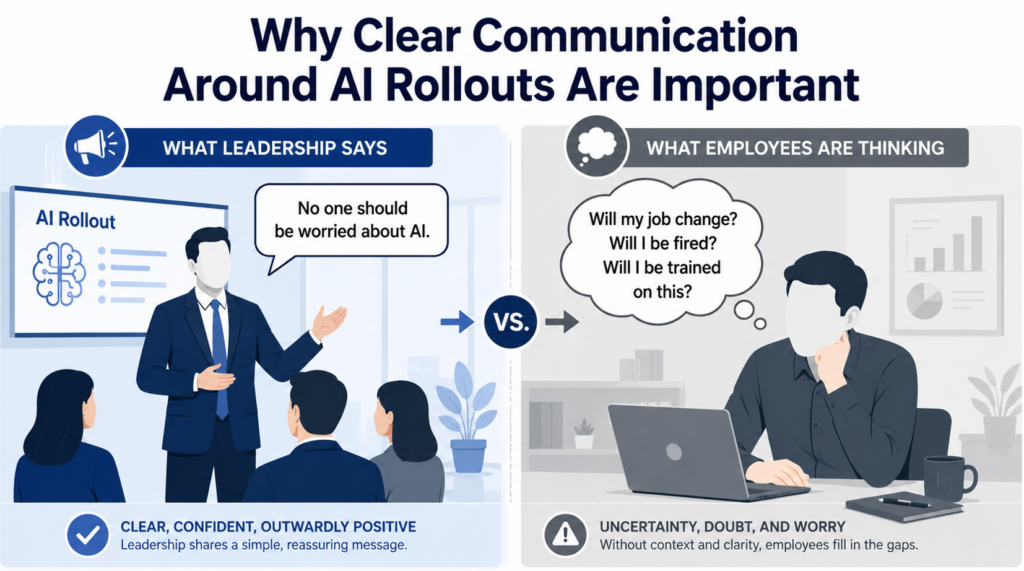
    This is why leaders should treat a failed AI rollout as a trust issue, not just a technology issue. Employees may be wondering whether leadership understands their work. They may wonder whether their concerns were ignored. They may worry that AI will be used to judge them, replace them, monitor them, or increase their workload. They may also worry that if AI output is wrong, they will be blamed for trusting it.

    A trust recovery process should start with listening. Leaders should talk to the people closest to the work and ask what actually happened. Where did AI help? Where did it slow things down? Where did output quality break down? Where were instructions unclear? Where did employees feel exposed, confused, or unsupported?

    For example, a marketing team may say the AI writing tool was useful for early brainstorming but harmful when managers expected publish-ready drafts. A customer service team may say the chatbot helped with simple FAQs but failed on refund policies and edge cases. An operations team may say the AI reporting tool created summaries quickly but missed context that only experienced employees understood.

    These details are where the real implementation lessons live. Leaders should not treat employee feedback as complaining. They should treat it as implementation intelligence.

    Step 4: Map the workflow before trying again

    Many AI rollouts fail because leaders start with the tool instead of the workflow. They buy software, announce access, schedule training, and then tell employees to “find ways to use it.” That approach usually produces shallow experimentation, not meaningful adoption.

    A better recovery process starts by mapping the workflow that AI was supposed to improve. Leaders should look at how the work is actually done, not how it appears in a process document. The real workflow includes handoffs, missing information, repeated questions, approvals, judgment calls, exceptions, quality checks, and workarounds employees have built over time.

    For example, suppose a home services company introduces AI to help customer service representatives respond to customer inquiries. The rollout fails because employees do not trust the responses. When leadership maps the workflow, they discover the real problem is not response writing. The real problem is that job notes from technicians are incomplete, customer history is spread across multiple systems, and CSRs have to ask follow-up questions before they can respond accurately. In that case, an AI writing tool does not fix the workflow. It just creates polished responses based on incomplete information.

    Workflow mapping helps leaders separate the actual problem from the assumed AI solution. It may reveal that AI belongs earlier in the process, later in the process, or not in that workflow at all.

    Step 5: Redefine the AI use case

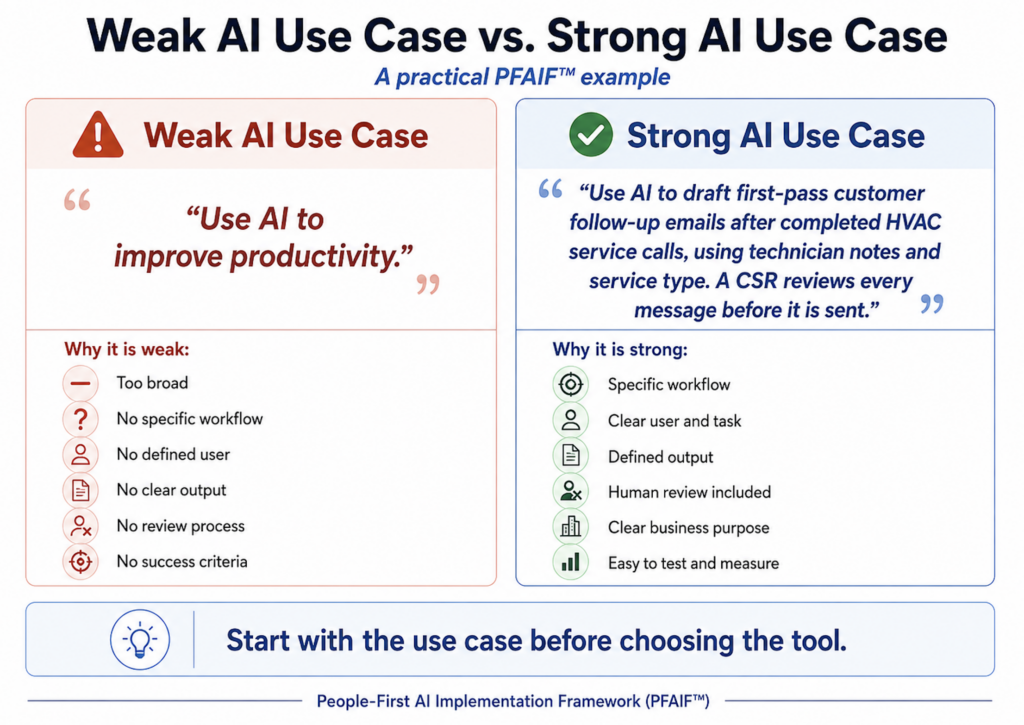
    A failed rollout often has a vague use case behind it. “Use AI for productivity” is not a use case. “Use AI for customer service” is not specific enough. “Use AI for content” is still too broad.

    A strong AI use case defines the task, the user, the input, the output, the review process, and the business purpose. It also defines when AI should not be used.

    A weak use case might be, “Use AI to help the sales team.” A stronger use case would be, “Use AI to draft first-pass follow-up emails after discovery calls, using approved call notes and CRM fields, with the sales representative reviewing and personalizing every message before sending.” That use case is much easier to train, measure, and govern.

    Another weak use case might be, “Use AI for HR.” A stronger version would be, “Use AI to summarize employee engagement survey comments into common themes, with HR reviewing the summaries for accuracy and excluding any individual-level employment decisions.”

    That version makes the role of AI clearer and reduces the risk of inappropriate use.

    When AI implementation fails, leaders should rewrite every use case using this level of specificity. They should ask what problem AI is solving, who will use it, what information it needs, what output it should produce, who reviews it, what quality standard applies, and how success will be measured.

    If those questions cannot be answered, the use case is not ready to relaunch.

    Step 6: Clearly define what AI should not be used for

    One of the most common mistakes in workplace AI adoption is failing to define boundaries. Leaders tell employees where AI might help, but they do not clearly explain where AI should not be used. That leaves employees guessing.

    Some employees will avoid AI entirely because they are afraid of using it incorrectly. Others will use AI too broadly and create risk. Both problems come from unclear boundaries.

    A company trying to recover from a failed AI rollout should create a simple “use, review, do not use” guide. This guide does not need to be complicated. It just needs to be specific enough to help employees make good decisions.

    For example, a company might say AI can be used to draft internal meeting summaries, but those summaries must be reviewed before being shared. AI can be used to brainstorm blog topics, but it cannot publish content without human editing. AI can be used to organize customer feedback, but it cannot make final customer service decisions. AI can help prepare first drafts, but it should not be used for legal, medical, financial, safety, HR, or compliance-sensitive decisions without proper professional review and governance.

    This step is important for trust. Employees need to know that leadership is not asking them to blindly rely on AI. They need to know where human judgment remains required.

    Step 7: Replace generic AI training with role-specific training

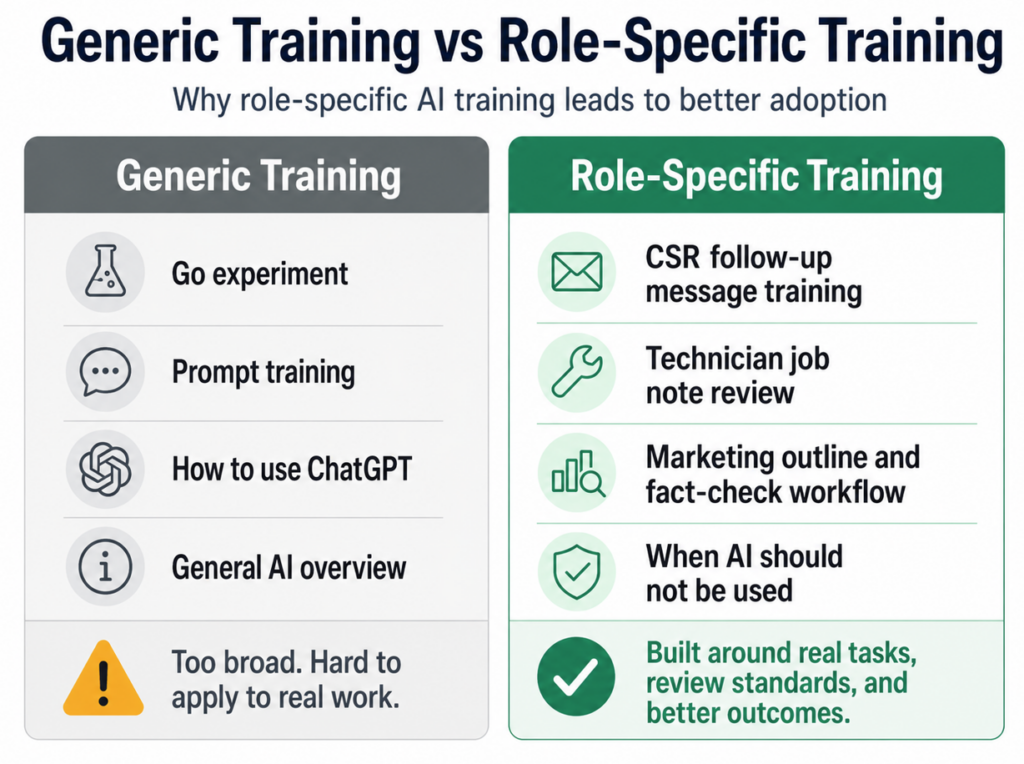
    If a failed AI rollout included training, the problem may be that the training was too generic. A one-hour overview of prompt writing may help employees understand what AI can do, but it usually does not teach them how to use AI responsibly in their actual jobs.

    Role-specific training is different. It connects AI to real tasks, real risks, real examples, and real quality expectations.

    A customer service representative needs training on reviewing AI-generated responses, checking policy language, and avoiding promises the company cannot keep. A marketing employee needs training on brand voice, factual review, originality, and editing. A manager needs training on how to use AI for planning or summarization without turning it into surveillance. A technician may need training on documenting field notes clearly enough for AI-assisted summaries to be useful.

    This is where many AI turnarounds either succeed or fail. Employees do not need more hype. They need guided practice. They need to see examples from their own work. They need to know what good AI-assisted work looks like and what mistakes to watch for.

    If employees are expected to use AI in real workflows, training should happen inside those workflows.

    Step 8: Set quality standards for AI-assisted work

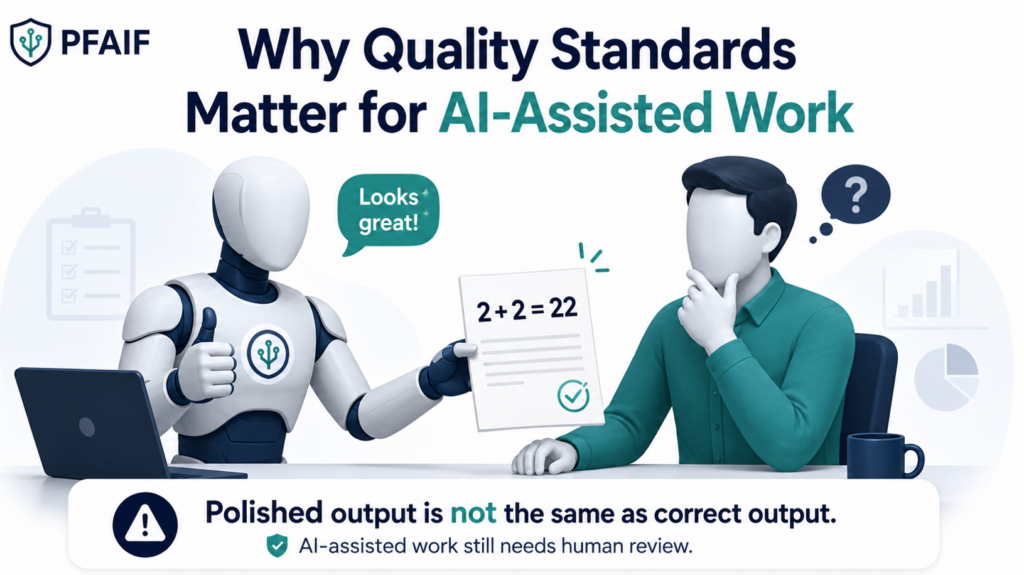
    AI can make weak work look finished. That is one of the biggest reasons failed rollouts lose employee trust. The output may be formatted well, written clearly, and delivered quickly, but still be wrong, incomplete, generic, or risky.

    A quality standard tells employees what must be true before AI-assisted work can be used. It answers questions like: What has to be checked? Who owns the final output? When is human review required? What kinds of errors are unacceptable? How much correction work is too much? When should an AI use case be paused because the output is not good enough?

    For example, if AI is used to draft customer emails, the quality standard might require the employee to verify customer details, policy language, tone, promised next steps, and any pricing or timeline information. If AI is used to summarize meetings, the quality standard might require confirmation of decisions, owners, deadlines, and missing context. If AI is used for content, the standard might require fact-checking, originality review, brand alignment, and human editing.

    Without quality standards, employees are left to guess. That creates inconsistent adoption and increases the chance that AI creates more cleanup work than value.

    Step 9: Relaunch as a pilot, not a company-wide mandate

    If the first rollout failed, the second attempt should be smaller. Leaders should not relaunch the tool across the entire company just because they made a few improvements. They should pilot the revised use case with a limited group of real users.

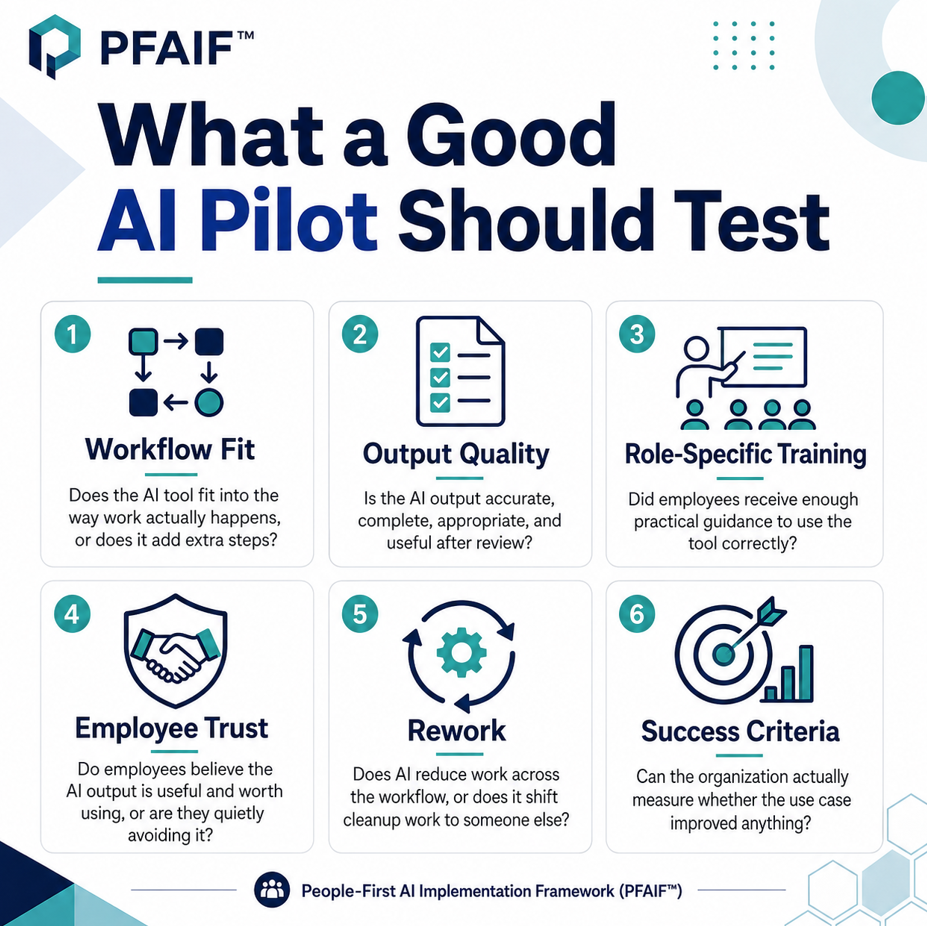
    A good pilot tests the full implementation process, not just the tool. It should test workflow fit, use case clarity, employee training, output quality, trust, time savings, rework, and feedback processes. The pilot group should include employees who will actually use the AI in normal work, not only AI enthusiasts or managers.

    For example, instead of telling the entire customer service department to use AI for all responses, a company might pilot one narrow use case with five CSRs for three weeks. The use case might be limited to drafting follow-up messages after completed service calls. During the pilot, the company would measure how long drafts take, how much editing is required, where the AI makes mistakes, whether employees trust the process, and whether customers receive better or faster communication.

    At the end of the pilot, leaders should make a real decision. Expand it, revise it, narrow it, or stop it. A pilot is not a formality. It is a decision-making tool.

    Step 10: Measure trust, usefulness, and rework

    Many companies measure AI adoption by tracking logins, licenses, or usage volume. Those numbers can be useful, but they do not tell the whole story. Employees can use a tool without trusting it. They can generate output without believing it improves their work. They can comply with a mandate while privately thinking the tool is a waste of time.

    A better measurement approach looks at trust, usefulness, quality, and rework. Leaders should ask employees whether they trust the output, whether AI saves time after review, whether it improves quality, whether it creates additional correction work, whether they know when not to use it, and whether they would keep using it if it were optional.

    This is especially important after a failed rollout. Leaders need to know whether trust is recovering. If employees still believe the tool creates risk or extra work, adoption may remain shallow even if usage numbers improve.

    For example, an operations team might show increased AI usage after a relaunch, but employee feedback may reveal that people are using it only for low-value tasks because they do not trust it for anything important. That is useful information. It tells leadership that the problem is not access. The problem is confidence, quality, or use case fit.

    Step 11: Build feedback loops after relaunch

    AI implementation does not end when the revised tool goes live. This is where many companies fail a second time. They diagnose the problem, revise the use case, run a better training session, relaunch the tool, and then stop paying attention.

    A successful turnaround needs feedback loops. Employees need a simple way to report problems, suggest improvements, and explain where AI is helping or hurting. Leadership needs a process for reviewing that feedback, identifying patterns, updating workflows, improving training, and communicating what changed.

    This is how trust becomes durable. Employees do not need leadership to promise that AI will be perfect. They need to see that when AI creates problems, the organization responds.

    For example, if employees report that AI-generated summaries often miss action items, the company might update the prompt, revise the meeting template, adjust the review checklist, and share the change with the team. That visible loop matters. It shows employees that feedback is not disappearing into a black hole.

    A feedback loop turns AI adoption from a one-time rollout into an ongoing improvement process.

    A reverse PFAIF diagnosis for failed AI implementation

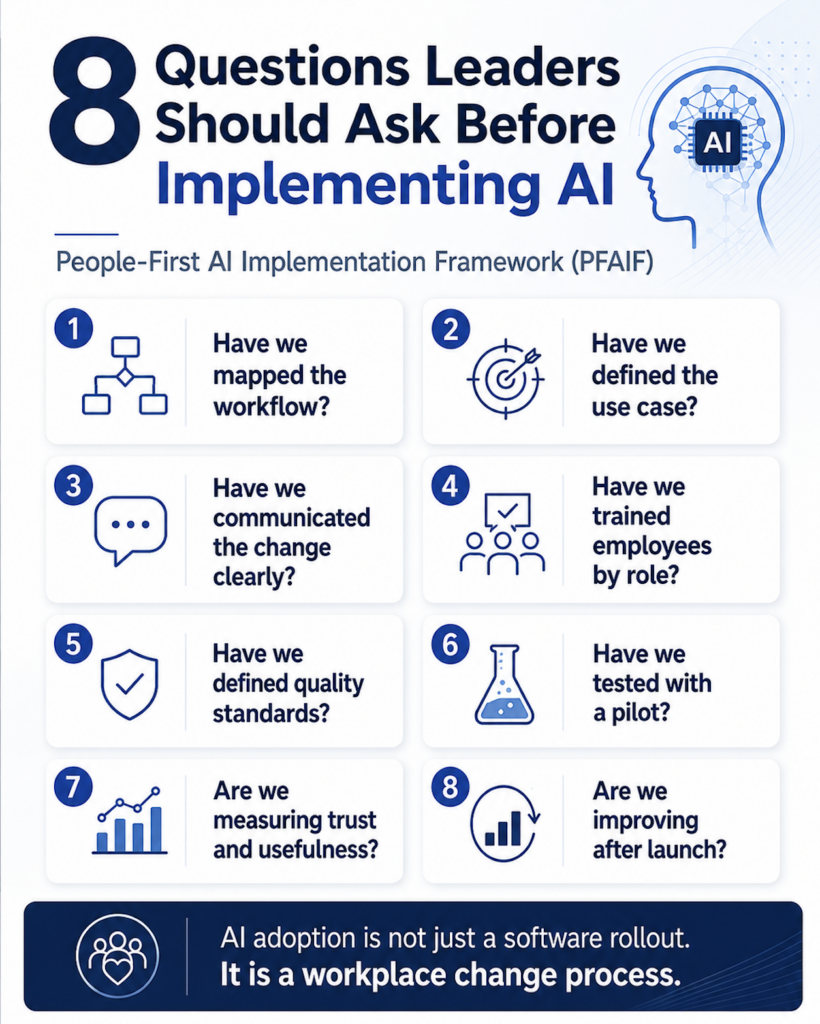
    When an AI rollout fails, leaders can use the People-First AI Implementation Framework in reverse to diagnose what went wrong.

    Start with the failure symptoms. Adoption is low. Trust is weak. The tool is expensive. Employees are not using it. Output quality is inconsistent. Rework is high. The business value is unclear.

    Then work backward through the implementation system.

    • First, look at reinforcement and feedback loops. Did the company have a way to collect and act on employee feedback after launch? If not, problems may have been allowed to grow without correction.
    • Next, look at adoption and trust measurement. Did leadership measure whether employees trusted the tool, or only whether they logged in? If trust was never measured, the organization may have confused access with adoption.
    • Then review pilot testing. Was the tool tested with real users before scaling, or was it launched broadly based on vendor demos and leadership enthusiasm?
    • Next, review quality standards. Did employees know how to check AI output, who owned final approval, and when AI-assisted work was good enough to use?
    • Then review role-specific training. Were employees trained for their actual jobs, or did everyone receive the same generic AI overview?
    • Next, review change communication. Did leadership explain why AI was being introduced, how it would affect work, and how concerns would be handled?
    • Then review use case definition. Was AI tied to a specific task, output, user, and success measure, or was the goal just to “use AI more”?
    • Finally, review workflow assessment. Did the company map the real workflow before choosing the tool, or did it try to fit the work around the software?

    This reverse diagnosis usually reveals that the failure was not one isolated mistake. It was an implementation system that had missing pieces.

    The practical turnaround plan

    The simplest turnaround plan is pause, diagnose, rebuild, pilot, and measure.

    Pause the rollout if the tool is creating confusion, rework, risk, or cost without clear value. This does not always mean canceling the software immediately. It may mean stopping expansion while leadership reviews what is happening.

    Diagnose the failure using the reverse PFAIF approach. Identify whether the issue is workflow fit, unclear use cases, poor communication, generic training, missing quality standards, skipped pilot testing, weak trust measurement, or no feedback loop.

    Rebuild the implementation foundation. Map the workflow, narrow the use case, define what AI should and should not be used for, train employees by role, and create quality standards.

    Pilot the revised approach with a small group of real users. Measure whether AI fits the workflow, improves quality, saves time after review, and earns employee trust. Measure and improve after launch. Track usefulness, trust, rework, quality, and employee experience. Keep revising the process instead of assuming the rollout is complete.

    When AI implementation fails in the workplace, leaders should resist the urge to blame employees or immediately buy another tool. Failed AI adoption is usually a sign that the organization skipped important implementation work. The tool may not have matched the workflow. The use case may have been too vague. Communication may have created anxiety. Training may have been too generic. Quality standards may have been unclear. Pilot testing may have been skipped. Trust may never have been measured. Feedback may never have been used.

    The fix is not more pressure. The fix is better implementation.

    Regain employee trust. Map the real work. Define specific AI use cases. Clarify what AI should not be used for. Train people around their actual roles. Set quality standards. Pilot before scaling. Measure trust and rework. Build feedback loops after launch.

    And when an AI tool does not work, stop using it.

    The goal is not to force AI into every corner of the business. The goal is to use AI where it genuinely helps employees do better work. The companies that succeed with AI will not be the ones that push adoption the hardest. They will be the ones that implement AI in ways people understand, trust, and can actually use.
  • Why AI Adoption Needs Feedback Loops After Launch

    AI adoption needs feedback loops after launch because implementation does not end when employees get access to a tool. After rollout, leaders need a structured way to learn whether AI is actually improving the workflow, whether employees trust the output, whether quality standards are working, whether the tool is creating extra cleanup work, and what needs to change over time. In the People-First AI Implementation Framework, or PFAIF™, reinforcement and feedback loops are a core readiness area because AI adoption should be treated as an ongoing workplace change process, not a one-time software launch. The PFAIF assessment specifically measures whether organizations review AI workflows after implementation, use employee feedback to improve AI processes, reinforce effective use through coaching or documentation, update AI processes when work needs change, and treat AI adoption as an ongoing change process.

    This is where many AI rollouts lose momentum.

    A company announces the tool. Employees attend a training session. A pilot may even go well. Everyone feels like progress is happening. Then the tool enters real daily work, and the problems become more specific. Some outputs are useful. Some are not. Some employees use AI confidently. Others avoid it. Some workflows improve. Others become more complicated. Managers realize they need better review standards. Employees discover edge cases nobody thought about during planning.

    That is normal. The mistake is assuming launch means the hard part is over. With AI, launch is when the real learning begins.

    What an AI Feedback Loop Should Include from the People-First AI Implementation Framework (PFAIF)

    AI Adoption Is Not a One-Time Event

    A traditional software rollout often has a clear finish line. The system goes live. Employees receive access. Training is completed. The implementation team moves on.

    AI does not work that cleanly.

    AI tools change quickly. Use cases evolve. Employee confidence changes. Teams discover new possibilities and new risks. The same tool may work well in one workflow and poorly in another. A process that looks good during a pilot may break when more people use it. A prompt or workflow that works today may need to be adjusted next month. This is why feedback loops matter.

    A feedback loop is a structured process for collecting real-world information, learning from it, and improving the AI workflow. It can be as simple as a monthly review meeting, a short feedback form, updated documentation, manager check-ins, or a shared place where employees can report issues.

    The format matters less than the habit. The organization needs a way to keep asking: Is this still working?

    Without that habit, AI adoption can drift. Employees start inventing their own workarounds. Managers stop seeing the real issues. AI output quality varies by team. People stop reporting problems. The tool remains available, but adoption becomes shallow.

    Why Feedback Loops Matter After AI Rollout

    Feedback loops matter because AI creates a gap between what leadership planned and what employees actually experience.

    Leadership may believe the AI tool is saving time. Employees may be spending that saved time reviewing, correcting, rewriting, or explaining AI errors. Leadership may believe a use case is clear. Employees may still be unsure when to use AI and when not to. Leadership may believe training was enough. Employees may need more examples tied to their real tasks.

    Feedback loops close that gap.

    They give employees a way to share what is happening in the actual workflow. They also give leaders a way to adjust the rollout before small problems become permanent frustrations.

    For example, a business may launch AI-assisted customer follow-up messages. At first, the drafts look helpful. After two weeks, CSRs may notice that the messages work well for routine maintenance visits but fail when the customer had a complaint, a warranty concern, or an incomplete technician note. Without a feedback loop, CSRs may quietly rewrite everything or stop using the tool. With a feedback loop, the company can narrow the use case, improve technician note templates, update the review checklist, and train employees on which situations require human-only writing.

    That is the difference between a tool that fades and a workflow that improves.

    The Biggest Mistake: Treating AI Launch as Success

    One of the most common AI implementation mistakes is treating launch as proof of success.

    A tool going live does not mean the organization adopted AI well. It only means the tool is available.

    Real adoption requires more than access. Employees need to understand the use case, trust the output, know how to review it, believe leadership is listening, and see that AI actually improves the work. That takes reinforcement after launch.

    A company can have strong initial excitement and weak long-term adoption. This happens when employees try the tool, find it clunky or unreliable, and slowly return to old habits. It also happens when early AI users produce low-quality work that creates problems for everyone else. It happens when managers measure usage but ignore correction work. It happens when employees give feedback and nothing changes.

    Feedback loops prevent launch from becoming the final checkpoint.

    They make launch the beginning of the improvement cycle.

    This matters because the PFAIF research findings suggest that reinforcement and feedback loops are one of the weaker areas in workplace AI readiness. In the integrated findings, Reinforcement and Feedback Loops ranked near the bottom of the eight PFAIF dimensions, and the study notes that adoption gaps are concentrated around training, trust measurement, reinforcement, and communication.

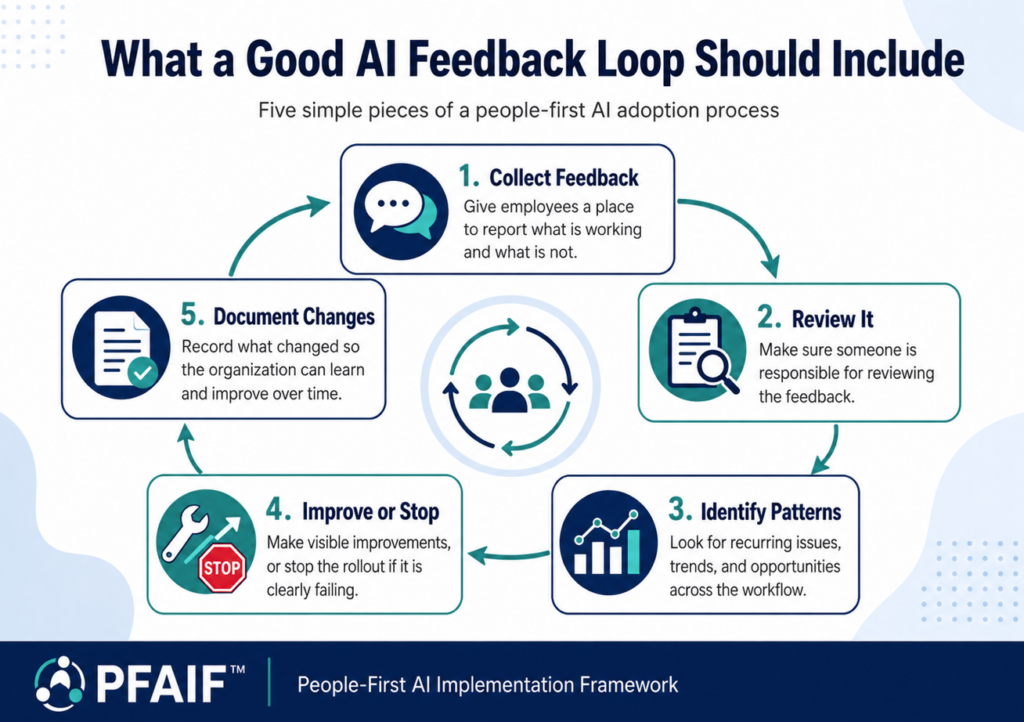
    What an AI Feedback Loop Should Include

    A good AI feedback loop should include five basic pieces.

    • First, employees need a place to report what is working and what is not. This can be a form, shared document, Slack channel, Teams channel, weekly check-in, or manager conversation.
    • Second, someone needs to review the feedback. Collecting feedback is not enough. If nobody looks at it, employees will stop participating.
    • Third, the organization needs to identify patterns. One bad AI output may be a one-off issue. Ten similar complaints may mean the use case, prompt, input data, training, or workflow needs to change.
    • Fourth, leaders need to make visible improvements. Employees should see that feedback leads to changes. Otherwise, feedback becomes performative.
    • Fifth, the organization should document what changed. Updated prompts, examples, review checklists, approved use cases, prohibited uses, and training materials should be easy to find.

    A feedback loop does not have to be complicated, but it does have to be real.

    The worst version is asking employees for feedback and then doing nothing with it. That damages trust faster than never asking at all.

    Example: Feedback Loops in a Home Services Company

    A home services company may use AI to help with technician job notes, customer follow-up messages, review responses, and internal dispatch summaries.

    At launch, the use case may seem clear. AI drafts follow-up messages after completed service visits. CSRs review the drafts before sending. Managers expect faster and more consistent communication.

    After a few weeks, the team may notice patterns.

    AI drafts are useful when technician notes are complete. They are weak when notes are vague. AI handles maintenance visits well but struggles with complex repairs. It sometimes creates messages that sound too polished for a frustrated customer. It occasionally suggests next steps that were not actually recommended by the technician. A feedback loop lets the company respond.

    The company may update the technician note template, create a “do not use AI” rule for complaints, add a CSR review checklist, and build examples of good and bad AI-assisted messages. Managers may also review which job types produce the most editing work.

    Without that feedback loop, the office team may quietly lose trust in the tool. With it, the AI process gets better.

    Example: Feedback Loops in a Marketing Agency

    A marketing agency may use AI for content outlines, keyword clustering, client research summaries, meta descriptions, reporting summaries, and first-draft support.

    At first, leadership may see faster output and think adoption is working. But editors may notice that AI-assisted outlines are too generic. Writers may say the AI helps with structure but not client-specific insight. Account managers may find that AI summaries miss important client context. SEO strategists may see that AI keyword groupings look clean but do not always match search intent.

    A feedback loop gives each role a way to report these issues.

    The agency could create a monthly AI content review where writers, editors, strategists, and account managers discuss what is helping and what is creating rework. The team may decide that AI is useful for organizing research but not for drafting final recommendations. They may create stronger prompts for service-area businesses, add a local relevance checklist, or prohibit AI from inventing claims, statistics, testimonials, or case study details.

    This kind of feedback loop protects quality.

    It also protects morale. Writers and editors are more likely to accept AI when they see that leadership is not blindly chasing volume at the expense of quality.

    Example: Feedback Loops in a Dental Office

    A dental office may use AI to draft appointment preparation messages, routine reminders, internal checklists, and front desk communication.

    At launch, the office may decide that AI can support routine administrative communication, but not diagnosis, treatment recommendations, clinical advice, or sensitive patient details. That is a good start.

    But real use will still reveal issues.

    Front desk staff may find that AI reminders are too long. Patients may still arrive without the right forms. Some messages may use language that sounds too clinical. Staff may be unsure how to handle questions about insurance, sedation, post-treatment instructions, or patient-specific concerns.

    A feedback loop could include a short weekly check-in for the first month. Staff can flag confusing drafts, patient questions, and situations where AI should not be used. The office manager can update approved templates and examples based on what employees see.

    This keeps the AI workflow safe and practical.

    It also reminds employees that they are not expected to figure out the boundaries alone.

    Example: Feedback Loops in a Law Firm

    A law firm may use AI for internal document summaries, timeline organization, administrative drafts, or intake classification.

    In this environment, feedback loops are especially important because the cost of overtrusting AI can be high.

    Attorneys and paralegals may discover that AI summaries are useful for orientation but sometimes miss important details, overstate certainty, or fail to capture nuance. Intake staff may find that AI helps categorize inquiries but occasionally misclassifies urgency. Legal assistants may use AI to draft routine administrative emails but need clearer rules about confidentiality and review.

    A feedback loop might include documented issue reporting, attorney review of sample outputs, updated guidance on approved use cases, and a monthly discussion of where AI created value or risk.

    The firm may decide that AI is helpful for first-pass internal organization but should not be used for certain document types or client-facing work. That is not a failure. It is responsible implementation.

    AI feedback loops help the firm keep the tool in its proper role.

    Example: Feedback Loops in an Accounting Firm

    An accounting firm may use AI during tax season to draft routine client messages, organize document requests, summarize internal notes, or explain common administrative items in plain language.

    At first, this may feel like a major time saver. But during busy season, small problems become big quickly.

    Staff may notice that AI-generated messages sound helpful but are too generic for certain clients. Some explanations may be accurate in general but not appropriate for a specific situation. Employees may spend extra time editing messages to avoid anything that sounds like personalized tax advice. Managers may realize that some staff are using AI carefully while others need more guidance.

    A feedback loop allows the firm to refine the process.

    The firm might build approved message templates, define which client questions require professional review, create examples of safe plain-language explanations, and track whether AI is reducing repetitive writing or creating more review work.

    The goal is not to eliminate judgment.

    The goal is to make routine work easier without weakening professional standards.

    Example: Feedback Loops in a Restaurant Group

    A restaurant group may use AI for review responses, social media captions, job descriptions, shift summaries, and internal communications.

    After launch, managers may discover that AI works well for routine positive reviews but poorly for complaints. It may sound robotic. It may fail to address the specific customer concern. It may use phrasing that feels too formal for the brand. It may draft responses too quickly for sensitive situations that need careful human attention.

    A feedback loop can help the group create better rules.

    Managers can share examples of good AI-assisted responses and bad ones. The company can create a clear escalation list: food safety, injuries, discrimination, employee behavior, refunds, legal threats, and highly emotional complaints should be handled by a person, not casually drafted by AI.

    The restaurant group can also update its brand voice examples so AI-assisted drafts sound more like the business.

    This keeps AI useful without making the customer experience feel automated or careless.

    Feedback Loops Help Employees Trust the Process

    Employees are more likely to trust AI adoption when they see that feedback matters.

    This does not mean every employee suggestion will be accepted. It means employees need to know their real-world experience is part of the rollout.

    When employees report that AI output is wrong and leadership ignores it, trust drops. When employees say the tool creates extra work and leadership only responds with more pressure to use it, resistance grows. When employees ask for better examples and nothing changes, training loses credibility.

    On the other hand, trust grows when employees see visible improvement.

    A CSR reports that AI follow-up messages are weak for warranty issues, and the company narrows the use case. A writer says AI outlines are too generic, and the agency updates the prompt and review checklist. A paralegal flags missed details in AI summaries, and the firm adds a stricter review rule. A restaurant manager says AI review responses sound robotic, and the company updates brand voice examples.

    These changes tell employees: “Your experience matters.”

    That is the foundation of a people-first AI rollout.

    Feedback Loops Prevent Silent Resistance

    Not all AI resistance is loud.

    In many organizations, employees do not openly push back. They simply stop using the tool. Or they use it only when required. Or they create workarounds. Or they fix AI mistakes quietly and never tell leadership. Or they comply in public while privately believing the tool is not helpful. This is called silent resistance. Feedback loops help leaders catch it early.

    If employees are avoiding AI, leaders need to know why. Maybe the output is poor. Maybe the training was too generic. Maybe the use case is unclear. Maybe employees are worried about accountability. Maybe the workflow adds steps instead of removing them. Maybe people do not believe leadership wants honest feedback.

    Without feedback loops, silent resistance looks like a mystery. With feedback loops, it becomes diagnosable.

    Leaders can ask direct questions: Where is AI helping? Where is it slowing you down? What do you not trust? What do you have to fix? What would make this easier to use? Would you keep using it if it were optional? Those questions make hidden problems visible.

    Feedback Loops Help Identify Hidden Rework

    AI can make work look faster while quietly increasing rework.

    This is one of the biggest reasons feedback loops are needed after launch.

    For example, a salesperson may use AI to summarize calls faster, but account managers may later correct missed commitments. A technician may use AI to clean up job notes, but the office still has to call for missing details. A writer may use AI to draft content faster, but editors spend extra time removing generic sections. A manager may use AI to create reports, but the team has to correct misleading summaries.

    If leaders only measure output volume, they may miss this.

    Feedback loops should ask where AI creates correction work and who is doing that correction. The person who benefits from AI may not be the person paying the cleanup cost.

    That matters because hidden rework destroys trust.

    Employees will not keep supporting AI if they feel it only moves work from one person to another.

    A good feedback loop measures whether AI improves the whole workflow, not just one task.

    Feedback Loops Should Update Documentation

    One of the most practical outputs of a feedback loop is better documentation.

    As employees use AI, the organization should keep improving its guidance. That may include approved use cases, prohibited uses, prompt examples, review checklists, escalation rules, quality standards, training examples, and common mistakes.

    Documentation should not be treated as a one-time PDF that nobody reads after launch.

    It should become a living reference.

    For example, after a pilot, a company may update its AI guide to say:

    • AI may be used for routine maintenance follow-up messages.
    • AI should not be used for warranty disputes, safety concerns, or complaints without manager review.
    • CSRs must check job details, pricing language, recommendations, and tone before sending.
    • Technician notes must include diagnosis, work performed, parts, and recommended next steps.
    • Feedback should be submitted through the AI workflow form.

    This kind of documentation turns lessons learned into better adoption. It also helps new employees understand the process later.

    Feedback Loops Should Reinforce Good AI Use

    Feedback loops are not only for catching problems. They should also reinforce what is working.

    If an employee finds a strong way to use AI responsibly, the organization should document it and share it. If a team improves a workflow, that should become a model for others. If a prompt, checklist, or review process works well, it should be added to the approved guidance.

    This is important because employees often learn from each other.

    For example, one CSR may develop a strong review process for AI-assisted customer messages. One technician may create better job note structure. One editor may build a useful checklist for AI-assisted outlines. One manager may find a better way to use AI for meeting summaries without losing context.

    Good feedback loops identify these wins and turn them into repeatable practices.

    That does not mean rewarding people for using AI the most. High usage is not always good usage. The better goal is to reinforce AI use that improves the workflow, protects quality, and reduces unnecessary work.

    Responsible AI adoption should reward judgment, not just activity.

    Feedback Loops Help Leaders Decide What to Scale, Fix, or Stop

    After launch, leaders need a way to make decisions.

    A feedback loop can help classify AI use cases into three categories.

    Some use cases should scale. They are useful, trusted, low-risk, and clearly improve the workflow.

    Some use cases should be fixed. They have potential, but need better training, better inputs, clearer review rules, or a narrower scope.

    Some use cases should stop. They do not create enough value, create too much risk, damage trust, or produce more rework than benefit.

    This is healthy.

    Not every AI use case deserves to survive. The goal is not to keep every experiment alive. The goal is to learn which AI uses are worth keeping.

    For example, a marketing agency may stop using AI for full first drafts but continue using it for outlines and research organization. A restaurant group may scale AI for routine positive review responses but stop using it for complaint responses. A home services company may continue AI-assisted follow-up messages only for specific job types. A law firm may limit AI to internal summaries with stricter review.

    That is not failure.

    That is good governance.

    How Often Should AI Feedback Loops Run?

    The right timing depends on the workflow and risk level.

    During a new pilot or rollout, feedback should be frequent. Weekly or biweekly check-ins can help leaders catch problems quickly. After the process stabilizes, monthly or quarterly reviews may be enough.

    High-risk use cases should be reviewed more often. Anything involving customers, clients, legal work, medical information, financial advice, HR decisions, safety, compliance, or sensitive communication needs closer monitoring.

    Low-risk use cases may need lighter review. Brainstorming, internal drafts, meeting agenda ideas, or low-stakes summaries may not require as much structure, but employees should still have a way to report issues.

    A simple schedule could look like this:

    Week 1: early check-in on confusion and obvious problems.

    Week 2 to 4: collect feedback on output quality, review burden, and workflow fit.

    End of pilot: decide whether to scale, revise, pause, or stop.

    After launch: review monthly for the first quarter.

    Ongoing: review quarterly or when the workflow changes.

    The key is consistency.

    A feedback loop only works if people know it exists and trust that it will continue.

    What Leaders Should Ask After AI Launch

    After an AI workflow launches, leaders should ask practical questions.

    • Is the AI use case still clear?
    • Are employees using it for the intended tasks?
    • Are employees avoiding it in certain situations?
    • Does the AI output meet quality standards?
    • How much review is required?
    • Does AI save time after review and correction are included?
    • Does AI create extra cleanup work for another team?
    • Do employees trust the output?
    • Are customers, clients, or internal users seeing better results?
    • What examples should be added to training?
    • What should AI no longer be used for?
    • What should be scaled?
    • What should be stopped?

    These questions help leaders stay connected to reality.

    They also prevent AI adoption from becoming a slogan instead of a working process.

    Create a Simple AI Feedback Loop Template

    Leaders can use a simple template to manage post-launch feedback.

    AI Use Case:
    What workflow or task does this feedback apply to?

    What Worked:
    Where did AI help?

    What Did Not Work:
    Where did AI create problems?

    Output Quality Issues:
    Was anything inaccurate, incomplete, generic, off-brand, unsafe, or confusing?

    Review Burden:
    How much editing or correction was required?

    Workflow Impact:
    Did AI reduce friction or add steps?

    Trust Level:
    Do employees trust the output enough to keep using it?

    Employee Suggestions:
    What should be changed?

    Customer or Client Impact:
    Did the AI-assisted process affect the customer, client, patient, or user experience?

    Decision:
    Scale, revise, pause, or stop?

    Documentation Update Needed:
    What training, checklist, prompt, or policy should be updated?

    This template is simple, but it forces the right conversation.

    Feedback Loops and AI Governance

    Feedback loops are not just adoption tools. They are also part of responsible AI governance.

    Governance is often discussed in terms of policies, security, legal review, privacy, and compliance. Those are all important. But real AI governance also needs feedback from the people using the tool in daily work.

    Employees are often the first to see when AI output is unreliable, when a workflow creates risk, when a customer message feels wrong, when a process encourages overreliance, or when a tool is being used outside its intended purpose.

    A feedback loop gives the organization a practical warning system.

    It helps leaders catch misuse, poor fit, quality problems, training gaps, and trust issues before they become larger failures.

    This is why PFAIF treats reinforcement and feedback loops as part of readiness. The framework does not see AI adoption as finished when a tool is launched. It sees adoption as something that must be reinforced, reviewed, and improved over time. The PFAIF manuscript also frames AI implementation as a socio-technical and organizational readiness challenge rather than only a technology rollout.

    How Feedback Loops Fit Into PFAIF

    Reinforcement and Feedback Loops is the final readiness area in PFAIF, and that placement matters.

    The earlier steps help the organization prepare. Workflow assessment identifies where AI might fit. Use case definition clarifies what AI is supposed to do. Change communication explains the rollout. Role-specific training prepares employees. Quality standards define what good AI-assisted work looks like. Pilot testing checks the use case before broad rollout. Adoption and trust measurement shows whether people are using and trusting the process.

    Feedback loops then keep the system alive after launch.

    They turn AI adoption into an improvement cycle.

    If the workflow changes, the AI process should change. If employees discover better practices, documentation should change. If trust is low, training or communication should change. If AI output creates rework, quality standards should change. If the use case does not show enough value, leaders should change or stop it.

    Practical Checklist: AI Feedback Loops After Launch

    After launching an AI use case, leaders should be able to answer these questions:

    • Do employees have a clear way to report AI problems?
    • Is someone responsible for reviewing feedback?
    • Are employee concerns being grouped into patterns?
    • Are AI workflows reviewed after implementation?
    • Is employee feedback used to improve AI-related processes?
    • Are effective AI uses documented and reinforced?
    • Are AI processes updated when work needs change?
    • Are leaders tracking whether AI creates extra correction work?
    • Are employees told what changed because of their feedback?
    • Are weak AI use cases revised, narrowed, paused, or stopped?
    • Are training materials updated based on real use?
    • Are managers reinforcing responsible use, not just more use?

    If these questions cannot be answered, the organization may have launched AI, but it has not built a mature adoption system.

    Common Mistakes With AI Feedback Loops

    • The first mistake is not having one. Many companies launch AI and assume employees will speak up if something is wrong. That is not a strategy.
    • The second mistake is collecting feedback but not acting on it. Employees quickly notice when feedback disappears into a black hole.
    • The third mistake is listening only to AI enthusiasts. Power users can provide useful ideas, but leaders also need to hear from cautious employees, reviewers, managers, and people who inherit AI-created work.
    • The fourth mistake is measuring only positive stories. Leaders need to know where AI fails, where it creates rework, and where employees do not trust it.
    • The fifth mistake is failing to update documentation. If lessons learned are not captured, each team repeats the same mistakes.
    • The sixth mistake is rewarding usage instead of responsible use. The goal is not to use AI more. The goal is to use AI better.
    • The seventh mistake is refusing to stop weak use cases. Some AI workflows are not worth keeping. A strong feedback loop should make that visible.

    AI adoption needs feedback loops because real implementation begins after launch. That is when employees discover whether AI actually helps the workflow. That is when quality issues appear. That is when trust grows or fades. That is when leaders learn whether the tool is reducing work or just moving cleanup to someone else.

    A good feedback loop gives the organization a way to keep improving. It helps leaders listen to employees, update training, refine use cases, strengthen quality standards, measure trust, document what works, and stop what does not.

    For business leaders, the lesson is simple: do not treat AI rollout as the finish line. Treat it as the start of the learning cycle. That is how AI adoption becomes useful, trusted, and sustainable.

    Take the PFAIF Readiness Assessment

    The PFAIF Readiness Assessment helps organizations evaluate people-first AI readiness across workflow assessment, use case definition, change communication, role-specific training, quality standards, pilot testing, adoption and trust measurement, and feedback loops.

    Use it to identify where your organization is strongest and where more support may be needed before scaling AI.

    Take the PFAIF Readiness Assessment

    Learn more about the People-First AI Implementation Framework

    Watch the recorded PFAIF webinar

    FAQ

    Why does AI adoption need feedback loops after launch?

    AI adoption needs feedback loops after launch because employees discover real workflow issues, quality problems, trust concerns, and training gaps only after AI enters daily work. Feedback loops help leaders improve the process instead of assuming launch means success.

    What is an AI feedback loop?

    An AI feedback loop is a structured process for collecting employee feedback, reviewing AI workflow issues, identifying patterns, updating training or documentation, and improving or stopping AI use cases based on real-world experience.

    What should leaders ask after an AI rollout?

    After an AI rollout, leaders should ask whether employees trust the output, whether AI saves time after review, whether it creates extra cleanup work, whether quality standards are working, whether the use case is still clear, and what needs to change.

    How do feedback loops improve employee trust in AI?

    Feedback loops improve employee trust by showing employees that leadership listens to real-world concerns and acts on them. When employees see their feedback lead to better training, clearer rules, or improved workflows, they are more likely to trust the process.

    What are examples of AI feedback loops?

    Examples include weekly pilot check-ins, employee feedback forms, manager review meetings, shared issue logs, updated prompt libraries, revised quality checklists, role-specific training updates, and formal decisions to scale, revise, pause, or stop AI use cases.

    How do feedback loops fit into PFAIF?

    In the People-First AI Implementation Framework, Reinforcement and Feedback Loops is one of the eight readiness areas. It focuses on reviewing AI workflows after implementation, using employee feedback to improve AI processes, reinforcing effective use, updating processes as work changes, and treating AI adoption as an ongoing change process.

  • How to Measure Employee Trust in AI

    Employee trust in AI can be measured by asking whether employees believe AI tools are useful, reliable, accurate enough for their tasks, worth using after review, and supported by clear training, quality standards, and leadership expectations. Leaders should not measure AI adoption only through logins, licenses, or tool usage. They should also measure whether employees trust the output, understand when to use AI, know how to review it, and feel that AI improves work instead of creating extra cleanup. In the People-First AI Implementation Framework, or PFAIF™, adoption and trust measurement is one of the core readiness areas because AI adoption is weak if employees use the tool but do not trust it.

    This is one of the most important parts of workplace AI implementation.

    A company can buy AI tools, train employees, run pilots, and still misunderstand whether adoption is actually working. On the surface, everything may look fine. Employees may have accounts. Usage numbers may show activity. A few people may be producing more drafts, summaries, reports, or automations.

    But underneath that activity, employees may not trust the tool.

    They may use AI only because leadership told them to. They may avoid it for important work. They may quietly double-check everything because they assume the output is unreliable. They may spend more time fixing AI mistakes than they save. They may believe leadership cares more about AI usage than quality, judgment, or employee experience.

    That is why leaders need to measure trust directly.

    The PFAIF Readiness Assessment includes specific adoption and trust measurement items focused on whether organizations measure actual AI use, employee trust, time savings, added work, and usefulness rather than tool access alone.

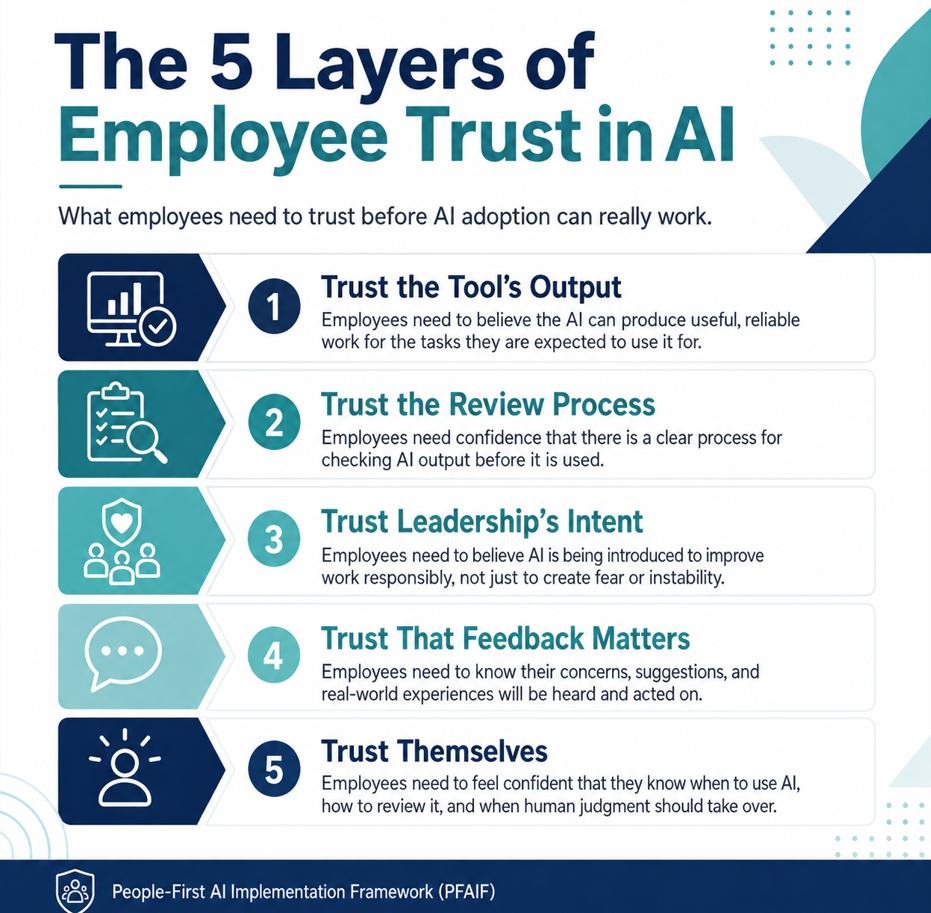
    The 5 Layers of Employee Trust in AI from the People-First AI Implementation Framework (PFAIF)

    Why Employee Trust in AI Is Critically Important

    Trust is what turns AI access into real adoption.

    If employees do not trust an AI tool, they will find ways around it. They may avoid using it. They may use it only for low-stakes tasks. They may comply during training but return to old habits later. They may produce AI-assisted work but feel uneasy about the quality. They may hesitate to tell leadership that the tool is not helping.

    This is especially true when AI touches work that employees care about. People may feel comfortable using AI to brainstorm a subject line or summarize a meeting. They may feel much less comfortable using it for customer messages, client recommendations, legal summaries, performance reviews, safety information, patient communication, financial explanations, or anything that could create real consequences.

    That does not mean employees are anti-AI. It means they are using judgment. Leaders should want that.

    Blind trust in AI is not the goal. Useful trust is the goal. Employees should trust AI enough to use it when it fits the work, but not so much that they stop reviewing outputs, checking facts, or applying professional judgment.

    A healthy AI culture does not say, “Trust the tool.” It says, “Use the tool where it helps, verify what matters, and tell us when it fails.”

    Usage Is Not the Same as Trust!

    One of the biggest mistakes leaders make is confusing AI usage with AI trust.

    Usage metrics can be helpful, but they do not tell the whole story. A dashboard might show that employees logged into the tool, used prompts, generated summaries, or created drafts. That does not mean they believe the tool is useful. It does not mean they trust the output. It does not mean AI improved the workflow.

    For example, a customer service team may use AI to draft follow-up emails because management expects it. The usage numbers may look strong. But if every CSR has to rewrite most of the draft before sending it, trust may be low.

    A marketing agency may see that writers are using AI every day. But if editors are spending extra time removing generic sections, fixing unsupported claims, and adding client-specific insight, the workflow may not be improving.

    A law firm may see that attorneys are using AI for internal summaries. But if attorneys still have to review every detail from scratch because they do not trust the summaries, the tool may be creating the appearance of efficiency without real value.

    Usage tells you whether people touched the tool. Trust tells you whether the tool is becoming useful in real work. Leaders need both.

    What Employee Trust in AI Actually Means

    Employee trust in AI is not one simple thing. It usually includes several layers.

    • First, employees need to trust the tool’s output. They need to believe that AI can produce useful work for the task at hand. Not perfect work. Useful work.
    • Second, employees need to trust the review process. They need to know what must be checked, who owns the final output, and what standard applies before AI-assisted work is used.
    • Third, employees need to trust leadership’s intent. If employees believe AI is mainly being introduced to cut jobs, monitor them, or squeeze more output from the same staff, adoption will be fragile.
    • Fourth, employees need to trust that feedback matters. If they report problems and nothing changes, trust drops.
    • Fifth, employees need to trust themselves. This is often overlooked. Employees may avoid AI because they are not confident they know how to use it correctly, review the output, or avoid mistakes.

    When measuring AI trust, leaders should not only ask, “Do employees trust AI?” They should ask what kind of trust is missing.

    A team may trust AI for brainstorming but not for customer communication. A technician may trust AI to clean up note formatting but not to summarize technical recommendations. A writer may trust AI for outline ideas but not for final copy. A manager may trust AI for organizing meeting notes but not for evaluating employee performance. That nuance matters.

    The Main Questions to Ask Employees About AI Trust

    The best way to measure employee trust in AI is to ask practical questions tied to real work.

    Here are useful questions leaders can ask:

    • Do you trust AI output for the tasks you are expected to use it for?
    • Do you know which AI use cases are approved for your role?
    • Do you understand when AI should not be used?
    • Do you know how to review AI output before using it?
    • Does AI save time after review and correction are included?
    • Does AI make your work better, or just faster?
    • Does AI create extra cleanup work for you or someone else?
    • Do you feel comfortable telling your manager when AI output is wrong?
    • Do you believe leadership is listening to employee feedback about AI?
    • Would you keep using this AI workflow if it were optional?

    That last question is especially useful. If employees would stop using the tool the moment it became optional, the adoption may not be healthy.

    The point is not to pressure employees into positive answers. The point is to learn what is really happening before weak trust turns into silent resistance.

    Use Surveys, But Keep Them Practical

    A short employee AI trust survey can be very useful, especially after a pilot or early rollout.

    The survey should be simple enough that employees will complete it honestly. It should not feel like a corporate compliance exercise. A good survey might ask employees to rate statements on a 1 to 5 scale.

    For example:

    • I understand when I am expected to use AI in my role.
    • I understand when AI should not be used.
    • I trust AI output for the tasks I am expected to use it for.
    • I know how to review AI output before using it.
    • AI helps me complete work more effectively.
    • AI saves time after review and correction are included.
    • AI creates extra work that reduces its value.
    • I feel comfortable reporting problems with AI output.
    • Leadership communicates clearly about how AI should be used.
    • Employee feedback is used to improve AI workflows.

    These questions give leaders a clearer picture than usage metrics alone.

    They also align with the broader PFAIF logic that AI success should be measured by usefulness, trust, time savings, correction burden, and whether the organization improves the process after launch. The PFAIF outcome items also include employee trust, willingness to use AI when it fits the work, correction burden, and leadership-employee alignment as relevant adoption outcomes.

    Ask Open-Ended Questions Too

    Numbers are useful, but open-ended questions often explain why employees feel the way they do.

    A survey score might show that trust is low. An open-ended response tells you why.

    Leaders should ask questions like:

    • What makes you hesitant to use AI in your work?
    • Where has AI helped you so far?
    • Where has AI created extra work?
    • What kind of AI output do you not trust?
    • What would make you more comfortable using AI?
    • What training, examples, or standards would help?
    • What should leadership understand about how AI is affecting your work?

    These responses may reveal patterns that leaders would not see in a dashboard.

    For example, employees may say they do not trust AI because the tool makes up details, because the training was too generic, because managers still expect perfect output, because the workflow is unclear, or because AI creates more work for the next person in the process. That kind of feedback is implementation gold.

    A small business owner may discover that employees are not resisting AI itself. They are resisting a messy rollout. A manager may discover that trust is low because employees do not know who is responsible when AI makes a mistake. A consultant may discover that employees like the tool but hate the workflow around it.

    Open-ended feedback helps leaders fix the real problem.

    Example: Measuring AI Trust in a Home Services Company

    Imagine a home services company using AI to draft customer follow-up messages after completed service visits.

    Leadership may start by checking usage. Are CSRs using the AI draft tool? How many messages are generated? How many are sent?

    That is useful, but not enough.

    The company should also ask CSRs whether they trust the drafts. Are the messages accurate? Do they match the technician notes? Do they include the right service details? Do they avoid incorrect warranty or pricing language? Do they save time after editing? Are some job types better suited for AI than others?

    The company may discover that CSRs trust AI for routine maintenance follow-ups but not for complicated repair visits, angry customers, warranty issues, or jobs with incomplete technician notes.

    That is a strong finding. It gives leadership a practical next step. The company can narrow the use case, improve technician note templates, create a review checklist, and train CSRs on when to use AI and when to write manually.

    Without trust measurement, leadership might only see that the tool is being used.

    With trust measurement, leadership sees where the tool is actually useful.

    Example: Measuring AI Trust in a Marketing Agency

    A marketing agency may use AI to support content planning, outlines, research summaries, meta descriptions, and first drafts.

    Usage may be high because marketing teams tend to experiment with tools quickly. But trust may vary by role.

    Writers may trust AI for outline ideas but not for final content. Editors may trust AI for structure but not for accuracy. SEO strategists may trust AI for brainstorming keyword groupings but not for final search intent decisions. Account managers may trust AI summaries for meeting notes but still worry that important client context gets missed.

    The agency should measure trust at the task level.

    Instead of asking, “Do you trust AI?” the agency should ask:

    • Which AI-assisted tasks are useful?
    • Which outputs require too much editing?
    • Where does AI produce generic work?
    • Where does AI miss client-specific details?
    • Where does AI improve speed without lowering quality?
    • Where does AI create more work for editors?

    The answers may show that AI is useful in planning but harmful when used for full drafts. Or it may show that AI works well for certain content types but not others.

    That lets the agency build smarter standards instead of making a blanket rule like “use AI more” or “do not use AI.”

    Example: Measuring AI Trust in a Dental Office

    A dental office may use AI for routine appointment reminders, patient preparation messages, internal checklists, and front desk communication.

    Employee trust should be measured carefully because patient communication can become sensitive.

    The office might ask front desk staff whether AI-generated reminders are clear, accurate, and easy to review. It might ask whether employees know what information should not be entered into AI tools. It might ask whether employees understand that AI should not be used for diagnosis, treatment recommendations, or personalized clinical advice.

    The office should also ask whether the AI workflow actually helps. Does it reduce repetitive writing? Do patients arrive better prepared? Are staff spending less time correcting messages? Are employees confident in the review process?

    The goal is not to make the dental team trust AI for everything.

    The goal is to identify the narrow areas where AI can safely support routine work.

    Trust measurement helps keep that boundary clear.

    Example: Measuring AI Trust in a Law Firm

    A law firm may use AI for internal document summaries, research organization, timeline building, or administrative drafts.

    In this setting, trust measurement should be specific and cautious.

    Attorneys and paralegals may be asked whether AI summaries help them understand documents faster, but also whether the summaries miss important details, overstate conclusions, or create false confidence. The firm should measure whether AI output saves time after verification is included.

    A good trust survey for a law firm might ask:

    • Do you trust AI summaries as a first-pass support tool?
    • Do you know what must be verified before relying on a summary?
    • Have you seen AI output miss or distort important information?
    • Do you understand what information can and cannot be entered into the tool?
    • Do you feel pressure to use AI even when it may not fit the task?
    • Do you know who is accountable for final work?

    In a law firm, low trust may be appropriate for certain uses. That is not necessarily a failure. It may simply mean the use case requires tighter limits, better review, or a different tool.

    Trust measurement should not push people toward blind confidence.

    It should help the firm find the right level of reliance.

    Example: Measuring AI Trust in an Accounting Firm

    An accounting firm may use AI to draft routine client messages, summarize meetings, organize document requests, or translate technical language into plain English.

    During tax season, employees may appreciate anything that reduces repetitive communication. But they may not trust AI with client-specific questions or anything that sounds like tax advice.

    The firm should measure where employees draw that line.

    Staff may trust AI to draft a basic reminder asking a client for missing documents. They may not trust it to explain how a tax rule applies to a specific client. They may trust it to organize meeting notes but not to recommend a filing position. That distinction is healthy.

    The firm can measure employee trust by asking whether AI outputs are clear, accurate, useful, easy to review, and properly limited. It should also ask whether AI creates extra correction work during the busiest parts of the year.

    If staff say AI helps with routine explanations but slows them down on complex client questions, the firm should not treat that as resistance. It should treat it as good implementation intelligence.

    Example: Measuring AI Trust in a Restaurant Group

    A restaurant group may use AI to respond to reviews, draft social media posts, summarize shift notes, or write job descriptions.

    Trust measurement should focus on tone, accuracy, and escalation.

    A manager may trust AI to draft responses to routine positive reviews. They may not trust AI for complaints about food safety, discrimination, injuries, refunds, employee conduct, or legal threats.

    That boundary should be measured and respected.

    Leaders can ask managers:

    • Which review types are safe for AI-assisted drafts?
    • Which review types should always be human-led?
    • Do AI drafts sound like our brand?
    • Do they feel too robotic?
    • Do they address the customer’s actual concern?
    • Do they save time after editing?
    • Do managers feel comfortable rejecting AI drafts?

    The last question matters. Employees should not feel like they have to use AI output just because it exists.

    In customer-facing industries, trust is not just about whether employees trust the tool. It is also about whether the customer will trust the business after seeing AI-assisted communication.

    Measure Trust by Role, Not Just Company-Wide

    Company-wide trust scores can hide important differences.

    One department may trust AI because their use case is simple and low-risk. Another team may distrust AI because their use case is sensitive or poorly defined. One location may have strong managers and good training. Another may have confusion and weak feedback loops.

    If leaders only look at an overall trust score, they may miss the real problem.

    Trust should be measured by role, team, location, workflow, and use case whenever possible.

    For example, a home services company may find that CSRs trust AI follow-up drafts, but technicians do not trust AI-assisted note formatting because it misinterprets technical details. A marketing agency may find that writers trust AI for brainstorming but editors distrust AI-generated drafts. A consulting firm may find that junior analysts use AI heavily, while senior consultants worry about quality and client risk.

    These differences are not bad. They help leaders understand where support is needed.

    PFAIF treats the eight readiness areas as diagnostic categories, meaning they are useful for identifying where implementation support is weaker even while the broader assessment is strongest as an overall readiness index.

    Track Rework as a Trust Signal

    Rework is one of the clearest signs that AI trust may be weaker than leadership thinks.

    If employees have to constantly fix AI output, they will stop trusting it. If one team uses AI and another team cleans up the mistakes, trust can break down across departments.

    Leaders should track whether AI is creating extra work.

    This can be done through simple questions:

    • How often do AI outputs need major edits?
    • How often does AI miss important information?
    • How often does AI create customer, client, or internal confusion?
    • How much time is spent reviewing and correcting AI output?
    • Which use cases create the most cleanup work?
    • Who is doing the cleanup?

    That last question is especially important.

    Sometimes AI makes one person faster while making another person slower. For example, a salesperson may use AI to generate quick call summaries, but account managers may spend extra time correcting missed commitments. A technician may use AI to clean up notes, but the office may still have to clarify missing details. A writer may use AI to draft faster, but the editor may spend longer fixing generic work.

    If AI shifts work downstream, trust will drop.

    Rework is not just an efficiency metric. It is a trust metric.

    Measure Whether Employees Feel Safe Reporting AI Problems

    Employees may not tell the truth about AI if they think leadership already decided the tool is a success.

    This is common. A company introduces AI with a lot of excitement. Leaders talk about productivity gains. Managers encourage adoption. Employees quickly learn that positive feedback is welcome and negative feedback may be viewed as resistance.

    That is dangerous.

    If employees do not feel safe reporting AI problems, leadership will not see the real implementation issues until they become expensive.

    Trust measurement should include psychological safety around feedback.

    Leaders should ask:

    • Do you feel comfortable telling your manager when AI output is wrong?
    • Do you feel comfortable saying a use case is not working?
    • Do you believe leadership will act on AI feedback?
    • Are employees rewarded only for using AI, or also for using judgment?
    • Have you ever avoided reporting an AI issue because you did not want to seem negative?
    • These questions may feel uncomfortable, but they are important.

    A healthy AI rollout needs employees who are willing to say, “This output is wrong,” “This workflow does not help,” or “This creates more work than it saves.”

    That is not resistance. That is quality control.

    Measure Trust Before and After a Pilot

    Trust should not be measured only after a broad rollout. It should be measured before and after a pilot.

    Before the pilot, leaders should understand employee expectations and concerns. Are employees worried about job security? Do they understand the use case? Do they trust the tool at all? Do they know what will remain human-led?

    After the pilot, leaders should measure whether trust improved, declined, or stayed the same.

    For example, before a pilot, employees may feel skeptical because they have never used the tool. After a well-designed pilot with good training and clear quality standards, trust may improve. That is a good sign.

    But the opposite can happen too. Employees may begin the pilot with curiosity and leave with lower trust because the AI output was poor, the workflow was clunky, or leadership ignored feedback.

    That is also useful information.

    A pilot should not be judged only by whether AI technically worked. It should be judged by whether employees trust the process enough to continue.

    Combine Quantitative and Qualitative Trust Signals

    The best AI trust measurement combines numbers and stories.

    Quantitative measures help leaders see patterns. Survey scores, usage rates, time saved, correction rates, and adoption by role can show whether trust is improving or weakening.

    Qualitative feedback explains what those numbers mean. Employee comments, interviews, team discussions, and open-ended survey responses reveal the reasons behind trust or distrust.

    For example, a survey may show low trust in AI-generated customer messages. Comments may reveal that the issue is not the AI tool itself. The problem is incomplete technician notes, unclear review rules, or fear of sending inaccurate warranty information.

    A survey may show high usage but low usefulness. Comments may reveal that employees use AI because leadership expects it, but they do not believe it improves the work.

    A survey may show trust is higher in one department than another. Comments may reveal that the stronger department received better role-specific training.

    Numbers show where to look. Comments explain what to fix.

    What Leaders Should Do When Trust Is Low

    Low AI trust is not always bad news. It is a signal.

    If employees do not trust AI, leaders should not respond by pushing harder. Forced adoption may increase compliance, but it usually does not create real trust.

    Instead, leaders should diagnose the reason.

    • If employees do not trust the output, improve quality standards, narrow the use case, or strengthen review.
    • If employees do not trust the workflow, map the process again and remove extra steps.
    • If employees do not trust leadership’s intent, communicate more clearly and address concerns honestly.
    • If employees do not trust themselves, provide role-specific training and guided practice.
    • If employees do not trust that feedback matters, create visible changes based on employee input.

    For example, if a pilot shows that employees distrust AI because it creates too many inaccurate customer drafts, the solution is not to tell employees to “get comfortable with AI.” The solution may be to improve inputs, revise prompts, change the use case, add review standards, or stop using AI for that task.

    Trust is earned through better implementation.

    Not slogans.

    Warning Signs That AI Trust Is Weak

    Leaders should watch for signs that employees do not trust AI, even when they are not saying it directly.

    Common warning signs include:

    • Employees use AI only when watched or required.
    • Employees avoid AI for important work.
    • Employees create their own unofficial AI workarounds.
    • Employees spend a lot of time checking or rewriting AI output.
    • Managers receive more complaints about quality.
    • One team’s AI use creates more work for another team.
    • Employees joke negatively about the tool.
    • People stop giving feedback because they think nothing will change.
    • AI use remains high during training but drops afterward.
    • Employees ask the same basic questions weeks after rollout.

    These signs do not mean AI adoption is doomed. They mean leadership needs to investigate.

    The earlier leaders notice weak trust, the easier it is to fix.

    How Often Should Employee AI Trust Be Measured?

    Trust should be measured at multiple points.

    • Before an AI pilot, measure expectations and concerns.
    • During the pilot, collect quick feedback weekly or biweekly.
    • At the end of the pilot, measure usefulness, trust, review burden, and willingness to continue.
    • After rollout, measure trust again after 30, 60, or 90 days.

    For ongoing AI workflows, measure trust periodically. Quarterly may be enough for stable use cases. More frequent check-ins may be needed when the tool, workflow, team, or risk level changes.

    The key is to avoid treating trust measurement as a one-time survey.

    AI tools change. Workflows change. Employee confidence changes. Leadership expectations change. A use case that worked well at first may become less useful later. A use case that seemed weak may improve after better training and standards.

    Trust should be monitored as part of ongoing implementation.

    How Employee Trust Measurement Fits Into PFAIF

    In PFAIF, Adoption and Trust Measurement comes after workflow assessment, use case definition, communication, training, quality standards, and pilot testing.

    That order matters.

    Employees are more likely to trust AI when the workflow is clear, the use case is specific, communication is honest, training is role-specific, quality standards are defined, and pilot testing includes real feedback. If those earlier steps are weak, trust measurement will often reveal the damage.

    PFAIF treats trust as something leaders should measure, not assume. That is important because leaders may have a very different view of AI adoption than employees do. Leadership may see tool access, usage dashboards, or pilot activity. Employees may see confusing workflows, weak output, unclear accountability, or extra cleanup work.

    Trust measurement closes that gap.

    It helps leaders see whether AI is becoming useful, trusted, and sustainable in the actual workplace.

    Practical Checklist: Measuring Employee Trust in AI

    Before deciding that AI adoption is working, leaders should be able to answer these questions:

    • Do employees understand the approved AI use cases for their role?
    • Do employees trust AI output for those use cases?
    • Do employees know how to review AI output?
    • Do employees know when AI should not be used?
    • Does AI save time after review and correction are included?
    • Does AI improve work quality?
    • Does AI create extra cleanup work?
    • Do employees feel safe reporting AI problems?
    • Are employees willing to keep using AI when it fits the work?
    • Do managers know where employees trust AI and where they do not?
    • Is feedback being used to improve the AI workflow?
    • Are trust levels being measured over time?

    If leaders cannot answer these questions, they do not really know whether AI adoption is working.

    They only know whether AI is available.

    A Simple Employee AI Trust Survey Template

    Here is a simple survey leaders can adapt for a pilot or rollout.

    Use a 1 to 5 scale where 1 means strongly disagree and 5 means strongly agree.

    I understand when I am expected to use AI in my role.

    I understand when AI should not be used.

    I trust AI output for the tasks I am expected to use it for.

    I know how to review AI output before using it.

    AI helps me complete work more effectively.

    AI saves time after review and correction are included.

    AI improves the quality or consistency of my work.

    AI creates extra cleanup work for me or others.

    I feel comfortable reporting problems with AI output.

    Leadership communicates clearly about AI expectations.

    Employee feedback is used to improve AI workflows.

    I would continue using this AI workflow if it were optional.

    Add two open-ended questions:

    Where is AI helping you most?

    What would make you trust AI more in your work?

    This is simple enough for most businesses to use, but detailed enough to reveal whether adoption is healthy.

    Common Mistakes When Measuring Employee Trust in AI

    • The first mistake is measuring only usage. Usage matters, but it does not prove trust or value.
    • The second mistake is asking questions that are too broad. “Do you trust AI?” is less useful than asking whether employees trust AI for a specific task.
    • The third mistake is ignoring rework. If AI saves time in one place but creates cleanup work somewhere else, trust will suffer.
    • The fourth mistake is failing to measure psychological safety. Employees need to feel safe reporting AI problems.
    • The fifth mistake is measuring trust only after rollout. Trust should be measured before, during, and after pilots.
    • The sixth mistake is treating low trust as employee resistance. Low trust may be a rational response to poor output, unclear expectations, weak training, or messy workflows.
    • The seventh mistake is collecting feedback and doing nothing with it. Nothing damages trust faster than asking for input and ignoring it.

    Employee trust in AI should not be assumed. It should be measured. Leaders need to know whether employees trust AI output, understand how to review it, believe it improves the work, and feel safe reporting problems. They also need to know whether AI is saving time after correction work is included or simply shifting work to someone else.

    The goal is not blind trust. The goal is responsible trust.

    Employees should trust AI enough to use it where it helps, but they should also have the training, judgment, and support to challenge it when it is wrong. That is how AI adoption becomes useful, trusted, and sustainable.

    Take the PFAIF Readiness Assessment

    The PFAIF Readiness Assessment helps organizations evaluate people-first AI readiness across workflow assessment, use case definition, change communication, role-specific training, quality standards, pilot testing, adoption and trust measurement, and feedback loops.

    Use it to identify where your organization is strongest and where more support may be needed before scaling AI.

    Take the PFAIF Readiness Assessment

    Learn more about the People-First AI Implementation Framework

    Watch the recorded PFAIF webinar

    FAQ

    How do you measure employee trust in AI?

    You measure employee trust in AI by asking whether employees trust AI output for specific tasks, understand when to use AI, know how to review the output, believe AI improves their work, feel safe reporting problems, and would continue using the AI workflow if it were optional.

    Why is AI usage not enough to measure adoption?

    AI usage is not enough because employees may use AI only because they are required to. Usage does not prove that employees trust the tool, find it useful, save time after review, or believe it improves work quality.

    What questions should leaders ask about employee trust in AI?

    Leaders should ask whether employees trust AI output, know when AI should not be used, understand review expectations, believe AI saves time after correction work, feel safe reporting problems, and think employee feedback is used to improve AI workflows.

    What is a good employee AI trust survey?

    A good employee AI trust survey includes practical role-based questions about approved use cases, output trust, review confidence, time savings, correction work, psychological safety, leadership communication, feedback loops, and willingness to keep using AI when it fits the work.

    What are signs employees do not trust AI?

    Signs employees do not trust AI include avoiding the tool, using it only when required, heavily rewriting outputs, creating unofficial workarounds, joking negatively about the tool, avoiding important use cases, or reporting that AI creates more cleanup work than value.

    How does trust measurement fit into PFAIF?

    In the People-First AI Implementation Framework, Adoption and Trust Measurement is one of the eight readiness areas. It focuses on whether organizations measure actual AI use, employee trust, time savings, added work, and usefulness rather than relying only on tool access.

  • Why AI Pilot Testing Should Come Before Broad Rollout

    AI pilot testing should come before broad rollout because it gives leaders a controlled way to test whether an AI use case actually works in the real workflow before the entire organization is expected to adopt it. A good AI pilot helps identify workflow problems, training gaps, quality issues, employee trust concerns, hidden rework, and unclear success measures before those problems become expensive at scale. In the People-First AI Implementation Framework, or PFAIF™, pilot testing is one of the core readiness areas because responsible AI adoption should be tested with real users before it becomes a company-wide expectation.

    Many businesses want to move fast with AI. That is understandable. AI tools are improving quickly, competitors are experimenting, and leadership teams do not want to fall behind. But speed can create a false sense of progress. Buying the tool is not the same as implementing it. Giving everyone access is not the same as adoption. Asking employees to “start using AI” is not the same as building a reliable process.

    A pilot helps slow the rollout down just enough to learn.

    That does not mean getting stuck in endless planning. It means testing one use case with the right people, in the right workflow, with clear review standards, feedback, and success criteria. The goal is not to make AI adoption slower. The goal is to make it safer, smarter, and more likely to work.

    The PFAIF Readiness Assessment includes pilot testing items that focus on limited-group testing, including actual users in the pilot, collecting feedback before expansion, revising AI use cases when problems appear, and being willing to stop a use case when it does not show enough value.

    What a Good AI Pilot Should Test list from the People-First AI Implementation Framework (PFAIF)

    Why AI Rollouts Go Wrong Without a Pilot Test

    AI rollouts often go wrong because leaders assume the tool will work in the real business the same way it worked in the demo.

    A vendor demo usually shows clean inputs, clear tasks, ideal users, and polished outputs. Real work is messier. Customer information may be incomplete. Employees may use different wording. Data may live in multiple systems. Managers may have different expectations. Some employees may trust the tool quickly, while others may avoid it. AI output may look good at first but create problems later. A company-wide rollout exposes all of those issues at once.

    For example, imagine a home services company buys an AI tool to summarize customer calls and push notes into the CRM. In the demo, the summaries look clean. Leadership approves the rollout across all locations. Within a few weeks, problems appear. Some summaries miss urgent details. Some CSRs do not trust the notes. Managers are unsure who should check them. Dispatchers complain that the summaries are formatted nicely but not actually useful. The company now has a messy adoption problem across the whole operation.

    A pilot would have caught many of those issues earlier.

    The company could have tested the tool with one team, reviewed the summaries, asked employees what was missing, adjusted the process, and decided whether the use case was ready to expand.

    Without a pilot, the company learns the hard way.

    A Pilot Is Not Just a Small Rollout

    A common mistake is thinking that a pilot simply means “give the tool to fewer people.” That is not enough.

    A real AI pilot is a structured test. It should answer specific questions before broader rollout. Does the AI use case solve the problem it was supposed to solve? Does it fit the workflow? Do employees understand how to use it? Is the output good enough after review? Does it save time or create more cleanup work? Do employees trust it enough to keep using it? What needs to change before expansion?

    A small rollout without structure can still fail. If leaders give five employees access to a tool and say, “Try this and let us know what you think,” they may get random feedback. One person may use it heavily. Another may ignore it. Another may use it in a way leadership did not intend. The company may still not know whether the use case is working.

    A good pilot needs a defined use case, a defined group, a defined workflow, defined quality standards, a defined feedback process, and a decision point at the end.

    The pilot should not be vague experimentation. It should be a learning process.

    What a Good AI Pilot Should Test

    A good AI pilot should test more than whether the tool technically works.

    The technical part matters, but implementation usually succeeds or fails around the people and workflow surrounding the tool.

    A strong pilot should test at least six things.

    • First, it should test workflow fit. Does the AI tool fit into the way work actually happens, or does it add extra steps?
    • Second, it should test output quality. Is the AI output accurate, complete, appropriate, and useful after review?
    • Third, it should test role-specific training. Did employees receive enough practical guidance to use the tool correctly?
    • Fourth, it should test employee trust. Do employees believe the AI output is useful and worth using, or are they quietly avoiding it?
    • Fifth, it should test rework. Does AI reduce work across the workflow, or does it shift cleanup work to someone else?
    • Sixth, it should test success criteria. Can the organization actually measure whether the use case improved anything?

    For example, a marketing agency piloting AI for blog outlines should not only ask whether the tool can create outlines. It should ask whether writers find the outlines useful, whether editors spend less time restructuring drafts, whether the outlines match search intent, whether the content remains client-specific, and whether quality stays high.

    That is the difference between testing the tool and testing the implementation.

    Example: AI Pilot Testing in a Home Services Company

    A home services company wants to use AI to draft customer follow-up messages after service visits.

    The broad rollout version would be risky. Leadership might tell every CSR to start using AI for follow-up messages. Some employees might use it carefully. Others might send weak drafts. Some might avoid it. Managers may not know how to judge whether the process is helping.

    A pilot is better.

    The company could choose one service area, one small CSR group, and one type of follow-up message. For example, the pilot might only include completed maintenance visits, not complaints, warranty disputes, emergency calls, or complex repair recommendations.

    The pilot process could look like this: technician notes come in, AI drafts a first-pass follow-up message, the CSR reviews the message for accuracy and tone, the CSR edits and sends it, and the team records whether the draft was useful.

    The company could measure how long follow-up takes, how often the AI draft needs heavy editing, whether customer details are missed, whether CSRs trust the draft, and whether managers see fewer follow-up issues.

    After 30 days, the company may learn that AI works well for routine maintenance follow-ups but performs poorly when technician notes are incomplete. That is valuable. The next step may not be broader rollout. It may be improving technician note quality first.

    That is exactly what a pilot is supposed to reveal.

    Example: AI Pilot Testing in a Dental Office

    A dental office wants to use AI to help with appointment preparation messages.

    Instead of letting the whole office use AI for patient communication immediately, the practice could pilot one narrow use case: drafting reminder messages for new patients based on approved templates.

    The office could select one front desk employee and one office manager for the pilot. The front desk employee uses AI to draft messages, but the messages are based only on approved language. The office manager reviews them before they are sent. AI is not used for diagnosis, treatment recommendations, clinical advice, or sensitive patient information.

    During the pilot, the office tracks whether messages are clearer, whether patients arrive better prepared, whether staff spend less time repeating instructions, and whether any messages create confusion.

    The pilot may show that AI is useful for routine appointment preparation but not for insurance questions, which require more careful review. That is a good finding. It helps the office expand only where the process is safe and useful.

    Without a pilot, the office might use AI too broadly and create unnecessary risk.

    Example: AI Pilot Testing in a Marketing Agency

    A marketing agency wants to use AI to improve content production.

    A broad rollout could create quality problems quickly. If every writer starts using AI differently, editors may receive inconsistent drafts. Some content may become generic. Some client details may be wrong. Account managers may not know what was AI-assisted and what was not.

    A pilot gives the agency a cleaner way to learn.

    The agency might test AI only for first-pass blog outlines. It could select two writers, one editor, and one SEO strategist. The AI would use approved keyword research, client notes, and a standard outline format. Writers would not copy AI output directly into final content. Editors would review outlines for search intent, client fit, factual accuracy, and originality before drafting begins.

    The agency could measure whether planning time improves, whether outlines reduce structural edits, whether writers find them useful, and whether editors trust the output.

    After the pilot, the agency may discover that AI is strong for organizing research but weak for local service nuance. That does not mean the use case failed. It means the agency learned where AI fits and where human judgment remains essential.

    That is a better outcome than flooding the content process with generic AI drafts.

    Example: AI Pilot Testing in a Law Firm

    A law firm should be especially careful with AI pilot testing because the risks are higher.

    Suppose the firm wants to use AI for internal summaries of long case documents. That may be a useful idea, but it should not be rolled out casually.

    A pilot might involve one approved AI tool, one document type, one practice group, and a clear rule that AI summaries are for internal review only. Attorneys remain responsible for verifying every summary. AI output cannot be used directly in client-facing documents, filings, legal conclusions, or advice without attorney review.

    The firm could compare AI summaries against human-reviewed summaries to see what the tool misses. It could track whether the summaries save time, whether they create overconfidence, and whether attorneys trust them enough to continue using them.

    The firm may find that AI helps with broad document orientation but misses important details. That finding is useful. It can shape the quality standard, review checklist, and training before any expansion.

    A pilot does not eliminate risk, but it gives the firm a controlled way to understand the risk before scaling.

    Example: AI Pilot Testing in an Accounting Firm

    An accounting firm may want to use AI during tax season to help with client communication. The temptation may be to let staff use AI broadly to answer client questions faster.

    That is risky because some questions require professional judgment.

    A better pilot could focus on one narrow use case: drafting plain-language explanations of routine document requests. The AI would help staff explain why a client needs to provide certain forms, receipts, payroll records, bank statements, or business expense details. Staff would review every message before sending. AI would not provide tax advice, filing recommendations, or interpretations of complex client situations.

    The firm could measure whether staff spend less time writing repetitive explanations, whether clients send more complete documents, whether follow-up emails decrease, and whether employees feel comfortable with the process.

    The pilot might reveal that AI is helpful for routine explanations but not for client-specific questions. That gives the firm a safe boundary for future use.

    For professional service firms, a good pilot should separate communication support from expert judgment.

    Example: AI Pilot Testing in a Restaurant Group

    A restaurant group with multiple locations may want to use AI for online review responses.

    If leadership rolls this out broadly, every manager may use AI differently. Some responses may sound robotic. Some may fail to address real complaints. Some may handle sensitive issues poorly. A bad response to a serious review can create reputational damage.

    A better pilot would start with routine positive reviews and basic service feedback at one or two locations.

    Managers could use AI to draft first-pass responses, but every response would be reviewed before posting. AI would not handle reviews involving food safety, injuries, discrimination, employee conduct, refunds, legal threats, or highly emotional complaints.

    The restaurant group could measure response time, tone consistency, manager workload, customer engagement, and whether responses still feel human.

    At the end of the pilot, the company may decide that AI is useful for routine positive reviews but that negative reviews should follow a different process. That is a strong result because the organization learned where AI adds value and where human judgment should stay in control.

    Choose the Right Pilot Group

    A strong pilot depends on choosing the right people.

    The pilot group should include employees who actually perform the workflow. This is important. Leaders sometimes test AI with managers, executives, or technically curious employees who are not the real end users. That can produce misleading results.

    If CSRs will use the tool, CSRs should be in the pilot. If technicians will use it, technicians should be in the pilot. If writers, paralegals, office managers, or sales reps will use it, those roles need to be represented.

    The pilot group should also include a mix of comfort levels. If the pilot only includes AI enthusiasts, the results may look better than they will during broader rollout. If it only includes skeptics, the results may not reflect what is possible with proper training. A balanced group gives leaders better feedback.

    Managers should also be included, but not as the only testers. They need to understand what employees are experiencing, where review is required, and whether AI is improving the whole workflow.

    A good pilot group should be close enough to the work to identify real problems.

    Define Success Before the Pilot Starts

    An AI pilot should not begin until leaders know what success means.

    Too often, success is defined after the fact. If people use the tool, leadership calls it a win. If output volume increases, leadership assumes adoption is working. But usage and volume are not enough.

    A better pilot defines success in practical terms before testing begins.

    For example, a customer follow-up pilot might measure whether messages are prepared faster, whether fewer details are missed, whether CSRs trust the drafts, whether customer complaints decrease, and whether review time is reasonable.

    A meeting summary pilot might measure whether action items are captured accurately, whether managers spend less time writing summaries, whether deadlines are clearer, and whether team members trust the notes.

    A content outline pilot might measure whether writers start faster, whether editors make fewer structural revisions, whether outlines match search intent, and whether final content quality stays high.

    A support ticket pilot might measure routing accuracy, response time, escalation errors, and employee confidence.

    The key question is not “Did people use AI?”

    The better question is “Did AI improve the work after review, correction, and employee experience are included?”

    That is what pilots should measure.

    Collect Employee Feedback During the Pilot

    Employee feedback is not a nice extra. It is one of the main reasons to run a pilot.

    Employees closest to the work will often see issues that leaders miss. They know where the tool creates friction, where the output is not useful, where instructions are unclear, and where AI creates cleanup work.

    Feedback should be collected during the pilot, not only at the end. If the pilot runs for 30 days, leaders should check in during the first week, the middle of the pilot, and the end. This makes it easier to correct problems early.

    The feedback process can be simple. Leaders can ask:

    • Where did AI help?
    • Where did it slow you down?
    • What output did you not trust?
    • What did you have to fix?
    • What instructions were unclear?
    • What should we change before expanding this?
    • Would you keep using this if it were optional?

    Those questions reveal more than basic usage data.

    A tool can be used frequently and still be disliked. It can produce output quickly and still create rework. It can look successful in a dashboard while employees privately think it is not helping.

    Feedback is how leaders see the real adoption picture.

    Watch for Hidden Rework

    A pilot should pay close attention to hidden rework.

    This is one of the most common AI implementation problems. AI appears to save time in one part of the workflow, but it creates work somewhere else.

    For example, AI may help technicians write faster notes, but the office team still has to fix missing details. AI may help writers generate drafts, but editors spend extra time cleaning them up. AI may help salespeople summarize calls, but account managers have to correct missed commitments. AI may help managers create reports, but employees have to explain why the report does not reflect reality.

    A pilot should ask whether AI improves the whole workflow, not just one step.

    Leaders should track who benefits and who pays the cleanup cost. If AI saves one employee 10 minutes but creates 20 minutes of review work for someone else, the workflow did not improve.

    This is why PFAIF connects pilot testing to quality standards, adoption measurement, and feedback loops. A pilot is the place to discover whether AI is actually reducing friction or just moving friction around.

    Be Willing to Stop a Weak AI Use Case

    One of the most important signs of a mature AI pilot is the willingness to stop.

    Not every AI use case should continue. Some will not produce enough value. Some will create quality problems. Some will reduce employee trust. Some will be technically possible but operationally annoying. Some will be too risky for the benefit they provide.

    Stopping a weak AI use case is not failure.

    It is good implementation.

    For example, a restaurant group might discover that AI review responses are too generic and require so much editing that managers prefer writing them manually. A law firm might discover that document summaries miss too many important details for a certain type of file. A marketing agency might discover that AI-generated first drafts lower quality and increase editing time, but AI-generated outlines are useful. A home services company might discover that AI follow-ups work only when technician notes meet a certain standard.

    Those are useful findings.

    The purpose of a pilot is not to prove that leadership was right. The purpose is to learn whether the use case is worth expanding.

    If it is not, stop it, revise it, or narrow it.

    How Long Should an AI Pilot Run?

    The right length depends on the workflow, but many business AI pilots can start with 30 to 60 days.

    A pilot should be long enough to see real work patterns, not just first impressions. The first few days may reflect novelty. Employees may be excited, confused, or overly cautious. After a few weeks, the organization can see whether the process is becoming useful or irritating.

    For high-volume tasks like customer follow-up, review responses, call summaries, meeting notes, or ticket classification, 30 days may be enough to learn a lot. For lower-volume or higher-risk workflows, 60 to 90 days may be more realistic.

    The important thing is to set a defined pilot period before the test begins.

    Without an end point, pilots can drift. A “pilot” becomes permanent without anyone deciding whether it worked. That can create messy adoption because the organization never formally reviews the results.

    A pilot should end with a decision: expand, revise, pause, stop, or test again with a different group.

    What to Document During an AI Pilot

    Documentation does not need to be complicated, but leaders should capture enough information to make a good decision.

    For each pilot, document the use case, the workflow, the pilot group, the tool being used, the training provided, the quality standard, the review process, the feedback collected, the success metrics, the issues discovered, and the final recommendation.

    For example, a simple pilot summary could include:

    • Pilot name
    • Workflow tested
    • AI task
    • Pilot users
    • Start and end dates
    • Approved uses
    • Prohibited uses
    • Review owner
    • Success measures
    • Top benefits
    • Top problems
    • Employee feedback summary
    • Recommended next step

    This documentation matters because AI adoption often spreads quickly. If the first pilot works, another department may want to try something similar. Clear documentation helps the organization avoid repeating mistakes.

    It also creates accountability. Leaders can look back and see why a use case expanded, changed, or stopped.

    AI Pilot Testing and Employee Trust

    Pilot testing can build employee trust when it is done well.

    Employees are more likely to trust AI adoption when they see that leadership is not forcing the tool blindly. A pilot shows that the organization is willing to test, listen, adjust, and stop if something does not work.

    That is a very different message from “This is the future, so get on board.”

    A pilot tells employees, “We are going to learn before we scale.”

    That matters because employees often have reasonable concerns about AI. They may worry about job security, output accuracy, increased workload, unclear accountability, or being judged by a tool they do not trust.

    Pilot testing gives those concerns a place to surface before adoption becomes mandatory.

    For example, if CSRs in a pilot say the AI draft messages sound too robotic, leadership can adjust the prompt, change the review process, narrow the use case, or decide not to expand. Employees see that feedback matters.

    That builds more trust than pretending the tool is perfect.

    How Pilot Testing Fits Into PFAIF

    In PFAIF, pilot testing comes after workflow assessment, use case definition, change communication, role-specific training, and quality standards. That order matters.

    A pilot should not be the first time the organization thinks about the workflow, the use case, or the review process. Those should be defined before testing begins.

    Pilot testing is where the organization learns whether those earlier decisions hold up in real work.

    If the workflow assessment was incomplete, the pilot will reveal missing steps. If the use case was too vague, the pilot will create confusion. If communication was weak, employees will ask basic questions. If training was generic, employees will struggle. If quality standards were unclear, output review will be inconsistent.

    That is not a bad thing. It is the purpose of the pilot.

    The pilot turns assumptions into evidence.

    PFAIF treats AI adoption as an ongoing readiness process, not a one-time launch. Pilot testing is the bridge between planning and rollout.

    Practical Checklist: AI Pilot Testing Before Rollout

    Before starting an AI pilot, leaders should be able to answer these questions:

    • What specific workflow are we testing?
    • What specific AI use case are we testing?
    • Who will participate in the pilot?
    • Are actual end users included?
    • What training will pilot users receive?
    • What quality standards apply?
    • Who reviews AI output?
    • What should AI not be used for during the pilot?
    • What feedback will employees provide?
    • What metrics will we track?
    • How will we measure hidden rework?
    • How long will the pilot run?
    • What would make us expand the use case?
    • What would make us revise it?
    • What would make us stop it?

    If those questions cannot be answered, the organization is not ready for a broad rollout.

    It may not even be ready for a good pilot yet.

    A Simple AI Pilot Plan Template

    Leaders can use this simple structure before testing an AI use case.

    Pilot Name:
    Give the pilot a clear name.

    Workflow:
    What process will this test?

    Use Case:
    What specific task will AI support?

    Pilot Group:
    Who will participate?

    Timeline:
    When does the pilot start and end?

    Approved AI Use:
    What is allowed?

    Prohibited AI Use:
    What is not allowed?

    Training Plan:
    What will users be taught before starting?

    Quality Standard:
    What must be checked before AI output is used?

    Feedback Process:
    How will users report issues or suggestions?

    Success Measures:
    How will the organization judge whether this worked?

    Decision After Pilot:
    Will the organization expand, revise, pause, or stop?

    This template keeps the pilot focused.

    It also makes it easier to compare AI use cases across teams later.

    Common Mistakes in AI Pilot Testing

    • The first mistake is testing too many things at once. A pilot should focus on one use case, not every possible AI application in the business.
    • The second mistake is choosing only AI enthusiasts. Power users can be helpful, but the pilot should include people who reflect the real adoption audience.
    • The third mistake is failing to define success. If success is measured only by usage, the organization may miss quality problems, rework, and trust concerns.
    • The fourth mistake is ignoring employee feedback. A pilot without feedback is just a quiet rollout.
    • The fifth mistake is skipping quality standards. Employees need to know what good AI-assisted output looks like before they start using it.
    • The sixth mistake is expanding too quickly. A promising pilot may still need better training, clearer boundaries, or workflow changes before broad rollout.
    • The seventh mistake is being unwilling to stop. Some AI use cases are not worth scaling, and that is useful to know.

    AI pilot testing is not about slowing innovation down. It is about preventing avoidable mistakes. A good pilot helps leaders learn whether an AI use case fits the workflow, whether employees understand it, whether the output is good enough, whether the tool creates hidden rework, and whether people trust it enough to keep using it. That is much better than discovering all of those problems after a company-wide rollout.

    For business leaders, the lesson is simple: test AI with real users before scaling it to everyone. Start small. Learn honestly. Revise what needs to change. Scale only what is useful, trusted, and worth keeping. That is how AI adoption becomes more than a tool launch.

    Take the PFAIF Readiness Assessment

    The PFAIF Readiness Assessment helps organizations evaluate people-first AI readiness across workflow assessment, use case definition, change communication, role-specific training, quality standards, pilot testing, adoption and trust measurement, and feedback loops.

    Use it to identify where your organization is strongest and where more support may be needed before scaling AI.

    Take the PFAIF Readiness Assessment

    Learn more about the People-First AI Implementation Framework

    Watch the recorded PFAIF webinar

    FAQ

    What is AI pilot testing?

    AI pilot testing is a controlled test of a specific AI use case with a limited group of real users before broader rollout. It helps leaders evaluate workflow fit, output quality, training needs, employee trust, rework, and whether the use case is worth scaling.

    Why should AI pilot testing happen before broad rollout?

    AI pilot testing should happen before broad rollout because AI can create workflow problems, quality issues, employee confusion, and hidden rework if it is scaled too quickly. A pilot helps catch those problems early.

    How long should an AI pilot last?

    Many AI pilots can start with a 30 to 60 day test, depending on the workflow and risk level. High-volume tasks may show results faster, while more complex or sensitive workflows may need longer testing.

    Who should be included in an AI pilot?

    An AI pilot should include employees who actually perform the workflow being tested. Managers and technical users can be involved, but the pilot should not exclude the people who will be expected to use the AI in daily work.

    How do you measure AI pilot success?

    AI pilot success should be measured by usefulness, output quality, time saved after review, reduced rework, employee trust, workflow fit, and whether the use case improves real work. Usage alone is not enough.

    How does pilot testing fit into PFAIF?

    In the People-First AI Implementation Framework, Pilot Testing is one of the eight readiness areas. It focuses on testing AI with a limited group, including real users, collecting feedback, revising use cases when problems appear, and stopping use cases that do not show enough value.

  • How to Set Quality Standards for AI-Assisted Work

    Quality standards for AI-assisted work are the rules, review steps, and expectations employees use to decide whether AI output is accurate, useful, safe, appropriate, and ready to use. Before scaling AI at work, leaders should define what good AI-assisted work looks like, who is responsible for reviewing it, what must be verified, when AI should not be used, and how the organization will track errors or correction work. In the People-First AI Implementation Framework, or PFAIF™, quality standards are one of the core readiness areas because AI adoption can fail quickly when employees are unsure whether AI output is good enough to trust or use. The PFAIF Readiness Assessment includes quality standard items focused on clear standards, review responsibility, checking AI-assisted work, verifying outputs, and monitoring whether AI creates extra correction work.

    This matters because AI can make weak work look polished.

    That is one of the biggest risks of AI implementation. A draft can sound professional but still be wrong. A summary can look organized but leave out the most important detail. A customer response can sound friendly but include inaccurate warranty language. A report can look complete but rely on assumptions nobody checked.

    "Why Quality Standards Matter for AI-Assisted Work" showing a robot handing a human an incorrect mathematical equation while giving a thumbs up.

    AI output often looks finished before it is actually trustworthy.

    That is why quality standards matter.

    The goal is not to slow everyone down with unnecessary review. The goal is to prevent AI from creating hidden errors, rework, customer problems, compliance issues, or employee frustration.

    Why AI-Assisted Work Needs Quality Standards

    Most companies already have quality standards, even if they are informal. A service technician knows what a complete job note should include. A marketing writer knows what a good article needs. A lawyer knows what must be checked before legal work is used. A customer service representative knows when a message sounds right and when it sounds off.

    AI changes this because it can create output very quickly and very confidently.

    That speed can be useful, but it can also create problems. Employees may assume the output is good because it sounds good. Managers may assume AI is saving time because the first draft appears quickly. Leaders may think the process is improving because more content, summaries, responses, or reports are being produced.

    But speed is not the same as quality.

    A company can produce more work and still create worse outcomes if that work is inaccurate, generic, incomplete, off-brand, unsafe, or difficult for the next person in the workflow to use.

    Quality standards help employees answer a practical question: What has to be true before this AI-assisted output is good enough to use?

    Without that answer, AI adoption becomes risky.

    The AI Cleanup Problem

    One of the biggest hidden costs of AI adoption is cleanup work.

    AI may save time for the person who generates the output, but if another person has to fix it later, the business may not actually save time. The work just moves downstream.

    For example, a technician might use AI to turn a few rough notes into a polished service summary. That sounds helpful. But if the AI summary leaves out the actual diagnosis, adds details that did not happen, or uses vague language, the office team may have to call the technician for clarification. The summary looked better, but it did not make the workflow better.

    A marketing writer might use AI to create a blog draft. The draft may be long, organized, and readable. But if it is generic, missing local details, making unsupported claims, or repeating the same phrasing as every other AI-generated article, the editor may spend more time fixing it than they would have spent improving a human outline.

    A customer service representative might use AI to draft a response to a frustrated customer. The message may sound polite, but it may fail to address the actual complaint. Worse, it might accidentally promise something the company cannot honor.

    That is the AI cleanup problem.

    AI creates output fast, but people still have to make it right.

    Quality standards reduce cleanup work by making review expectations clear before the output moves forward.

    What Counts as Good AI-Assisted Work?

    Good AI-assisted work is not just work that sounds polished. It should meet the same standards the organization would expect from human-created work, plus a few extra checks because AI can invent, omit, distort, or overstate information.

    In most business settings, good AI-assisted work should be accurate, complete, relevant, clear, appropriate for the audience, aligned with company policy, reviewed by a responsible person, and useful in the workflow.

    That means a customer message should not only sound friendly. It should reflect the actual customer situation. It should use approved pricing, warranty, and service language. It should avoid promises the company cannot keep. It should be reviewed before sending.

    A meeting summary should not only be well formatted. It should capture the actual decisions, action items, owners, and deadlines. It should not invent commitments. It should be reviewed by someone who attended the meeting or owns the follow-up.

    A marketing outline should not only include keywords. It should match search intent, reflect the client’s actual services, avoid unsupported claims, and give the writer a useful structure.

    A legal summary should not only be readable. It should be verified by a qualified professional before anyone relies on it.

    Quality standards turn “this looks good” into “this is good enough to use for this purpose.”

    That distinction matters.

    Start by Defining the Risk Level of the AI Task

    Not every AI-assisted task needs the same level of review.

    A low-risk internal brainstorming prompt does not need the same quality standard as a customer-facing message, legal summary, medical communication, financial analysis, safety instruction, or public marketing claim.

    Leaders should start by grouping AI tasks by risk.

    Low-risk tasks may include internal brainstorming, first-pass outlines, meeting agenda ideas, rough categorization, or rewriting informal internal notes for clarity. These still need judgment, but the risk is usually lower because the output is not directly affecting customers, compliance, money, safety, or legal obligations.

    Medium-risk tasks may include customer follow-up drafts, internal reports, sales summaries, service notes, review responses, job descriptions, training materials, and client-facing drafts. These usually need clear review before use.

    High-risk tasks may include legal, medical, financial, HR, safety, regulatory, disciplinary, contractual, or sensitive customer communication. These should have stricter review rules, approved tools, defined accountability, and often professional oversight.

    For example, a restaurant manager using AI to brainstorm social media captions is a lower-risk use case. That same manager using AI to respond to a food safety complaint is a higher-risk use case.

    A dental office using AI to draft a generic appointment reminder from an approved template may be relatively low risk. Using AI to provide personalized clinical advice would be high risk and generally inappropriate without proper professional review.

    Quality standards should match the risk of the task.

    Define Who Owns the Final Work

    One of the most important quality standards is ownership.

    AI should not be treated as the owner of the output. A person or team must be responsible for reviewing and approving AI-assisted work before it is used.

    This sounds obvious, but it is easy for accountability to become blurry.

    An employee may say, “The AI wrote it.” A manager may say, “The employee should have checked it.” Leadership may say, “The tool was supposed to help.” Meanwhile, the customer receives inaccurate information, the client gets a weak deliverable, or the team has to fix a problem nobody owned.

    Every AI use case should answer this question:

    Who is responsible for the final output?

    For an HVAC company, a CSR may own the final customer follow-up message, even if AI drafted it. The CSR is responsible for checking accuracy, tone, job details, and any pricing or warranty language before sending.

    For a marketing agency, the writer and editor may own the final article, even if AI helped with the outline or first draft.

    For a law firm, the attorney owns the final legal interpretation, even if AI helped summarize documents.

    For an accounting firm, the accountant or reviewer owns the final client-facing explanation, even if AI helped draft a plain-language version.

    Ownership protects the business and the employee. It makes expectations clear. It also reinforces that AI is a tool, not an accountable worker.

    Create a Review Checklist for Each Use Case

    Quality standards become much easier to apply when employees have a simple checklist.

    A checklist does not need to be complicated. It should match the use case and help employees catch the most likely problems.

    For example, a customer follow-up message checklist might include:

    • Is the customer’s issue described accurately?
    • Does the message match the actual service performed?
    • Are pricing, warranty, and recommendation details correct?
    • Is the tone appropriate for the customer situation?
    • Does the message avoid promises we cannot keep?
    • Has a person reviewed the message before sending?

    A technician job note checklist might include:

    • Does the note include the problem reported by the customer?
    • Does it include the diagnosis?
    • Does it include work performed?
    • Does it include parts used or recommended?
    • Does it avoid adding details that were not documented?
    • Can the office team understand the note without calling back for clarification?

    A marketing content checklist might include:

    • Is the information accurate?
    • Does the content match the client’s services and service area?
    • Are claims supported?
    • Does the content avoid generic filler?
    • Does it match the brand voice?
    • Has the editor reviewed the final version?

    A meeting summary checklist might include:

    • Are action items accurate?
    • Are owners and deadlines correct?
    • Are decisions clearly separated from discussion points?
    • Are uncertain items marked for follow-up?
    • Did someone who attended the meeting review the summary?

    Checklists make quality standards practical.

    They also reduce the chance that each employee creates their own private version of “good enough.”

    Example: Quality Standards in a Home Services Company

    A home services company may use AI to help with technician notes, customer messages, review responses, and maintenance plan follow-ups.

    Without quality standards, the company may run into problems quickly. AI may create customer messages that sound professional but miss important job details. It may summarize technician notes in a way that looks clean but hides uncertainty. It may create review responses that sound too generic. It may accidentally overpromise on warranties, timelines, discounts, or repair outcomes.

    A practical quality standard for AI-assisted customer follow-up might say:

    AI may create first-pass drafts, but a CSR must review every message before sending. The CSR must verify the service performed, pricing, warranty language, recommended next steps, tone, and any customer-specific concern. AI may not invent technical details, change company policy, offer discounts, or respond to complaints without human review.

    That standard gives employees useful boundaries.

    It also protects the customer experience. The customer does not care whether AI helped draft the message. They care whether the message is accurate, helpful, and trustworthy.

    Example: Quality Standards in a Dental Office

    A dental office may use AI for appointment preparation messages, routine reminders, internal checklists, and front desk communication. These tasks can be useful, but the office needs strict boundaries because patient communication can become sensitive quickly.

    A quality standard might say:

    AI may be used to draft routine appointment reminders or preparation instructions based on approved office templates. Staff must review every message before sending. AI should not be used to provide diagnosis, treatment advice, personalized clinical recommendations, or responses involving sensitive patient information unless approved through the proper clinical and compliance process.

    This standard helps the front desk team use AI without crossing into areas that should remain clinical or protected.

    It also helps employees feel safer. They do not have to guess whether a task is appropriate for AI. The boundary is clear.

    For a dental office, the quality standard should not only ask, “Is this message well written?” It should ask, “Is this message appropriate for AI assistance in the first place?”

    That is a more responsible standard.

    Example: Quality Standards in a Marketing Agency

    A marketing agency may be tempted to use AI heavily because content production is time-consuming. AI can help with outlines, summaries, research organization, title ideas, meta descriptions, draft sections, and editing support.

    But agency work depends on quality. If AI creates generic content, unsupported claims, repetitive phrasing, or inaccurate recommendations, the agency can damage client trust.

    A useful quality standard might say:

    AI may be used for first-pass outlines, research organization, content structure ideas, and editing support. AI-generated content should not be published without human review. Writers and editors must verify factual claims, local relevance, client-specific details, service accuracy, originality, brand voice, and search intent before final delivery.

    For example, if AI drafts a blog about HVAC maintenance, the editor should check whether the recommendations are accurate for the client’s region, services, equipment types, and customer needs. If the blog includes statistics, those should be verified. If it mentions a coupon, financing offer, warranty, or service promise, that information should be confirmed.

    AI can make content faster, but it can also make bad content faster.

    Quality standards prevent volume from replacing value.

    Example: Quality Standards in a Law Firm

    A law firm should treat AI-assisted work with especially careful review.

    AI may be useful for internal summaries, issue organization, administrative drafting, document classification, or first-pass research support. But legal judgment, confidentiality, accuracy, and accountability cannot be handed over to an AI tool casually.

    A law firm quality standard might say:

    AI may assist with internal document summaries only when approved tools and approved data practices are used. AI-generated summaries must be reviewed by an attorney before being relied on. AI output should not be used directly in legal advice, court filings, contracts, client recommendations, or legal conclusions without attorney verification.

    The point is not that AI can never support legal work. The point is that the quality standard must match the risk.

    A polished legal-sounding AI answer can be dangerous if it is wrong. The firm needs a standard that makes review, verification, and accountability non-negotiable.

    Example: Quality Standards in an Accounting Firm

    An accounting firm might use AI for client communication, document request explanations, meeting summaries, internal checklists, or first-pass plain-language explanations.

    The quality standard should separate communication support from professional judgment.

    For example:

    AI may be used to draft plain-language explanations of routine document requests or administrative follow-up messages. A staff member must review the message before sending. AI should not create final tax advice, interpret complex client situations, or make filing recommendations without professional review.

    During tax season, this can be helpful. Staff may spend hours answering repeat questions about missing forms, receipts, expense categories, or deadlines. AI can help draft clearer explanations, but the firm still needs to verify that the message is accurate and appropriate for the client’s situation.

    The standard should protect both efficiency and professional responsibility.

    Quality Standards Should Include “Do Not Use AI” Rules

    A strong quality standard does not only say how to review AI output. It also says when AI should not be used.

    This is important because employees may assume that if AI is allowed in one task, it is allowed in related tasks. That is not always true.

    For example, a restaurant group may allow AI to draft routine positive review responses, but not complaints involving food safety, injuries, discrimination, employee behavior, legal threats, or refund disputes.

    A home services company may allow AI to draft routine maintenance reminder messages, but not safety instructions, complex diagnostic explanations, or disputed billing responses without manager review.

    A marketing agency may allow AI to generate outline ideas, but not invent client testimonials, statistics, case studies, or performance claims.

    A dental office may allow AI to draft appointment reminders, but not treatment recommendations.

    A law firm may allow AI to summarize internal documents, but not create final legal conclusions.

    Employees need these boundaries in plain language.

    Clear “do not use AI” rules reduce risk and make responsible experimentation easier.

    Monitor Whether AI Creates Extra Correction Work

    A quality standard should not end at review. Leaders should also monitor whether AI is creating extra correction work.

    This is a major part of people-first AI implementation. AI should improve work across the workflow, not simply make one step appear faster.

    For example, if technicians use AI to create cleaner job notes, but the office team still has to call them for missing details, the process may not be improving. If writers use AI to draft content, but editors spend more time fixing generic sections, the workflow may not be better. If customer service uses AI to draft replies, but managers have to review and rewrite every message, the time savings may not be real.

    Leaders should ask employees:

    • Does AI save time after review is included?
    • Does AI output reduce errors or create new ones?
    • Does it make work clearer for the next person in the process?
    • Does it improve consistency?
    • Does it create more cleanup work?
    • Does the team trust the output enough to keep using it?

    These questions matter because AI success should be evaluated based on usefulness, not just output volume.

    PFAIF treats this directly as part of quality readiness because one of the quality standard items asks whether the organization monitors whether AI creates extra correction work for employees.

    Set Different Standards for Drafts, Internal Use, and External Use

    Not all AI-assisted work needs to be treated the same way. Leaders should make a clear distinction between draft work, internal work, and external work.

    Draft work is early-stage support. This may include brainstorming, rough outlines, internal notes, or first-pass summaries. The quality standard can be lighter, but employees should still understand that the output is not final.

    Internal work may include reports, summaries, checklists, meeting notes, training materials, or operational documents. These outputs may not go to customers, but they can still affect decisions and workflows. They should be reviewed for accuracy and completeness.

    External work includes customer emails, client deliverables, public content, proposals, legal documents, patient messages, financial explanations, review responses, or anything that represents the company publicly. These require stronger review.

    For example, a marketing team may use AI to brainstorm blog title ideas with minimal risk. But if AI drafts a client-facing SEO recommendation, that should be reviewed carefully before delivery.

    A manager may use AI to organize thoughts before a team meeting. But if AI drafts a policy update, that needs a much higher standard.

    This three-level distinction helps employees understand how careful they need to be depending on where the output will go.

    Create Examples of Good and Bad AI-Assisted Work

    One of the best ways to teach quality standards is to show examples.

    Employees often understand quality better when they can compare a weak output to a strong one.

    For example, a home services company could show a weak AI-generated customer follow-up that is vague, misses the specific repair, and makes an unsupported promise. Then it could show a strong version that uses the actual job details, avoids overpromising, and clearly explains the next step.

    A marketing agency could show an AI-generated paragraph that sounds polished but says nothing specific. Then it could show a stronger version that includes the client’s service area, actual service offering, audience need, and verified information.

    A dental office could show a reminder message that is too clinical or too vague. Then it could show a clearer version based on approved office language.

    A law firm could show a summary that misses uncertainty or overstates a conclusion. Then it could show a safer internal summary that clearly labels what needs attorney review.

    Examples make quality standards concrete.

    They also help employees see that AI output should be evaluated, not admired just because it sounds fluent.

    Do Not Let AI Lower the Standard

    A common mistake is accepting lower-quality work because “AI helped with it.”

    That is backwards.

    AI-assisted work should still meet the organization’s normal quality expectations. In some cases, the standard should be higher because AI can introduce hidden risks.

    • If a company would not send a vague customer message written by an employee, it should not send a vague customer message written by AI.
    • If a company would not publish an unsupported claim written by a human, it should not publish one generated by AI.
    • If a manager would not accept incomplete notes from a team member, they should not accept incomplete notes because AI formatted them nicely.

    AI does not excuse weak work.

    It should support better work.

    Leaders should make this clear early. Otherwise, employees may think AI speed matters more than quality, and managers may reward volume without noticing downstream problems.

    How to Build AI Quality Standards Step by Step

    A practical way to build AI quality standards is to start with one use case.

    • First, define the AI task. What will AI help create, summarize, classify, draft, or organize?
    • Second, identify the risks. What could go wrong if the output is inaccurate, incomplete, generic, biased, inappropriate, or used without review?
    • Third, define the owner. Who is responsible for final approval?
    • Fourth, create a review checklist. What must be checked before the output is used?
    • Fifth, define boundaries. What should AI not do in this use case?
    • Sixth, decide where the output can go. Is it for brainstorming, internal use, or external use?
    • Seventh, monitor correction work. Is the AI output reducing work or creating more rework?
    • Eighth, revise the standard after real use. Employees will find issues that leadership did not predict.

    This process does not need to be complicated. It needs to be specific enough that employees know what good looks like.

    A Simple AI Quality Standard Template

    Leaders can use this template for each AI use case.

    AI Use Case:
    What task will AI support?

    Output Type:
    What will AI produce?

    Primary User:
    Who will use the AI?

    Final Owner:
    Who is responsible for approving the final work?

    Review Requirements:
    What must be checked before use?

    Accuracy Standard:
    What facts, details, policies, or claims must be verified?

    Tone and Audience Standard:
    What tone is appropriate for the audience?

    Boundary Rules:
    What should AI not do?

    Data Rules:
    What information should not be entered into the tool?

    Escalation Rules:
    When should the employee stop and ask a manager or specialist?

    Correction Tracking:
    How will we track whether AI creates rework?

    Success Criteria:
    How will we know whether AI improved quality, speed, consistency, or trust?

    This kind of template turns AI quality from a vague concern into a manageable process.

    How Quality Standards Fit Into PFAIF

    In PFAIF, quality standards sit between role-specific training and pilot testing. That order matters.

    Employees first need to understand the workflow, the use case, the change, and how AI applies to their role. Then they need quality standards that define what good AI-assisted work looks like. After that, the organization can pilot the use case in a safer and more structured way.

    Quality standards also connect directly to trust. Employees are more likely to trust AI when they know how to check it. Managers are more likely to trust AI-assisted workflows when they know review responsibilities are clear. Customers are more likely to trust the business when AI-assisted communication remains accurate, helpful, and human-reviewed where needed.

    The PFAIF assessment defines quality standards through practical readiness questions, including whether the organization has clear standards, whether employees know who reviews AI-assisted outputs, whether important work is checked, whether employees verify AI outputs rather than accept them automatically, and whether the organization monitors extra correction work.

    That is the heart of this topic. Quality standards are not about making AI harder to use. They are about making AI safer, clearer, and more useful.

    Practical Checklist: Quality Standards for AI-Assisted Work

    Before using AI-assisted work in a real workflow, leaders should be able to answer these questions:

    • What kind of output will AI create?
    • Who will use that output?
    • Who owns the final version?
    • Is the output for brainstorming, internal use, or external use?
    • What facts or details must be verified?
    • What tone or style is required?
    • What policies, legal rules, safety issues, or customer promises must be checked?
    • What should AI never be allowed to decide or generate in this workflow?
    • What information should employees avoid entering into the tool?
    • What does a good AI-assisted output look like?
    • What does a bad AI-assisted output look like?
    • How will employees report errors?
    • How will leaders track whether AI creates correction work?
    • How will the quality standard be updated after real use?

    If these questions are not clear, the AI use case is probably not ready to scale.

    Common Mistakes With AI Quality Standards

    The first mistake is assuming employees will know how to review AI output without guidance. Many employees can tell when something feels wrong, but they still need clear standards for what must be checked.

    The second mistake is treating all AI output the same. A brainstormed internal idea does not need the same review as a customer-facing message or legal summary.

    The third mistake is letting AI output move downstream too quickly. Fast output can create slow cleanup if it reaches the next person before review.

    The fourth mistake is failing to define ownership. Someone must be responsible for the final work.

    The fifth mistake is focusing only on accuracy. Accuracy matters, but quality also includes completeness, tone, relevance, policy fit, customer impact, brand fit, and usefulness.

    The sixth mistake is not tracking rework. If AI creates more correction work than value, leaders need to know that.

    The seventh mistake is allowing AI to lower the standard. If the organization would not accept the work from a person, it should not accept it from AI.

    AI-assisted work needs quality standards because AI can make imperfect work look complete. That does not mean companies should avoid AI. It means they should use it with clear expectations. Employees need to know what good AI-assisted work looks like, what must be checked, who owns the final output, when AI should not be used, and how to report problems. Leaders need to measure whether AI is improving the workflow or just creating faster drafts that someone else has to fix.

    The goal is not to create bureaucracy. The goal is to make AI useful without letting quality slip.

    Take the PFAIF Readiness Assessment

    The PFAIF Readiness Assessment helps organizations evaluate people-first AI readiness across workflow assessment, use case definition, change communication, role-specific training, quality standards, pilot testing, adoption and trust measurement, and feedback loops.

    Use it to identify where your organization is strongest and where more support may be needed before scaling AI.

    Take the PFAIF Readiness Assessment

    Learn more about the People-First AI Implementation Framework

    Watch the recorded PFAIF webinar

    FAQ

    What are quality standards for AI-assisted work?

    Quality standards for AI-assisted work are the rules and review expectations used to decide whether AI output is accurate, complete, appropriate, useful, and safe to use. They define what must be checked, who owns the final output, and when AI should not be used.

    Why does AI-assisted work need quality standards?

    AI-assisted work needs quality standards because AI can create output that sounds polished but is still wrong, incomplete, generic, or inappropriate. Without standards, employees may use AI output too quickly or create extra correction work for others.

    Who should review AI-assisted output?

    A person or team should always own final review of AI-assisted output. The reviewer depends on the use case. A CSR may review customer messages, an editor may review marketing content, an attorney may review legal summaries, and a manager may review internal reports.

    What should employees check in AI output?

    Employees should check AI output for accuracy, missing details, unsupported claims, tone, relevance, policy fit, customer impact, sensitive information, and whether the output matches the actual workflow or situation.

    When should AI not be used?

    AI should not be used when the task requires human judgment, professional expertise, confidential information, sensitive customer issues, legal or clinical advice, safety decisions, final financial recommendations, or any use case the organization has not approved.

    How do quality standards fit into PFAIF?

    In the People-First AI Implementation Framework, Quality Standards is one of the eight readiness areas. It focuses on whether organizations define review expectations, assign responsibility for AI-assisted output, verify important work, and monitor whether AI creates extra correction work.

  • Why Role-Specific AI Training Works Better Than Generic Training

    Role-specific AI training works better than generic training because employees need to understand how AI applies to their actual tasks, decisions, risks, workflows, and quality standards. A broad training session on prompts, tools, or AI basics may create awareness, but it usually does not teach a customer service representative, technician, attorney, office manager, salesperson, or marketing specialist how to use AI responsibly in their own work. In the People-First AI Implementation Framework, or PFAIF™, role-specific training is one of the core readiness areas because AI adoption depends on whether employees can translate AI into practical, trusted, day-to-day use. The PFAIF Readiness Assessment includes role-specific training items focused on role-based examples, output review, guided practice, and knowing when AI should not be used.

    This is one of the biggest gaps in workplace AI adoption right now.

    A company buys an AI tool. Leadership holds a training session. Someone explains what AI is, how prompts work, and why the tool can save time. Everyone nods. A few people get excited. A few people feel overwhelmed. Some employees try it once or twice. Others go back to the old way.

    Then leadership wonders why adoption is uneven. The issue is not always that employees are resistant. Sometimes the training simply was not close enough to the work. Generic AI training teaches people that AI exists. Role-specific AI training teaches people how to use it well.

    Generic AI Training vs Role-Specific AI Training

    The Problem With Generic AI Training

    Generic AI training usually covers the basics. It might explain what generative AI is, how tools like ChatGPT or Copilot work, how to write a prompt, how to summarize text, and how to ask for drafts or ideas.

    That kind of training can be useful as an introduction, but it is rarely enough for real adoption.

    The reason is simple: employees do not work in generic roles.

    A customer service representative does not need the same AI training as a field technician. A marketing writer does not need the same examples as a finance manager. An attorney does not need the same guardrails as a restaurant manager. A dental office front desk employee does not need the same workflow as a sales director.

    When training stays generic, employees are left to figure out the hard part on their own.

    They have to answer questions like:

    • How does this apply to my job?
    • Which tasks am I allowed to use AI for?
    • What information can I enter?
    • What output can I trust?
    • What should I double-check?
    • What does good AI-assisted work look like for my role?
    • When should I avoid AI completely?

    If training does not answer those questions, employees may feel confused, exposed, or unsupported. Some will avoid AI because they do not want to make a mistake. Others will use it too freely because the boundaries were never explained. Both outcomes are risky.

    AI Training Should Teach Judgment, Not Just Prompting

    A lot of AI training focuses too much on prompts.

    Prompting matters, but it is not the whole skill. In many workplace settings, the more important skill is judgment.

    Employees need to know when AI is useful, when it is risky, how to check the output, and when human expertise should take over.

    For example, a technician using AI to clean up job notes does not need to become a prompt engineer. They need to know what job details must be included, what the AI should never invent, how to check the final note, and what information the office team needs after the job.

    A customer service representative using AI to draft a follow-up email needs to know how to check tone, accuracy, pricing details, warranty language, and customer-specific concerns.

    A marketing writer using AI for outlines needs to know how to spot generic recommendations, missing search intent, weak local context, and unsupported claims.

    An attorney using AI for internal summaries needs to know that the output is not legal judgment. It is a draft or support tool that requires professional review.

    In all of these cases, the real training need is not just “how to use AI.”

    It is “how to use AI responsibly in this job.”

    That is why role-specific training is so important.

    Example: Role-Specific AI Training for an HVAC Company

    Imagine an HVAC company wants to use AI to improve service documentation and customer follow-up.

    If the company gives everyone the same generic AI training, it may sound like this:

    “AI can help you write, summarize, and organize information. Here are some prompt examples. Try using it to save time.”

    That is not enough.

    The technicians, CSRs, dispatchers, service managers, and sales team all interact with the same workflow differently. They need different training.

    Technicians may need training on how to turn job details into clear internal notes. They should know what information must be included, such as equipment type, symptoms, diagnosis, work performed, parts used, safety concerns, recommendations, and follow-up needs. They should also know that AI cannot invent details that were not documented.

    CSRs may need training on how to turn approved job notes into customer-friendly follow-up messages. They should know how to check for tone, missing details, warranty issues, pricing accuracy, and customer concerns.

    Dispatchers may need training on how AI can summarize scheduling notes or flag incomplete appointment information.

    Service managers may need training on how to review AI-assisted notes for quality and consistency across technicians.

    That is role-specific training.

    Each group learns how AI fits their part of the workflow.

    The company does not need everyone to become an AI expert. It needs each role to understand how AI can support their work without creating confusion, rework, or customer-facing mistakes.

    Example: Role-Specific AI Training for a Dental Office

    A dental office may want to use AI to help with patient communication, appointment reminders, intake instructions, and internal office documentation.

    A generic training session might show the whole team how to ask AI to draft messages. But that could create problems if employees do not understand the boundaries.

    Front desk staff may need training on using AI to draft appointment preparation messages from approved templates. They should know what information can be included, what should be reviewed, and what kinds of patient details should not be entered into unapproved AI tools.

    Office managers may need training on using AI to organize frequently asked questions, create internal checklists, or draft staff reminders.

    Clinical staff may need much stricter boundaries. AI should not be used casually for diagnosis, treatment recommendations, or personalized clinical advice without proper review and compliance processes.

    The same AI tool can create very different risks depending on who is using it and for what purpose.

    That is why role-specific training is not just about usefulness. It is also about safety, trust, and professional responsibility.

    A dental office does not need a one-size-fits-all AI lesson. It needs training that matches the responsibilities and risks of each role.

    Example: Role-Specific AI Training for a Marketing Agency

    Marketing agencies are a good example because many employees may already be using AI informally. Writers, editors, SEO strategists, account managers, paid media specialists, designers, and project managers may all see different possibilities.

    A generic AI training session might encourage everyone to use AI for faster content production. That can create quality issues fast.

    Writers may start using AI to draft blogs, but the content may become generic or repetitive. Editors may spend extra time cleaning up weak drafts. SEO strategists may get keyword recommendations without enough judgment behind them. Account managers may use AI to summarize client calls, but the summaries may miss key expectations or action items.

    Role-specific training helps avoid that.

    Writers may be trained to use AI for outlines, section ideas, research organization, and alternate phrasing, while still owning originality, accuracy, and client-specific insight.

    Editors may be trained to spot common AI problems, such as unsupported claims, vague recommendations, repeated phrasing, weak local details, or overconfident statements.

    SEO strategists may be trained to use AI for clustering ideas or first-pass page structures, while still validating search intent, competitiveness, and business relevance.

    Account managers may be trained to use AI for meeting summaries and follow-up drafts, while checking client commitments, deadlines, and strategic context.

    The agency gets better adoption because employees are not being told, “Use AI for marketing.”

    They are being shown how AI fits their actual responsibilities.

    Example: Role-Specific AI Training for a Law Firm

    In a law firm, role-specific AI training is not optional. The risks are too high.

    Attorneys, paralegals, legal assistants, intake staff, and administrative employees may all interact with information differently. They need different guidance.

    Attorneys may need training on using approved AI tools for internal document summaries, issue spotting support, or drafting internal outlines, while understanding that legal judgment, verification, and final responsibility remain human.

    Paralegals may need training on summarizing discovery materials, organizing timelines, or preparing internal research notes, with clear review requirements.

    Legal assistants may need training on drafting routine administrative communications or organizing scheduling information, with strict rules about confidential information.

    Intake staff may need training on summarizing intake calls or categorizing inquiry types, while avoiding legal advice.

    A generic “how to use AI” session does not address those differences.

    A law firm needs to teach employees where AI can help, where it cannot be trusted, what information is allowed, what must be reviewed, and who is accountable for final work.

    This is one of the clearest examples of why role-specific training matters. AI can support legal workflows, but only if the firm trains people around real responsibilities and real risks.

    Example: Role-Specific AI Training for a Restaurant Group

    A restaurant group may want to use AI for online review responses, social media captions, shift notes, hiring descriptions, inventory summaries, or internal communication.

    Different roles need different training.

    A location manager may use AI to draft responses to routine positive reviews, but they need clear rules about sensitive complaints. Food safety issues, discrimination claims, injuries, employee behavior complaints, refund disputes, and legal threats should not be handled casually with AI.

    A marketing coordinator may use AI for social media ideas, but they need to understand brand voice, accuracy, promotional rules, and approval processes.

    An HR manager may use AI to draft job descriptions or internal policies, but they need to review for legal compliance, fairness, and company-specific language.

    A general manager may use AI to summarize shift notes or recurring operational issues, but they need to make sure the output does not distort what actually happened.

    Generic training might make AI sound easy. Role-specific training makes it usable in a real restaurant operation.

    Role-Specific Training Reduces the AI Cleanup Problem

    One of the biggest hidden costs of AI adoption is cleanup work.

    AI may create an output quickly, but someone has to review it. If the person using AI does not understand what good output looks like, bad work moves downstream.

    A technician may create incomplete AI-assisted job notes, and the office team has to fix them.

    A writer may generate a generic draft, and the editor has to rewrite it.

    A salesperson may create a summary that misses the real customer concern, and the account manager has to clean it up later.

    A manager may use AI to draft an internal announcement, but the message creates confusion because it does not answer the questions employees actually have.

    This is where AI can become frustrating. It may save time for one person while creating work for someone else.

    Role-specific training helps prevent that by teaching employees how their AI-assisted work affects the next person in the workflow.

    For example, an HVAC technician should understand that job notes are not just for them. Those notes affect billing, customer service, warranties, future service calls, and management review. A marketing writer should understand that an AI-generated draft affects the editor, account manager, client, and final search performance. A customer service employee should understand that a bad AI-assisted response may create customer frustration that someone else has to handle.

    Good training makes the downstream impact visible.

    That is how AI starts improving the workflow instead of just moving work around.

    Role-Specific Training Builds Employee Confidence

    Many employees do not avoid AI because they hate technology. They avoid it because they are unsure.

    They are unsure what is allowed. They are unsure whether the output is good. They are unsure whether they will be blamed for mistakes. They are unsure whether leadership really understands the work. They are unsure whether using AI will make them look less skilled.

    Role-specific training reduces that uncertainty.

    It gives employees examples that feel familiar. It lets them practice with tasks they actually recognize. It shows them how to review outputs in context. It helps them understand where their judgment still matters.

    For example, a front desk employee at a dental office may feel nervous about using AI for patient messages. But if training shows them approved examples, privacy boundaries, review steps, and situations where AI should not be used, the tool becomes less intimidating.

    A service technician may not care about abstract AI capabilities, but they may appreciate a simple process that helps them turn messy notes into clear documentation.

    A marketing writer may not want to be told that AI will write for them, but they may find value in using AI to organize research or test alternate outlines.

    Confidence grows when training is connected to real work.

    Role-Specific Training Helps Leaders Set Better Expectations

    Role-specific training is not only for employees. It also helps leaders understand what they are actually asking people to do.

    Sometimes leadership assumes AI adoption is simple because the tool looks easy in a demo. But demos usually show ideal conditions. Real work is messier.

    When leaders design role-specific training, they have to think through the actual expectations for each group.

    • What should this role use AI for?
    • What should this role avoid?
    • What examples should they practice?
    • What quality standard applies?
    • What review process is required?
    • What mistakes are likely?
    • How will managers support the role after training?

    These questions force leadership to move from general AI enthusiasm to operational clarity.

    That clarity matters. If leaders cannot explain how AI should apply to a role, employees should not be expected to figure it out alone.

    Generic Training Can Accidentally Increase Risk

    Generic AI training can create a false sense of readiness.

    Employees may leave the session thinking they are expected to use AI, but without understanding the limits. That can lead to risky behavior.

    Someone may enter sensitive customer data into an unapproved tool. Someone may send an AI-generated message without reviewing it. Someone may rely on an AI summary that misses an important detail. Someone may use AI for a decision that should stay human-led. Someone may publish content with invented facts. Someone may assume that if leadership encouraged AI use, then the output must be acceptable.

    This is why “go experiment” is not enough.

    Experimentation needs boundaries.

    Role-specific training should make clear what information can be used, what tools are approved, what tasks are allowed, what outputs require review, and when AI should not be used at all.

    A company does not need to scare employees away from AI. It needs to make responsible use easier than careless use.

    What Good Role-Specific AI Training Should Include

    Good role-specific AI training should include several practical elements.

    First, it should explain the approved use cases for that role. Employees should know what tasks AI can support and what tasks are outside the boundary.

    Second, it should use examples from the employee’s actual work. A CSR should practice with customer messages. A technician should practice with job notes. A marketer should practice with briefs or outlines. A manager should practice with team updates or reporting summaries.

    Third, it should teach output review. Employees need to know what to check before using AI-assisted work. Accuracy, tone, missing details, customer impact, policy fit, and compliance risks may all matter depending on the role.

    Fourth, it should teach when not to use AI. This is often more important than teaching when to use it. Employees should understand where AI creates risk, where human judgment is required, and where the tool is not approved.

    Fifth, it should include guided practice. Watching someone else use AI is not the same as using it in context. Employees need hands-on practice with feedback.

    Sixth, it should explain how to report problems. If AI output is weak, confusing, biased, inaccurate, or creating extra work, employees should know how to raise that issue.

    Seventh, it should connect AI use to quality standards. The goal is not just to produce something faster. The goal is to produce work that is useful, accurate, appropriate, and worth using.

    This is the difference between training people on a tool and training people for adoption.

    How to Build Role-Specific AI Training

    A practical way to build role-specific AI training is to start with one role and one workflow.

    Do not try to train the entire company on every possible AI use case at once. Pick a role where there is a clear workflow problem and a defined AI use case.

    For example, start with CSRs drafting customer follow-up messages. Or technicians improving job notes. Or account managers summarizing client calls. Or office staff drafting routine appointment reminders.

    Once the role and workflow are selected, create three to five realistic examples. Use the kind of inputs employees actually see. Show what a weak AI output looks like. Show what a stronger output looks like. Walk through the review process.

    Then give employees practice. Let them use the tool with sample tasks. Ask them to identify problems in the output. Ask what they would change. Ask where the tool saves time and where it creates extra work.

    After training, collect feedback. Do employees feel confident? Do they understand what is allowed? Do they know how to review outputs? Do they know when not to use AI? Do they think the use case will actually help?

    That feedback should shape the next version of the training.

    AI training should improve over time just like the AI workflow itself.

    Example Training Plan for Customer Service Representatives

    A company training customer service representatives on AI-assisted follow-up messages could structure the session like this.

    Start by explaining the use case. AI will draft first-pass follow-up messages after completed service calls. CSRs will review every message before sending. AI should not change pricing, warranty details, safety recommendations, or complaint handling decisions.

    Then show the workflow. Technician notes come in. AI creates a draft message. The CSR reviews the message for accuracy, tone, completeness, and customer context. The CSR edits and sends the final version.

    Next, show examples. Give one good technician note, one incomplete note, and one complaint-related note. Show how AI handles each. Discuss what the CSR should accept, edit, or reject.

    Then practice. Have CSRs review AI-generated drafts and identify what needs to be fixed.

    Finally, define success. The company may measure whether follow-up messages are sent faster, whether CSRs spend less time on routine drafting, whether fewer details are missed, and whether CSRs trust the drafts enough to keep using the process.

    That is much more useful than a generic session on prompt writing.

    Example Training Plan for Managers

    Managers need their own AI training because they are responsible for coaching, reviewing, and measuring adoption.

    A manager training session should focus less on how to generate outputs and more on how to support responsible use.

    Managers should learn how to evaluate whether AI is improving the workflow or creating hidden rework. They should know how to review AI-assisted outputs, how to spot adoption problems, how to respond when employees are worried, and how to collect feedback without making employees feel punished.

    For example, a service manager in a home services company may need to review whether AI-assisted job notes are improving documentation quality. A marketing manager may need to evaluate whether AI-assisted outlines are helping writers or creating generic content. An operations manager may need to track whether AI-generated reports are saving time after corrections are included.

    Managers should also be trained not to measure adoption only by usage. High usage does not always mean high value. If employees use AI constantly but spend extra time fixing mistakes, the process may not be working.

    This is where role-specific training connects directly to adoption and trust measurement.

    Managers need to know what good adoption looks like.

    Role-Specific Training Should Include “When Not to Use AI”

    One of the most useful parts of AI training is teaching employees when not to use it.

    This is often left out because leaders want people to feel excited. But clear limits actually build trust.

    Employees should know when AI is not appropriate because of privacy, accuracy, legal risk, customer sensitivity, brand risk, safety, or professional judgment.

    For example, a customer service employee should not use AI to invent refund policies or respond to a serious complaint without review. A dental office employee should not use AI to give clinical advice. A law firm employee should not use AI to produce final legal conclusions without attorney review. A financial professional should not use AI to provide personalized advice without proper review. A marketer should not use AI to invent statistics, testimonials, or product claims.

    Knowing when not to use AI makes employees safer and more confident.

    It also prevents the organization from creating accidental risk through overuse.

    How Role-Specific Training Fits Into PFAIF

    In PFAIF, role-specific training comes after workflow assessment, use case definition, and change communication. That order matters.

    Leaders first need to understand the workflow. Then they define the AI use case. Then they communicate what is changing. After that, training can be built around the actual role and task.

    If a company skips those earlier steps, training becomes generic because there is nothing specific to train around.

    The PFAIF assessment treats role-specific training as a core readiness area. The assessment items ask whether employees receive AI training specific to their role, whether training uses examples from actual work, whether employees are taught how to review AI outputs, whether they have guided practice, and whether they are taught when AI should not be used.

    That last point is important. Role-specific training is not only about increasing use. It is about improving responsible use.

    The goal is not to get every employee using AI as much as possible.

    The goal is to help employees use AI where it fits, review it properly, avoid misuse, and improve real work.

    Practical Checklist: Role-Specific AI Training

    Before training employees on AI, leaders should be able to answer these questions:

    • Which role are we training?
    • What workflow does this role perform?
    • What specific AI use case applies to this role?
    • What examples from their actual work will be used?
    • What output should AI create?
    • What does good AI-assisted work look like?
    • What must employees check before using the output?
    • What should AI not be used for in this role?
    • What information should not be entered into the tool?
    • Who owns final approval?
    • Will employees get guided practice?
    • How will we know whether training worked?
    • How will employees give feedback after training?

    If those questions are not clear, the training is probably not ready.

    That does not mean the company should stop AI adoption. It means the training needs to get closer to the work.

    Common Mistakes in AI Training

    • The first mistake is training everyone the same way. This may be efficient for scheduling, but it is not always effective for adoption.
    • The second mistake is focusing only on prompts. Prompts are useful, but employees also need judgment, review standards, boundaries, and examples from their actual jobs.
    • The third mistake is skipping practice. Watching a demo is not enough. Employees need to try the process, review outputs, and receive feedback.
    • The fourth mistake is ignoring managers. Managers need training on how to support adoption, evaluate quality, and respond to employee concerns.
    • The fifth mistake is failing to teach when not to use AI. Without boundaries, employees may either overuse AI or avoid it completely.
    • The sixth mistake is treating training as a one-time event. AI workflows will change. Training should be updated as the company learns what works and what does not.

    Generic AI training may introduce the tool, but role-specific AI training is what turns AI into something employees can actually use.

    Employees do not need vague encouragement to “use AI more.” They need practical examples, clear boundaries, guided practice, review standards, and honest guidance about when AI is helpful and when it is not.

    For business leaders, the lesson is simple: train people for the work they actually do.

    That is how AI becomes less intimidating, less chaotic, and more useful.

    That is also how organizations reduce resistance, improve quality, and build trust.

    Take the PFAIF Readiness Assessment

    The PFAIF Readiness Assessment helps organizations evaluate people-first AI readiness across workflow assessment, use case definition, change communication, role-specific training, quality standards, pilot testing, adoption and trust measurement, and feedback loops.

    Use it to identify where your organization is strongest and where more support may be needed before scaling AI.

    Take the PFAIF Readiness Assessment

    Learn more about the People-First AI Implementation Framework

    Watch the recorded PFAIF webinar

    FAQ

    What is role-specific AI training?

    Role-specific AI training teaches employees how to use AI in the context of their actual job responsibilities. It uses real examples from their work, explains approved use cases, teaches output review, defines boundaries, and shows when AI should not be used.

    Why is generic AI training not enough?

    Generic AI training is not enough because employees need to know how AI applies to their specific tasks, workflows, risks, and quality standards. A broad session on prompts or AI basics may create awareness, but it often does not lead to confident or responsible adoption.

    What should AI training for employees include?

    AI training for employees should include role-specific use cases, examples from actual work, hands-on practice, output review standards, data and privacy boundaries, examples of when not to use AI, and a clear way to report problems or ask questions.

    How does role-specific AI training reduce resistance?

    Role-specific AI training reduces resistance by making AI feel practical instead of vague or threatening. Employees are more likely to trust AI when they understand how it fits their work, what remains human-led, and how they are expected to review outputs.

    What is an example of role-specific AI training?

    For a customer service team, role-specific AI training might teach employees how to use AI to draft first-pass follow-up messages after service calls. The training would include approved examples, review standards, tone checks, accuracy checks, and situations where AI should not be used.

    How does role-specific training fit into PFAIF?

    In the People-First AI Implementation Framework, Role-Specific Training is one of the eight readiness areas. It focuses on whether employees receive training tied to their role, actual work examples, output review, guided practice, and clear boundaries for when AI should not be used.

  • How Leaders Should Communicate AI Adoption to Employees

    Leaders should communicate AI adoption to employees by clearly explaining why AI is being introduced, what problem it is meant to solve, how it will affect day-to-day work, what employees are expected to do, what remains human-led, how AI outputs should be reviewed, and how employees can raise concerns or provide feedback. In the People-First AI Implementation Framework, or PFAIF™, change communication is one of the core readiness areas because employees are more likely to trust and use AI when leadership is clear, honest, and realistic about what is changing.

    This matters because AI communication is often where leaders accidentally create resistance.

    A company may have a decent AI tool, a reasonable use case, and good intentions. But if the message to employees is vague, overly optimistic, or full of corporate buzzwords, people may fill in the blanks themselves. They may wonder if AI is really about helping them or replacing them. They may worry that leadership is using “productivity” as a softer word for headcount reduction. They may wonder whether their performance will be judged against AI output they do not fully control.

    Those concerns are not irrational. They are human.

    If leaders want AI adoption to work, they need to treat communication as part of the implementation plan, not as an announcement at the end.

    Why AI Communication Is More Important Than You Think

    Why Clear Communication Around AI Rollouts Are Important in the People-First AI Implementation Framework

    AI is different from many other workplace tools because it touches people’s sense of value, security, competence, and control. A new scheduling system may be annoying. A new CRM may require training. But AI can feel more personal because it can write, summarize, analyze, recommend, generate, and automate parts of work that employees may see as tied to their expertise.

    That does not mean employees will automatically reject AI. Many employees are curious about it. Some are already using it. Many would welcome tools that reduce repetitive work, help them organize information, or make annoying tasks easier.

    The problem is not always AI itself. The problem is how AI is introduced.

    When leaders communicate poorly, employees may hear one message while leadership thinks it is sending another. Leadership may say, “We are using AI to increase efficiency.” Employees may hear, “We are going to expect more work with fewer people.” Leadership may say, “AI will help everyone be more productive.” Employees may hear, “If you do not use this perfectly, you will fall behind.” Leadership may say, “We want everyone to experiment.” Employees may hear, “There are no rules, but we will still judge the results.”

    Clear communication reduces those gaps.

    It gives employees context, boundaries, expectations, and a way to participate in the change.

    The Wrong Way to Announce AI Adoption

    A weak AI announcement usually sounds something like this:

    “We are excited to announce that we are embracing AI across the company to improve productivity, increase efficiency, and stay ahead of the competition. We expect everyone to start experimenting with AI tools and finding ways to use them in their daily work.”

    That may sound positive from a leadership perspective, but it leaves too much unanswered.

    Employees may immediately wonder what “embracing AI” means. Are they required to use it? Which tool should they use? What tasks are approved? Can they enter customer information? Who checks the output? What if the AI is wrong? Will using AI be part of performance reviews? Will this reduce jobs? Who do they ask if they are uncomfortable?

    A vague announcement can create more anxiety than clarity.

    It also pushes responsibility onto employees without giving them enough structure. Telling people to “find ways to use AI” may seem empowering, but it can easily become chaotic. Some employees may use AI in helpful ways. Others may use it in risky ways. Others may avoid it because they do not want to make a mistake.

    Good communication does not just tell employees that AI is coming.

    It explains what is changing and how the organization will support the change.

    A Better Way to Communicate AI Adoption

    A stronger AI adoption message is specific, honest, and grounded in the actual work.

    For example, a small business might say:

    “We are testing AI to help draft first-pass customer follow-up messages after completed service visits. The goal is to reduce repetitive writing and help the office team respond more consistently. AI will not send messages automatically. A customer service representative will review every message before it goes to a customer. During the pilot, we want feedback on whether the drafts are useful, accurate, and worth continuing.”

    That message is much better because it explains the use case, the purpose, the review process, and the feedback loop.

    It also avoids pretending that AI is perfect. It tells employees that the company is testing, not forcing. It makes clear that human review still matters. It invites feedback instead of demanding blind adoption.

    A good AI communication message should answer the questions employees are already asking in their heads.

    What is being introduced? Why are we doing this? Who will use it? What work will it affect? What should employees do differently? What should AI not do? Who owns the final output? How will we measure whether this helps? How can employees raise concerns?

    When those questions are answered early, AI adoption feels less like a mystery and more like a managed change.

    Start With the Problem, Not the Tool

    One of the best ways to communicate AI adoption is to start with the business problem, not the technology.

    Employees do not need to hear a long speech about how powerful AI is. They need to understand what problem the organization is trying to solve.

    For example, an HVAC company might say:

    “Our customer service team spends a lot of time turning technician notes into customer follow-up messages. Sometimes the notes are clear. Sometimes they are incomplete. Sometimes the office team has to go back to the technician for more detail. We are testing AI to help create first-pass drafts from completed job notes so the CSR team can respond faster, while still reviewing every message before it is sent.”

    That explanation starts with the actual workflow problem. It does not frame AI as a shiny new tool. It frames AI as a possible support for a known issue.

    A dental office might say:

    “Our front desk team spends a lot of time repeating the same appointment preparation instructions. We are testing AI to help draft plain-language reminders based on approved templates. Staff will review the messages before they are sent, and AI will not be used for diagnosis or treatment advice.”

    Again, the message starts with the work.

    This matters because employees are more likely to accept AI when they can see how it connects to a real pain point. If AI is introduced as a vague company initiative, it may feel like another top-down mandate. If it is introduced as support for a workflow employees already know is frustrating, it becomes more practical.

    Be Honest About Job Security Concerns

    Leaders do not build trust by pretending employees are not worried about job security.

    People know AI can automate tasks. They know companies care about efficiency. They know some organizations will use AI to reduce labor costs. If leadership avoids the topic completely, employees may assume the worst.

    That does not mean every AI announcement needs to include a dramatic speech about layoffs. But leaders should acknowledge the concern directly and honestly.

    A weak message would be:

    “No one should be worried about AI.”

    That sounds dismissive. It tells employees how to feel instead of addressing why they feel that way.

    A better message would be:

    “We understand that AI raises real questions about how work will change. For this rollout, the goal is to reduce repetitive tasks and improve consistency in this specific workflow. We are not using this pilot to replace roles. We are using it to learn where AI can support the team, where it creates problems, and what guardrails we need before expanding.”

    That message is more credible because it acknowledges the concern and narrows the claim. It does not make promises about all future uses of AI. It explains the current purpose and invites evaluation.

    Leaders should avoid making broad promises they cannot guarantee. Saying “AI will never affect jobs here” may not be realistic. Saying “This pilot is not designed to replace roles, and we will communicate clearly if the purpose changes” is more honest.

    Trust is built through specific, realistic communication.

    Explain What Remains Human-Led

    Employees need to know where human judgment still matters.

    One of the biggest fears around AI is that leadership will start treating AI output as automatically correct. That fear is reasonable. AI can sound confident even when it is wrong, incomplete, generic, or missing context.

    A strong communication plan should explain what AI can support and what remains human-led.

    For example, a marketing agency might tell its team:

    “We are using AI to help with first-pass outlines and research organization. Final strategy, client recommendations, editing, originality, and quality control remain human responsibilities.”

    That is clear. Writers and editors know AI is not replacing their judgment. It is being used in a defined part of the workflow.

    A law firm might say:

    “We are testing AI for internal document summaries only. Attorneys remain responsible for reviewing the summaries, verifying accuracy, and making all legal judgments. AI output should not be copied into client-facing work without attorney review.”

    A restaurant group might say:

    “We are using AI to draft responses to routine positive reviews. Managers must review every response before posting. Complaints involving food safety, employee behavior, injuries, discrimination, refunds, or legal concerns should not be handled by AI.”

    These boundaries matter.

    Employees are more likely to trust AI when they know where the human role begins and ends.

    Communicate What AI Should Not Be Used For

    Good AI communication should include limits.

    Many leaders focus only on what AI can do. Employees also need to know what AI should not do.

    For example, a company may tell employees not to enter sensitive customer data, confidential business information, employee records, protected health information, legal strategy, financial account details, or proprietary client information into unapproved AI tools.

    But the boundaries should go beyond data privacy. Employees also need task boundaries.

    A dental office might say AI should not provide diagnosis or treatment recommendations. A law firm might say AI should not make legal conclusions. An accounting firm might say AI should not provide final tax advice. A home services company might say AI should not change pricing, warranty language, or safety recommendations without human review. A marketing agency might say AI should not invent facts, statistics, testimonials, or client claims.

    This is not about scaring employees away from AI. It is about helping them use AI responsibly.

    When employees know the boundaries, they can experiment with more confidence.

    Make Communication Role-Specific

    A company-wide AI announcement is not enough.

    Different teams need different messages because AI affects their work in different ways. The customer service team may need to understand how AI will help with call summaries or follow-up emails. The sales team may need to know how AI can support meeting prep or CRM notes. The operations team may need to know how AI fits reporting, scheduling, or routing. Managers may need to know how to review AI-assisted work and coach employees.

    A generic message may be useful as a starting point, but it should be followed by role-specific communication.

    For example, in a home services company, technicians do not need the same message as office staff. Technicians may need to know how AI will affect job notes, service summaries, and required documentation. CSRs may need to know how AI will affect customer follow-ups and complaint responses. Managers may need to know how to evaluate whether AI is reducing rework or just moving work from one team to another.

    A marketing agency may need separate messages for writers, editors, SEO strategists, account managers, and leadership. Writers may need clarity on whether AI can be used for outlines or drafts. Editors may need review standards. Account managers may need to know what can be shared with clients. Leadership may need to define quality expectations.

    Role-specific communication makes AI adoption feel relevant instead of abstract.

    It also reduces the chance that employees will misunderstand what is expected of them.

    Avoid Overhyping AI

    Overhyping AI is one of the fastest ways to damage trust.

    Employees can usually tell when leadership is overselling a tool. If the message sounds like AI will magically save time, eliminate busywork, improve quality, and transform the company overnight, people may become skeptical before the rollout even starts.

    Worse, overhype can create unrealistic expectations. If employees are told that AI will save hours each week, but the tool produces output they have to clean up, frustration will build quickly.

    A better approach is to communicate AI as a tool with potential and limits.

    For example:

    “We believe this tool may help reduce repetitive drafting work, but we expect there will be issues during the pilot. We want to understand where it helps, where it fails, and what needs to change before we expand it.”

    That is a much stronger message than:

    “This tool is going to revolutionize the way we work.”

    Realistic communication builds credibility. It gives employees permission to point out problems without feeling like they are being negative. It also helps leadership learn faster because employees are more likely to share honest feedback.

    AI adoption does not need hype.

    It needs trust.

    Explain How Success Will Be Measured

    Employees should know how leadership will judge whether AI is working.

    If success is unclear, employees may assume leadership only cares about usage or speed. That can create bad incentives. People may use AI just to show they are using it. They may prioritize faster output even when quality drops. They may avoid reporting problems because they think leadership already decided the tool is a success.

    Good AI communication should define success in practical terms.

    For example, a customer service team might measure whether AI-assisted follow-ups are accurate, reviewed quickly, sent faster, and trusted by the employees using them. A marketing team might measure whether AI-assisted outlines reduce planning time without lowering content quality. A law firm might measure whether document summaries help attorneys review materials faster without missing important details. An operations team might measure whether AI-generated reports reduce manual work without increasing corrections.

    The key is to measure usefulness, not just access.

    Leaders should also explain that feedback matters. If the tool creates more cleanup work than value, that should count as an important finding, not employee failure.

    This aligns directly with PFAIF because the framework treats AI success as a readiness and adoption issue, not just a technology access issue. The PFAIF assessment includes outcome concepts such as perceived adoption success, productivity improvement, work quality, employee trust, willingness to use AI, correction burden, and leadership-employee alignment.

    Create a Feedback Channel Before Problems Pile Up

    Employees need a clear way to report what is working and what is not.

    If there is no feedback channel, problems may stay hidden. Employees may quietly fix AI mistakes, avoid the tool, complain privately, or create their own workarounds. By the time leadership realizes adoption is weak, trust may already be damaged.

    A feedback channel does not have to be complicated. It can be a short form, a weekly pilot meeting, a shared document, manager check-ins, or a dedicated Slack or Teams channel. What matters is that employees know where to send feedback and believe someone will act on it.

    For example, during an AI pilot in a plumbing company, CSRs could be asked to record when AI-generated follow-up messages are helpful, when they require heavy editing, and what types of jobs produce bad drafts. That feedback could be reviewed weekly and used to improve the prompt, adjust the workflow, or decide whether the use case is worth continuing.

    In a restaurant group, managers testing AI review responses could flag responses that sound too generic, too defensive, or inappropriate for sensitive complaints. That feedback could become part of the review standard.

    In a marketing agency, editors could track where AI outlines save time and where they create repetitive or shallow recommendations. That feedback could help decide which content types are a good fit.

    The message to employees should be simple: “We do not expect this to be perfect. We need your feedback to make it better.”

    That kind of communication builds participation.

    Communicate Before, During, and After the Rollout

    AI communication should not happen once.

    A single announcement is not enough for a meaningful workplace change. Leaders should communicate before the rollout, during the pilot, and after implementation.

    Before the rollout, explain the reason for the change, the use case, the expected impact, the boundaries, and the support plan. This is where leaders should address employee concerns directly and set realistic expectations.

    During the pilot, communicate what is being learned. Share early findings, common questions, mistakes to avoid, and changes being made based on feedback. Employees should see that the organization is listening.

    After launch, continue communicating updates. Explain what changed, what feedback was used, what standards are being updated, and what the next phase looks like.

    This is especially important because AI tools and workflows will change over time. What works in the first month may need adjustment later. New risks may appear. Employees may discover better ways to use the tool. Managers may realize the original success metrics were incomplete.

    Ongoing communication keeps the rollout from becoming a forgotten announcement.

    It also reinforces that AI adoption is a process, not a one-time event.

    Example: AI Communication in a Home Services Company

    A home services company wants to test AI for technician job notes and customer follow-ups.

    A poor communication approach would be:

    “We are rolling out AI to make job documentation more efficient. Everyone should start using the tool this month.”

    That message is too vague. It does not explain what is changing, how employees should use AI, what must be reviewed, or what the company will measure.

    A stronger message would be:

    “We are testing AI with a small group of technicians and CSRs to improve service documentation and customer follow-up messages. The goal is to reduce missing information and help the office team respond more consistently after completed jobs. Technicians will still be responsible for accurate job details. CSRs will review every customer message before it is sent. During the pilot, we will track whether this reduces follow-up delays, improves note quality, and creates less rework for the office team.”

    That message is practical. It explains the workflow, the purpose, the human responsibilities, and the success criteria.

    It also makes clear that AI is not being forced blindly across the whole company.

    That is the kind of communication that makes adoption more realistic.

    Example: AI Communication in a Marketing Agency

    A marketing agency wants to introduce AI into the content workflow.

    A poor message would be:

    “We are now using AI to speed up content production. Writers should start using AI to help create blogs and website copy.”

    That message could easily create fear and quality problems. Writers may worry that leadership is trying to replace them. Editors may worry they will be buried in low-quality AI drafts. Clients may wonder whether they are paying for original strategy or generic AI output.

    A better message would be:

    “We are testing AI in the content planning process. For now, AI may be used to organize research notes, generate first-pass outlines, and identify possible section ideas. Writers remain responsible for original drafting, client-specific insight, accuracy, and voice. Editors will review AI-assisted outlines before they move into drafting. We are not using AI to publish final content without human review.”

    That message gives the team boundaries. It also positions AI as planning support rather than a replacement for strategy and writing judgment.

    The agency could also tell the team what it wants to learn during the pilot: Does AI reduce planning time? Are outlines useful? Does it create generic ideas? Does it help newer writers? Does it create extra editorial work?

    That kind of communication makes the rollout feel controlled and professional.

    Example: AI Communication in a Dental Office

    A dental office wants to use AI to help with patient communication.

    A weak message would be:

    “We are using AI to help with patient messages and front desk work.”

    That could make staff nervous and create privacy concerns.

    A stronger message would be:

    “We are testing AI to help draft appointment preparation messages and routine reminder language based on approved office templates. Staff will review every message before it is sent. AI should not be used for diagnosis, treatment recommendations, clinical judgment, or entering sensitive patient information into unapproved tools. The goal is to reduce repetitive writing and make patient instructions clearer.”

    This message is clear and safe. It tells staff exactly where AI fits and where it does not.

    It also reassures employees that AI is not taking over clinical communication. It is supporting a narrow administrative workflow.

    For businesses in sensitive industries, this kind of boundary-setting is not optional. It is part of responsible implementation.

    What Leaders Should Say About AI Mistakes

    AI will make mistakes. Employees already know this. Leaders should say it clearly.

    A good message might be:

    “AI output should be treated as a draft or recommendation, not as automatically correct. Employees are expected to review the output before using it. If the AI creates inaccurate, incomplete, biased, unsafe, or low-quality output, report it through the pilot feedback process so we can improve or stop the use case.”

    This message does three useful things.

    It prevents overreliance. It makes human review part of the process. It also tells employees that reporting problems is expected, not punished.

    Leaders should avoid creating a culture where employees feel pressure to pretend AI is working better than it is. That kind of culture hides risk.

    A healthy AI rollout makes it normal to say, “This output is not good enough.”

    That is not resistance. That is quality control.

    What Leaders Should Not Say About AI Adoption

    There are a few phrases leaders should be careful with.

    “AI will not affect anyone’s job.” This may sound reassuring, but it can come across as unrealistic unless leadership can truly support it. It is usually better to be specific about the current use case and honest about the fact that work may change.

    “Everyone needs to become an AI expert.” Most employees do not need to become AI experts. They need to know how to use approved tools responsibly in their roles.

    “AI will save everyone time.” Maybe it will, but not always. It may save time in one step while creating review work in another. It is better to say the organization is testing whether AI saves time after review and correction are included.

    “Just experiment.” Experimentation can be useful, but employees need boundaries, especially around sensitive data, customer communication, legal issues, clinical information, financial decisions, and quality standards.

    “This is the future, so get on board.” That message may be true in a broad sense, but it is not helpful. It frames employee concerns as backward instead of treating them as implementation intelligence.

    The better tone is practical, honest, and specific.

    A Simple AI Adoption Communication Template

    Leaders can use this structure when introducing a new AI use case:

    What is changing:
    Explain the tool, workflow, or process being tested.

    Why we are doing this:
    Connect AI to a specific business problem or workflow friction.

    Who is involved:
    Name the team, role, department, or pilot group.

    How AI will be used:
    Describe the specific task AI will support.

    What remains human-led:
    Explain who reviews output and who owns final decisions.

    What AI should not be used for:
    Set boundaries around tasks, data, decisions, and risk.

    How success will be measured:
    Define what improvement means.

    How employees can give feedback:
    Give employees a clear channel for questions, concerns, and suggestions.

    Here is a sample version:

    “We are testing AI to help draft first-pass customer follow-up messages after completed service calls. The goal is to reduce repetitive writing and improve consistency. The CSR team will use the tool during a 30-day pilot. AI will create draft messages based on approved inputs, but CSRs will review every message before sending. AI should not change pricing, warranty details, or safety recommendations. We will measure whether the process saves time after review, reduces missing information, and improves follow-up consistency. Please submit feedback through the pilot form or raise issues during the weekly check-in.”

    That is the kind of message employees can actually work with.

    How AI Communication Fits Into PFAIF

    In PFAIF, Change Communication is one of the eight readiness areas because communication shapes how employees interpret AI adoption. If communication is vague, employees may interpret AI as a threat, a surveillance tool, a replacement strategy, or another unsupported mandate. If communication is clear, employees are more likely to understand the purpose, boundaries, and expectations around AI.

    This connects to the rest of the framework. Workflow assessment shows what work AI should support. Use case definition explains the specific problem and outcome. Change communication tells employees what is happening and why. Role-specific training turns the message into practical capability. Quality standards define what good AI-assisted work looks like. Pilot testing gives the organization a safe way to learn. Adoption and trust measurement shows whether employees believe the tool is useful. Feedback loops help the process improve after launch.

    When communication is weak, every other part of the rollout becomes harder.

    When communication is strong, employees have a better chance of understanding, trusting, and using AI responsibly.

    Practical Checklist: Communicating AI Adoption to Employees

    Before announcing an AI rollout, leaders should be able to answer these questions:

    • What specific AI use case are we communicating?
    • What business or workflow problem does it address?
    • Who will be affected?
    • What will employees be expected to do differently?
    • What remains human-led?
    • What information should not be entered into AI tools?
    • What decisions should AI not make?
    • Who reviews AI output?
    • How will success be measured?
    • How will employees provide feedback?
    • What concerns are employees likely to have?
    • How will leadership respond if the pilot does not work?

    If these questions cannot be answered clearly, the organization may not be ready to communicate the rollout yet.

    That does not mean the AI idea is bad. It means the communication plan needs more work before employees are asked to adopt it.

    AI adoption does not fail only because the tool is bad. It often fails because employees do not understand why the tool is being introduced, how it affects their work, what they are responsible for, or whether leadership is being honest about the purpose.

    Communication is not a soft extra. It is part of the implementation infrastructure. Leaders who communicate AI adoption well do not just announce the tool. They explain the problem, the use case, the human role, the boundaries, the review process, the success measures, and the feedback channel. That kind of clarity builds trust.

    Take the PFAIF Readiness Assessment

    The PFAIF Readiness Assessment helps organizations evaluate people-first AI readiness across workflow assessment, use case definition, change communication, role-specific training, quality standards, pilot testing, adoption and trust measurement, and feedback loops.

    Use it to identify where your organization is strongest and where more support may be needed before scaling AI.

    Take the PFAIF Readiness Assessment

    Learn more about the People-First AI Implementation Framework

    Watch the recorded PFAIF webinar

    FAQ

    How should leaders communicate AI adoption to employees?

    Leaders should communicate AI adoption by explaining why AI is being introduced, what workflow or problem it supports, who will use it, how it will affect day-to-day work, what remains human-led, what AI should not be used for, how output will be reviewed, and how employees can provide feedback.

    Why are employees nervous about AI adoption?

    Employees may be nervous about AI adoption because they worry about job security, loss of control, poor AI output quality, increased cleanup work, unclear expectations, surveillance, or leadership using AI mainly to cut costs. These concerns should be addressed directly rather than dismissed.

    What should leaders avoid saying when introducing AI?

    Leaders should avoid vague or overhyped statements such as “AI will transform everything,” “everyone needs to become an AI expert,” or “just start experimenting.” Employees need specific guidance, clear boundaries, role-specific expectations, and a realistic explanation of what is changing.

    How can companies reduce employee resistance to AI?

    Companies can reduce employee resistance to AI by communicating early, explaining the purpose clearly, involving employees closest to the work, setting realistic expectations, providing role-specific training, defining review standards, measuring trust, and creating feedback loops after launch.

    What is a good example of an AI adoption message?

    A good AI adoption message might say: “We are testing AI to draft first-pass customer follow-up messages after completed service calls. The goal is to reduce repetitive writing and improve consistency. A CSR will review every message before it is sent, and we will collect feedback during the pilot before expanding.”

    How does change communication fit into PFAIF?

    In the People-First AI Implementation Framework, Change Communication is one of the eight readiness areas. It focuses on whether leadership clearly explains the purpose of AI adoption, how AI affects work, what expectations are changing, and how employee concerns will be addressed.

  • How to Define AI Use Cases Before Choosing Tools

    Defining AI use cases before choosing tools means clearly identifying the business problem, workflow, user, expected output, review process, success criteria, and risk boundaries before selecting an AI platform. Instead of asking, “What AI tool should we buy?” leaders should first ask, “What specific work problem are we trying to solve, and what would a successful AI-assisted process look like?” In the People-First AI Implementation Framework, or PFAIF™, use case definition is one of the most important readiness steps because employees are more likely to trust and use AI when they understand exactly what the tool is for and how it fits their work.

    This is where many AI rollouts start to go wrong.

    A company sees a demo. The tool looks impressive. It can write, summarize, analyze, automate, classify, generate, and answer questions. Leadership gets excited. Someone says, “We should be using this.” A few licenses get purchased. A few people experiment. Then the organization tries to figure out where the tool fits.

    That order feels natural, but it is risky.

    AI implementation works better when the use case comes before the tool. Otherwise, teams may end up with software that looks powerful but does not solve a real problem. Employees may be told to “use AI” without knowing when, why, or how. Managers may measure activity instead of value. The business may spend money on a platform while the actual workflow problem remains unchanged.

    A good AI use case creates focus. It tells the organization what AI is supposed to do, who it is supposed to help, what output it should create, what human review is required, and how success will be measured.

    Without that clarity, AI adoption becomes guesswork.

    Why AI Use Case Definition Is Critical

    AI tools are flexible. That is part of what makes them useful. It is also part of what makes them dangerous from an implementation standpoint.

    If a tool can do many things, people may use it in many different ways. One employee may use it to draft emails. Another may use it to summarize notes. Another may use it to make decisions they should not be outsourcing. Another may avoid it completely because they are not sure what is allowed.

    That inconsistency creates confusion.

    Use case definition helps prevent that by narrowing the purpose. It turns vague AI enthusiasm into a practical implementation plan.

    For example, “We want to use AI for customer service” is not a strong use case. Customer service includes many different tasks: answering questions, summarizing calls, writing follow-up messages, categorizing complaints, updating records, scheduling appointments, and escalating urgent issues.

    A stronger use case would be:

    “Use AI to summarize customer service calls into structured notes for internal review before they are added to the CRM.”

    That use case is much clearer. It identifies the task, the output, the user, the system, and the review step.

    This does not mean the company can never expand the use case later. It means the company is starting with a specific use case that can be tested, trained, measured, and improved.

    That is how responsible AI implementation usually begins.

    A Weak AI Use Case vs. a Strong AI Use Case

    Defining AI use cases before choosing tools using the People-First AI Implementation Framework PFAIF

    A weak AI use case is broad, vague, and hard to measure.

    Examples of weak AI use cases include:

    • Use AI to improve productivity.
    • Use AI for marketing.
    • Use AI to help customer service.
    • Use AI to make operations more efficient.
    • Use AI to save time.

    Those statements may describe good intentions, but they are not implementation plans. They do not tell employees what to do. They do not tell managers what to measure. They do not define who owns the outcome. They do not explain what quality standard applies.

    A strong AI use case is specific, practical, and tied to a real workflow.

    For example:

    • Use AI to draft first-pass customer follow-up messages after completed HVAC service calls, using technician notes and job type, with CSR review before sending.
    • Use AI to summarize long internal meeting transcripts into action items, owners, and deadlines, with manager review before distribution.
    • Use AI to turn approved blog briefs into first-draft outlines for a marketing team, with a human editor responsible for accuracy, brand voice, and final recommendations.
    • Use AI to help front desk staff at a dental office draft appointment reminder language based on approved templates, with no patient diagnosis or protected health information entered into the tool.
    • Use AI to classify incoming support tickets by issue type so the operations team can route them faster, with manual review during the pilot period.

    These use cases are not perfect, but they are much stronger because they create boundaries. They make it easier to train employees, define quality standards, test the process, and measure whether AI helped.

    The Core Parts of a Good AI Use Case

    A good AI use case should answer seven practical questions.

    First, what problem are we trying to solve? The use case should start with a real business or workflow problem. If there is no clear problem, AI may become a novelty instead of a solution.

    Second, who will use the AI? A use case should identify the role, team, or department involved. A customer service team, technician, attorney, office manager, marketing writer, salesperson, or HR coordinator may all need different instructions.

    Third, what task will AI support? The task should be specific. Summarizing call notes is different from writing customer replies. Drafting a first-pass outline is different from publishing final content. Classifying support tickets is different from deciding how to respond.

    Fourth, what output should AI produce? Leaders should define the expected output. Is it a summary, draft, checklist, classification, recommendation, report, email, job note, or internal answer?

    Fifth, what human review is required? This is one of the most important parts. AI-assisted work still needs ownership. Someone should know what must be checked and who approves final use.

    Sixth, what should AI not do? Every use case needs boundaries. Employees should know what information should not be entered, what decisions should remain human-led, and when AI is not appropriate.

    Seventh, how will success be measured? The company needs to define what improvement means. It could be faster turnaround, fewer missing details, reduced rework, better documentation, more consistent responses, or improved employee confidence.

    If a proposed AI use case cannot answer these questions, it is probably not ready to scale.

    Example: Defining an AI Use Case in an HVAC Company

    Imagine an HVAC company wants to use AI to improve service follow-up.

    The vague version of the use case might be:

    “We want to use AI to help with customer communication.”

    That sounds fine, but it does not give the team enough direction. Customer communication could mean appointment reminders, job updates, review requests, sales follow-ups, maintenance plan emails, or complaint responses.

    A clearer use case might be:

    “We will use AI to draft first-pass follow-up messages after completed service calls. The AI will use technician notes, service type, and approved company language to create a draft. A CSR will review the message for accuracy, tone, pricing, warranty details, and customer-specific concerns before it is sent.”

    Now the use case is practical. It tells the team what AI will do and what it will not do. It also makes the review process clear.

    This helps avoid a common problem in field service businesses: AI output that sounds good but includes wrong or incomplete information. For example, an AI-generated message may accidentally imply that a repair is under warranty, leave out an important recommendation, or use a tone that feels too generic for a frustrated customer.

    The use case should also define success. The company might measure whether follow-up messages are sent faster, whether CSRs spend less time drafting routine messages, whether fewer customer details are missed, and whether employees trust the AI drafts enough to keep using the process.

    That is a real AI use case.

    It is specific enough to test.

    Example: Defining an AI Use Case in a Dental Office

    A dental office may want to use AI because the front desk is overloaded. The vague use case might be:

    “We want AI to help with patient communication.”

    Again, that is too broad.

    Patient communication could involve appointment reminders, insurance questions, post-treatment instructions, billing questions, new patient intake, or missed appointment follow-up.

    A more useful use case might be:

    “We will use AI to draft plain-language appointment preparation messages based on approved templates. Front desk staff will review and send the message. AI will not be used to provide diagnosis, treatment recommendations, or personalized clinical advice.”

    That use case creates boundaries. It also protects the practice from using AI in ways that create unnecessary risk.

    The office could measure success by looking at whether patients arrive with the right forms, whether front desk staff spend less time repeating routine instructions, and whether fewer appointments are delayed because patients were not prepared.

    In this example, AI is not being treated as a replacement for staff. It is being used to support a narrow communication task that already exists in the workflow.

    That is the kind of use case definition that makes adoption easier.

    Example: Defining an AI Use Case in a Marketing Agency

    A marketing agency may want to use AI to increase content production. The vague use case is obvious:

    “We want to use AI to write content faster.”

    That sounds productive, but it can quickly create quality problems. AI-generated content may be generic, repetitive, inaccurate, off-brand, or too similar across clients. Editors may spend more time fixing poor drafts than they would have spent writing from a stronger brief.

    A better use case might be:

    “We will use AI to turn approved keyword research and client notes into first-pass blog outlines. Writers will use those outlines as planning support, not final content. Editors will review outlines for search intent, brand fit, accuracy, local relevance, and missing sections before drafting begins.”

    This use case avoids the common trap of using AI as a volume machine. Instead, AI supports a specific part of the workflow: outline development.

    The agency could measure whether outlines are created faster, whether writers find them useful, whether editors make fewer structural changes later, and whether content quality remains strong.

    Another use case might be:

    “We will use AI to summarize client source materials into internal research notes before writing begins. AI summaries will not be copied directly into client content.”

    That is also useful because it reduces research friction while preserving human judgment.

    The key is to define where AI fits in the workflow instead of telling the team to use it anywhere.

    Example: Defining an AI Use Case in a Law Firm

    A law firm needs especially careful use case definition because risk, confidentiality, and professional judgment matter.

    A vague use case like “Use AI for legal research” is not enough. That could mean too many things, and some of them may be inappropriate depending on the tool, data, jurisdiction, client requirements, and firm policies.

    A clearer use case might be:

    “We will use an approved AI tool to create internal first-pass summaries of uploaded case documents. Attorneys will verify all summaries before relying on them. AI output will not be used directly in client-facing documents, court filings, or legal conclusions without attorney review.”

    This use case defines the role of AI as support, not authority. It also makes accountability clear.

    The firm may decide to test this with one type of document first, such as deposition transcripts or discovery materials. It may measure whether summaries help attorneys identify relevant sections faster, whether important details are missed, and whether the time saved justifies the review process.

    In a law firm, the right use case definition can be the difference between helpful internal support and serious professional risk.

    Example: Defining an AI Use Case in an Accounting Firm

    An accounting firm may be tempted to use AI broadly during tax season. The vague version might be:

    “We want to use AI to help with tax work.”

    That is not specific enough. Tax work includes document requests, client communication, data entry, review, planning, research, and filing support.

    A more practical use case might be:

    “We will use AI to draft plain-language explanations of common document requests for administrative staff to review before sending to clients.”

    That is a safer and clearer place to begin. AI is not making tax decisions. It is helping explain routine requests in a clearer way.

    For example, clients often get confused when asked for forms, receipts, year-end statements, business expense details, or missing documentation. AI could help staff draft a friendly explanation of what is needed and why, based on approved firm language.

    The firm could measure whether staff spend less time writing repetitive explanations, whether clients submit documents more completely, and whether fewer follow-up emails are needed.

    That is a useful AI use case because it reduces friction without handing judgment to the tool.

    Example: Defining an AI Use Case in a Restaurant Group

    A restaurant group with several locations may want to use AI for customer reviews. The vague use case might be:

    “Use AI to respond to reviews.”

    That is too open-ended. Reviews can be positive, negative, sensitive, inaccurate, emotional, or related to health and safety. A careless AI response can make the business look robotic or dismissive.

    A stronger use case might be:

    “We will use AI to draft first-pass responses to routine positive reviews and basic service feedback. Managers will review every response before posting. AI will not respond automatically to complaints involving food safety, discrimination, employee behavior, injuries, refunds, or legal concerns.”

    This gives the team a practical starting point while protecting the business from obvious risks.

    The restaurant group could measure whether managers respond to more reviews, whether response time improves, whether tone remains consistent, and whether sensitive reviews are escalated properly.

    Again, the use case is not just “AI for reviews.” It is a specific process with clear boundaries.

    Why Use Case Definition Reduces Employee Confusion

    Employees are more likely to use AI when they know what it is for.

    If leadership says, “Everyone should start using AI,” employees may feel confused, pressured, or skeptical. Some may overuse it. Some may avoid it. Some may use it in risky ways. Some may assume leadership wants speed at the expense of quality.

    Clear use cases reduce that confusion. They tell employees:

    • This is the task AI can support.
    • This is the type of output we want.
    • This is how you should review it.
    • This is when you should not use it.
    • This is who owns the final result.
    • This is how we will know whether it helped.

    That level of clarity matters because AI changes how people work. It affects confidence, judgment, accountability, and trust. Employees do not just need access to AI. They need to understand how AI fits into their actual responsibilities.

    A clear use case makes AI feel less like a vague mandate and more like a defined work support.

    Why Use Case Definition Helps Prevent Wasted AI Spend

    AI software costs can add up quickly, especially when companies buy licenses before they understand who will use them and why.

    A small business may think a monthly AI subscription is cheap, but the real cost is not just the subscription. The real cost includes employee time, manager time, training time, workflow disruption, cleanup work, and the opportunity cost of focusing on the wrong problem.

    For example, a company may buy a broad AI platform for the entire team. After three months, only a few employees use it regularly. Some use it for basic writing help. Others do not touch it. Managers cannot tell whether it improved anything. The company now has activity, but not a clear return.

    That does not mean the tool is bad. It means the use cases were not defined.

    A better approach is to define one or two specific use cases first, then choose the tool that fits those use cases. The company may discover it needs a writing assistant, a call summarization tool, a CRM-integrated workflow tool, an internal knowledge base, or no new tool at all.

    Use case definition protects the business from buying technology before it understands the job.

    Use Cases Should Be Built Around Real Work, Not Tool Features

    One of the most common AI implementation mistakes is building around features instead of work.

    A vendor may say the tool can summarize, generate, analyze, classify, translate, and automate. Those features may be impressive, but features do not automatically equal business value.

    The better question is how those capabilities fit into real work.

    For example, “summarization” is a feature. A use case would be: “Summarize customer call transcripts into CRM-ready notes for account manager review.”

    “Content generation” is a feature. A use case would be: “Draft first-pass service page outlines based on approved keyword research and brand guidelines.”

    “Classification” is a feature. A use case would be: “Classify incoming maintenance requests by urgency so the operations team can prioritize same-day issues.”

    “Automation” is a feature. A use case would be: “Route completed inspection forms to the correct manager based on location, service type, and flagged issues.”

    Features describe what the tool can do. Use cases describe how the organization will use that capability to improve work.

    That distinction is critical.

    What to Include in an AI Use Case Statement

    A simple AI use case statement can follow this format:

    “We will use AI to [specific task] for [specific user or team] so that [intended outcome]. The AI output will be [type of output], reviewed by [person or role], and success will be measured by [specific metric or outcome].”

    Here are a few examples.

    “We will use AI to draft first-pass customer follow-up emails for the CSR team so that routine follow-up messages can be prepared faster. The AI output will be reviewed by a CSR before sending, and success will be measured by response time, accuracy, and employee feedback.”

    “We will use AI to summarize sales call transcripts for account managers so that follow-up tasks are easier to identify. The AI output will be reviewed by the account manager, and success will be measured by follow-up speed, missed task reduction, and CRM completeness.”

    “We will use AI to create first-pass blog outlines for the content team so that writers can start from a more structured brief. The AI output will be reviewed by an editor, and success will be measured by planning time, editorial revision needs, and content quality.”

    “We will use AI to categorize inbound support tickets for the operations team so that urgent issues can be routed faster. The AI output will be reviewed during the pilot, and success will be measured by routing accuracy and resolution time.”

    This format forces clarity before the tool is chosen.

    How Use Case Definition Fits Into PFAIF

    In PFAIF, use case definition comes after workflow assessment because the use case should be grounded in the actual work. The framework treats AI implementation as a people-first change process, not just a technical deployment. The assessment itself includes specific use case definition items, such as whether each AI use case has a clearly defined problem, intended outcome, responsible person or team, and success criteria before expansion.

    That matters because every later step depends on use case clarity.

    Communication is easier when the use case is clear.

    Training is easier when employees know the task.

    Quality standards are easier when the expected output is defined.

    Pilot testing is easier when success criteria are known.

    Trust measurement is easier when employees can judge whether AI is helping with a specific process.

    Feedback loops are easier when the organization knows what it is trying to improve.

    If the use case is vague, the entire rollout becomes harder.

    That is why “Use AI to improve productivity” is not enough. Productivity is an outcome, not a use case.

    Questions Leaders Should Ask Before Approving an AI Use Case

    Before approving an AI use case, leaders should be able to answer the following questions:

    • What workflow does this use case support?
    • What specific problem are we trying to solve?
    • Who will use the AI tool?
    • What task will AI perform?
    • What output should AI create?
    • What information will AI need?
    • What information should not be entered?
    • Who reviews the AI output?
    • Who owns the final decision or final work?
    • What risks need to be managed?
    • What does success look like?
    • How will we know whether AI saved time or created more cleanup work?
    • What would cause us to stop or revise the use case?

    These questions help turn AI from a broad idea into a manageable implementation plan.

    Common Mistakes When Defining AI Use Cases

    The first mistake is defining the use case too broadly. “AI for operations” or “AI for marketing” is not specific enough. Leaders should narrow the use case to a task, workflow, output, and user.

    The second mistake is ignoring human review. AI-assisted work needs accountability. A use case should explain who checks the output and what they are responsible for verifying.

    The third mistake is confusing tool capability with business value. Just because a tool can do something does not mean it should be used in that workflow.

    The fourth mistake is choosing use cases that employees do not actually need. Leaders may choose something that sounds impressive while employees are struggling with a different problem entirely.

    The fifth mistake is failing to define success. If success means “people used the tool,” the bar is too low. Better success measures include time saved after review, fewer errors, better documentation, faster response times, reduced rework, or improved employee confidence.

    The sixth mistake is expanding too quickly. A use case should show value in a limited setting before it becomes a company-wide expectation.

    How to Define Your First AI Use Case

    A simple way to define your first AI use case is to start small.

    Choose one workflow where the business already feels friction. This could be customer follow-up, call summaries, internal reporting, service documentation, onboarding, content planning, support ticket routing, invoice follow-up, or meeting notes.

    Talk to the employees closest to the work. Ask what slows them down, what they repeat often, what information is usually missing, and where errors create extra work.

    Then define one narrow AI task that could help. Avoid trying to transform the whole department at once. Start with one task that is repetitive enough to benefit from AI but important enough to matter.

    Next, define the expected output. If AI is summarizing, what should the summary include? If AI is drafting, what tone and information should be included? If AI is classifying, what categories should it use?

    Then define the review process. Who checks the output? What must be verified? What should happen when AI is wrong?

    Finally, define success. Decide what you will measure before the use case expands.

    This does not need to be complicated. It needs to be clear.

    A Simple AI Use Case Template

    You can use this template before choosing an AI tool:

    Use Case Name:
    What do we call this use case?

    Workflow Supported:
    What process does this fit into?

    Business Problem:
    What problem are we trying to solve?

    Primary Users:
    Who will use the AI?

    AI Task:
    What will AI do?

    Expected Output:
    What should AI produce?

    Human Review:
    Who checks the output and what must they verify?

    Boundaries:
    What should AI not do?

    Data or Input Rules:
    What information can and cannot be used?

    Success Criteria:
    How will we know whether this worked?

    Pilot Plan:
    Where will we test this before scaling?

    Even a one-page version of this template can prevent a lot of confusion.

    AI adoption should not begin with a software purchase. It should begin with a clearly defined use case. A good use case gives the organization focus. It helps employees understand what AI is for. It helps managers train and measure properly. It helps leaders choose tools based on actual work instead of vendor excitement. It also helps prevent one of the biggest AI implementation problems: buying technology before the organization knows what problem it is trying to solve.

    The goal is not to use AI everywhere. The goal is to use AI where it improves real work. That starts with defining the use case before choosing the tool.

    Take the PFAIF Readiness Assessment

    The PFAIF Readiness Assessment helps organizations evaluate people-first AI readiness across workflow assessment, use case definition, change communication, role-specific training, quality standards, pilot testing, adoption and trust measurement, and feedback loops.

    Use it to identify where your organization is strongest and where more support may be needed before scaling AI.

    Take the PFAIF Readiness Assessment

    Learn more about the People-First AI Implementation Framework

    Watch the recorded PFAIF webinar

    FAQ

    What is an AI use case?

    An AI use case is a specific task, workflow, or business problem where AI is applied to produce a defined outcome. A strong AI use case identifies who will use AI, what AI will do, what output it should create, what human review is required, and how success will be measured.

    Why should companies define AI use cases before choosing tools?

    Companies should define AI use cases before choosing tools because tool selection should be based on real business needs. Without a clear use case, organizations may buy AI software that looks impressive but does not solve the actual workflow problem.

    What is an example of a good AI use case?

    A good AI use case might be: “Use AI to summarize customer call transcripts into structured CRM notes for account manager review.” This is stronger than “use AI for customer service” because it defines the task, user, output, review process, and workflow.

    What makes an AI use case too vague?

    An AI use case is too vague when it does not define the specific task, user, output, review process, or success criteria. Phrases like “use AI to improve productivity” or “use AI for marketing” are too broad to guide implementation.

    How does use case definition reduce employee resistance?

    Use case definition reduces employee resistance by making AI expectations clearer. Employees are more likely to trust and use AI when they understand what the tool is for, when it should be used, how output should be reviewed, and what remains human-led.

    How does use case definition fit into PFAIF?

    In the People-First AI Implementation Framework, use case definition is one of the eight readiness areas. It helps organizations clarify the problem AI is meant to solve, the intended outcome, ownership, and success criteria before AI use is expanded.

  • 8 Questions Leaders Should Ask Before Implementing AI at Work

    What questions should leaders ask before implementing AI at work? Before rolling out AI, leaders should ask whether they have mapped the workflow, defined the use case, communicated the change clearly, trained employees by role, created quality standards, tested with a pilot, measured trust and usefulness, and built a process for improving after launch. These eight questions form the practical foundation of the People-First AI Implementation Framework, or PFAIF™, which helps organizations implement AI in ways employees can understand, trust, and actually use.

    AI adoption is moving fast, but moving fast is not the same thing as moving well.

    A business can buy AI tools, give employees access, hold a training session, and still end up with weak adoption. Employees may avoid the tool. Managers may not know how to measure success. The tool may create extra cleanup work. Customers may get inconsistent outputs. Leadership may think AI is helping, while employees quietly feel confused, frustrated, or unsupported.

    This is why AI implementation should not start with the tool. It should start with cultural and employee readiness.

    AI adoption is not just a software rollout. It is a workplace change process. The companies that do this well will not be the ones that simply buy the most tools. They will be the ones that understand the work, prepare their people, define quality standards, measure trust, and improve over time.

    Below are eight questions every leader should ask before implementing AI at work.

    8 questions leaders should ask before implementing AI using the People-First AI Implementation Framework PFAIF

    1. Have We Mapped the Workflow?

    Before implementing AI, leaders should understand the workflow they are trying to improve.

    This sounds basic, but it is one of the most common mistakes companies make. They start with the AI tool instead of the actual work. They see a platform that can write, summarize, automate, analyze, or generate content, and they immediately start looking for somewhere to use it.

    That is quite backwards. AI should be matched to real workflow friction. Leaders should ask:

    • Where is work slow?
    • Where are employees repeating the same task over and over?
    • Where do handoffs break down?
    • Where are customers waiting too long?
    • Where is quality inconsistent?
    • Where are employees already frustrated?

    For example, imagine a small HVAC company wants to use AI to improve customer service. Leadership may think the company needs a tool that writes better customer emails. But after mapping the workflow, they may realize the real problem is not email writing. The real problem is that dispatch notes are inconsistent, technicians are not documenting job details the same way, and customer service representatives do not always have the information they need for follow-up calls.

    In that case, an AI writing tool may not solve the problem. The better AI use case might be summarizing technician notes, structuring job details, or helping customer service teams prepare accurate follow-up messages.

    The same applies to a dental office. The owner may want to use AI for marketing, but the bigger bottleneck might be patient intake, appointment reminders, insurance questions, or post-visit instructions. Without mapping the workflow, the practice may invest in a tool that feels exciting but does not fix the most painful part of the business.

    AI should not be forced into a workflow that has not been clearly understood. A good first step is simple: pick one process and map it from start to finish. Identify who touches it, where information moves, where delays happen, and where quality breaks down. Then ask where AI could actually help.

    2. Have We Defined the Use Case?

    Once the workflow is clear, leaders need to define the specific AI use case.

    A weak AI use case sounds like this:

    “We want to use AI to improve productivity.”

    That may sound good in a leadership meeting, but it is too vague to guide implementation.

    A stronger use case sounds like this:

    “We want to use AI to summarize customer call transcripts into structured notes so account managers can follow up faster, with human review before the summary is added to the CRM.”

    See the difference? It explains:

    • What AI will do
    • Who will use it
    • What output it should create
    • What business problem it supports
    • What human review is required
    • How success will be judged

    This matters because vague AI use cases create confusion. Employees do not know when to use the tool. Managers do not know what success looks like. Teams use the same tool in inconsistent ways. Leadership cannot tell whether AI is helping or just creating activity.

    Consider a small law firm. “Use AI to help with legal work” is not a good use case. That is too broad and risky. A better use case might be: “Use AI to create a first-pass summary of long discovery documents for internal review only, with attorney verification before any client-facing use.”

    That use case is clearer because it defines the task, the boundary, and the review process.

    Or think about a local accounting firm. “Use AI for tax season” is too vague. A better use case might be: “Use AI to draft plain-language explanations of common tax document requests for administrative staff to review before sending to clients.”

    That is specific, limited, and easier to train around.

    Before implementing AI, leaders should define the use case in plain language. Everyone involved should understand what the tool is for, what it is not for, and what outcome it is supposed to improve.

    3. Have We Communicated the Change Clearly?

    Employees are not wrong to be nervous about AI. Many people have seen headlines about automation, layoffs, surveillance, and job disruption. They see a future dominated by LLMs and are understandably freaked out.

    When leadership introduces AI without clear communication, employees may simply assume the worst. That does not mean employees are anti-innovation. It means they are human. Leaders should explain why AI is being introduced, how it will affect the work, what expectations are changing, and what remains human-led.

    A vague message like “We are embracing AI to increase efficiency” is not enough. That phrasing will leave employees sitting there wondering:

    • Is this here to help me or replace me?
    • Am I expected to use this every day?
    • Will my performance be judged by AI output?
    • Who is responsible if the AI makes a mistake?
    • Will this make my job easier or create more cleanup work?
    • Can I give feedback if the tool does not work?

    For example, imagine a home services company introduces AI-generated customer responses. If leadership simply tells the office team to “start using AI for customer communication,” employees may worry that speed is now more important than accuracy or empathy.

    A better communication approach would be:

    “We are testing AI to help draft first-pass customer responses. The goal is to reduce repetitive writing, not remove human judgment. Every message still needs review before it is sent. We will collect feedback from the customer service team after two weeks and adjust the process based on what works and what does not.”

    That message is clearer, more honest, and more likely to build trust.

    A marketing agency could do the same thing. Instead of telling writers, “We are using AI for content now,” leadership could say:

    “We are testing AI for outlines, research organization, and first-draft support. Final strategy, editing, originality, and client judgment remain human responsibilities.”

    The distinction matters! AI communication should be specific enough that employees understand the purpose, the limits, and their role in the process.

    4. Have We Trained Employees by Role?

    At this point in societal AI adoption, generic AI training is not enough. A one-hour session on prompt engineering may introduce the tool, but it rarely creates meaningful adoption across a business. Different employees need different examples, different guardrails, and different review standards.

    Role-specific training is one of the most important parts of people-first AI implementation.

    A customer service employee needs different AI training than a technician. A salesperson needs different examples than a bookkeeper. A manager needs different guidance than an entry-level employee.

    For example, an HVAC technician probably does not need a long lesson on advanced prompt engineering. They may need a simple process for turning job notes into a clear service summary. They need to know what information must be included, what should be checked, and what should never be guessed by AI.

    A CSR at the same company may need training on how to use AI to draft follow-up messages, summarize customer issues, or prepare call notes. Their risks are different. Their workflow is different. Their examples should be different.

    A small medical practice may train front desk staff to use AI for drafting appointment reminder language, but clinical staff would need stricter rules around patient information, review, and what AI should never be used for.

    A real estate office may train agents to use AI for listing descriptions, neighborhood summaries, and email drafts, but still require human review for fair housing language, accuracy, and compliance.

    We should not be teaching employees how to get an AI output. We should be teaching judgment on when and how to use the tools for their specific circumstance.

    Employees need to know:

    • When to use AI
    • When not to use AI
    • How to review the output
    • How to spot weak or generic answers
    • What information should not be entered
    • Who approves final work
    • How to ask for help

    AI training should be connected to the work employees actually do. Otherwise, employees may leave training thinking, “That was interesting, but I still do not know how this applies to my job.”

    5. Have We Defined Quality Standards?

    We’ve all seen it. Garbage AI content that is incorrect, but looks deceivingly correct. AI can produce work that looks polished, but is still wrong. That is one of the biggest risks of AI implementation.

    Remember, LLMs are statistically powered tools that use a strong algorithm to predict the next best word to use. There is no “fact-based checking” that happens (at least not yet). A response can sound confident but include inaccurate information. A summary can look clean but miss an important detail. A recommendation can seem reasonable but fail to account for the customer, the policy, the job history, or the business context.

    That is why quality standards matter. Before implementing AI, leaders should define what good AI-assisted work looks like.

    They should ask:

    • What must be checked?
    • Who owns final approval?
    • What information needs verification?
    • What kinds of work require human review?
    • When should AI not be used?
    • How will mistakes be caught?
    • How will rework be tracked?

    For example, a plumbing company might use AI to draft customer follow-up messages after a service visit. Without quality standards, AI may create a message that sounds professional but gives the wrong maintenance advice or misses an important warranty issue.

    A quality standard could require that any AI-assisted customer message must be checked for job details, pricing accuracy, warranty language, and tone before it is sent.

    A financial advisory firm may use AI to summarize meeting notes. But the firm should clearly define that AI-generated summaries cannot be treated as final records until reviewed by a licensed professional.

    A marketing agency may use AI to draft blog outlines. But the agency still needs standards for originality, brand voice, factual accuracy, internal linking, client-specific details, and final editorial review.

    AI should assist the work, not remove accountability. A simple rule for leaders is this: AI can help create, organize, summarize, or suggest. But a person still owns the final judgment. Without quality standards, AI may appear to save time while quietly creating more correction work later.

    6. Have We Tested With a Pilot?

    AI should be tested before it is scaled. A pilot gives leaders a safe way to learn what works, what breaks, and what needs to change before the entire organization is expected to adopt the tool.

    A good pilot is not just a small rollout. It is a structured learning process. Leaders should define:

    • Who is part of the pilot
    • What use case is being tested
    • What success looks like
    • What risks need to be monitored
    • How feedback will be collected
    • What happens after the pilot ends

    For example, a home services company may want to use AI to help summarize inbound calls. Instead of rolling it out to every location, the company could test it with one customer service team for 30 days.

    During the pilot, leaders could track whether summaries are accurate, whether CSRs find them useful, whether managers trust the output, and whether the summaries reduce follow-up confusion.

    A restaurant group might test AI for responding to online reviews. Before letting every location use it, the company could pilot the process with one manager, review the tone and accuracy of responses, and create a standard for what types of reviews need human-only responses.

    A small e-commerce company might test AI for product descriptions. The pilot could measure whether AI-assisted descriptions improve speed without creating inaccurate claims, duplicate language, or brand voice problems.

    The most important part of a pilot is the willingness to change course. Some AI use cases should expand. Some need more training. Some need better data. Some should stop entirely.

    A responsible AI rollout does not force every pilot to become permanent. It uses pilots to learn before mistakes become expensive.

    7. Are We Measuring Trust and Usefulness?

    Usage is not the same as value. This is another mistake leaders make when implementing AI at work. They measure logins, licenses, prompt counts, or training completion and assume they are measuring adoption. Those numbers can be useful, but they do not prove AI is helping.

    Employees may be using AI because they were told to. They may be using it only for low-risk tasks. They may be trying it once and then going back to the old way. They may use it often but spend extra time fixing the output. Leaders should measure trust and usefulness, not just activity.

    They should ask employees:

    • Do you trust the AI output?
    • Does AI help you do your work better?
    • Does it save time after review is included?
    • Does it create extra cleanup work?
    • Do you feel confident using it?
    • Do you know when not to use it?
    • Would you keep using it if it were optional?

    For example, a small insurance agency may see that employees are using AI to draft client emails. But if employees say they do not trust the output, or they spend more time editing than they would have spent writing from scratch, the tool may not be creating real value.

    A consulting firm may see high AI usage among analysts. But if senior consultants are spending extra time correcting AI-generated work, the company has not saved time. It has shifted the workload.

    A service business may use AI to write job summaries. But if office staff do not trust the summaries and still have to call technicians for clarification, the adoption is shallow.

    Trust should be measured directly. Not assumed. AI adoption works better when employees believe the tool is useful, accurate enough for the task, and supported by clear review standards.

    8. Are We Improving After Launch?

    AI implementation does not end when the tool goes live.

    In many companies, the rollout gets the most attention. There is an announcement, a training session, maybe a pilot, and then everyone moves on. But the real work starts after launch.

    That is when employees discover edge cases. That is when quality issues show up. That is when workflows need adjustment. That is when managers learn whether the tool is actually helping or just creating noise.

    Leaders need feedback loops. A feedback loop is simply a process for learning from real use and improving over time. It can include:

    • Employee feedback forms
    • Monthly team discussions
    • Manager check-ins
    • Updated training examples
    • A shared list of approved use cases
    • A process for reporting bad outputs
    • Documentation of what works
    • A decision process for stopping weak use cases

    For example, a small retail business might use AI to generate product descriptions. After launch, employees may notice that AI descriptions are too generic or occasionally inaccurate. A feedback loop would allow the team to collect those issues, update the prompt templates, improve the review checklist, and decide which product categories are not a good fit for AI assistance.

    A construction company might use AI to summarize project updates. After launch, project managers may find that certain details are consistently missed. A feedback loop would help refine the process before bad summaries create confusion across teams.

    A marketing department might use AI for first drafts. After launch, editors may notice that AI output is creating repetitive language or off-brand messaging. Feedback loops help turn those observations into better training and better standards. AI adoption should be treated as an ongoing change process. Not a one-time tool rollout.

    Why These 8 Questions Matter

    These eight questions are part of the People-First AI Implementation Framework, or PFAIF. The framework is built around a simple idea: AI works better when organizations prepare the people, workflows, training, quality standards, trust systems, and feedback loops around the tool.

    The goal is not maximum AI usage. The goal is useful, trusted, sustainable AI adoption.

    Business leaders should care about these questions because they help prevent common AI implementation problems:

    • Buying tools before understanding the work
    • Launching AI without clear use cases
    • Creating employee fear through vague communication
    • Providing generic training that does not stick
    • Allowing low-quality AI output to reach customers
    • Scaling too quickly without testing
    • Measuring usage instead of trust and value
    • Failing to improve after launch

    For small and mid-sized businesses, these mistakes are especially costly. A large enterprise may be able to absorb a failed pilot, wasted software spend, or messy rollout. A smaller business often cannot. Every tool, training hour, process change, and employee frustration matters.

    Before implementing AI at work, leaders should slow down just enough to ask the right questions.

    Quick Checklist: 8 Questions Before Implementing AI at Work

    Use this checklist before rolling out an AI tool:

    1. Have we mapped the workflow?
    2. Have we defined the use case?
    3. Have we communicated the change clearly?
    4. Have we trained employees by role?
    5. Have we defined quality standards?
    6. Have we tested with a pilot?
    7. Are we measuring trust and usefulness?
    8. Are we improving after launch?

    If the answer to several of these questions is no, the organization may not be ready to scale AI yet. That does not mean AI should be avoided. It means the foundation needs to be stronger. AI is already changing the workplace. Pandora’s box is open, and businesses are going to keep looking for ways to use AI to improve productivity, service, operations, marketing, decision-making, and customer experience.

    But responsible AI adoption requires more than buying tools. It requires leadership, communication, training, trust, and a willingness to listen to the employees who actually have to use the technology. The businesses that succeed with AI will not be the ones that force it into every workflow as quickly as possible. They will be the ones that ask better questions before implementation, support their employees through the change, and build AI adoption around real work.

    That is the purpose of the People-First AI Implementation Framework. AI adoption is not just a software rollout. It is a workplace change process.

    Take the PFAIF Readiness Assessment

    The PFAIF Readiness Assessment helps organizations identify where they are strongest and where more support may be needed before scaling AI.

    Use it to evaluate your organization’s people-first AI readiness across workflow assessment, use case definition, communication, training, quality standards, pilot testing, trust measurement, and feedback loops.

    Take the PFAIF Readiness Assessment

    Learn more about the People-First AI Implementation Framework

    Watch the recorded PFAIF webinar

    FAQ

    What questions should leaders ask before implementing AI at work?

    Leaders should ask whether they have mapped the workflow, defined the AI use case, communicated the change clearly, trained employees by role, defined quality standards, tested with a pilot, measured trust and usefulness, and created a process for improving after launch.

    Why should companies map workflows before using AI?

    Companies should map workflows before using AI because AI should be matched to real work problems. Without workflow mapping, leaders may buy tools that seem useful but do not solve the actual bottleneck, handoff issue, quality problem, or employee pain point.

    Why is role-specific AI training important?

    Role-specific AI training is important because employees need examples, practice, and review standards tied to their actual jobs. Generic AI training may introduce the tool, but it often does not help employees apply AI responsibly in their day-to-day work.

    What is the People-First AI Implementation Framework?

    The People-First AI Implementation Framework, or PFAIF, is a framework for helping organizations implement AI at work in ways employees can understand, trust, and use effectively. It focuses on workflows, use cases, communication, training, quality standards, pilot testing, trust measurement, and feedback loops.

    What is the goal of people-first AI adoption?

    The goal of people-first AI adoption is not maximum AI usage. The goal is useful, trusted, sustainable AI adoption that improves real work without creating unnecessary fear, confusion, rework, or employee resistance.

    PFAIF™ and the People-First AI Implementation Framework™ are trademarks of Jason Karaman.

  • People-First AI Readiness: How to Implement AI at Work Without Employees Hating You

    People-first AI readiness means an organization is prepared to implement AI in ways employees can understand, trust, and use effectively. Before leaders buy AI tools, launch pilots, or push employees to use AI, they should first ask whether the organization has the workflows, use cases, communication, training, quality standards, trust measurement, and feedback loops needed to support responsible AI adoption.

    That is the central idea behind the People-First AI Implementation Framework, or PFAIF™.

    AI adoption is not just a software rollout. It is a workplace change process.

    When companies treat AI like a normal tool launch, they often run into the same problems: employees avoid the tool, training does not stick, AI output creates rework, managers do not know how to measure success, and leadership mistakes activity for value.

    This post is based on the recorded webinar, People-First AI Readiness: How to Implement AI at Work Without Employees Hating You.

    Watch the video here:

    Video Summary:

    The Big Idea: AI Access Is Not the Same as AI Adoption

    A lot of companies are moving quickly with AI.

    They know AI matters. They know competitors are experimenting. They know they probably need to start learning how AI fits into the business.

    So they buy tools. They launch pilots. They test automations. They tell employees to experiment.

    Then something happens.

    The tool is available, but people do not really use it.

    Or they use it once or twice and go back to the old way.

    Or one team uses it well, while another team has no idea what to do with it.

    Or leadership thinks AI is saving time, while employees are quietly spending extra time fixing AI mistakes.

    That is the gap PFAIF is designed to address.

    Many AI adoption problems are not really AI problems.

    They are readiness problems.

    Before a company asks, “Which AI tool should we buy?” there is a better question to ask first:

    Is the organization actually ready to use AI in a way employees understand, trust, and can apply to real work?

    Why Employees Are Right to Be Nervous About AI at Work

    People are justified in being nervous about AI implementation.

    That does not mean AI is automatically bad. It means many organizations are introducing AI poorly.

    They are moving fast. They are buying tools. They are talking about efficiency and productivity. But they are not always explaining what AI means for employees, how the tools should be used, who is accountable for the output, or how people are supposed to adapt.

    So of course people are worried.

    They are asking fair questions:

    Is this here to help me or replace me?

    Am I going to be judged against a tool I do not control?

    Is this going to make my job easier, or will I spend more time cleaning up AI mistakes?

    Is leadership using AI to support better work, or just to cut costs?

    Those are not anti-innovation questions.

    They are human questions.

    Any responsible AI conversation has to start there.

    AI is here. Pandora’s box is open. We are not going back to a world where AI does not affect work.

    The question is not whether AI will be used.

    The question is whether organizations will manage it responsibly.

    That is what PFAIF is about.

    It is not about forcing AI into every workflow. It is not about replacing people as quickly as possible. It is not about pretending there are no risks.

    It is about helping organizations implement AI in a way employees can understand, trust, and actually use.

    If AI adoption is handled poorly, it can create fear, resistance, wasted money, lower quality work, and real economic instability.

    Handled responsibly, AI can support people, improve workflows, reduce repetitive work, and create value without treating employees like an afterthought.

    That is the heart of people-first AI readiness.

    What Is the People-First AI Implementation Framework?

    The People-First AI Implementation Framework, or PFAIF, is a practical framework for helping organizations evaluate whether they are ready to implement AI in a way that actually works.

    It is not a tool selection framework.

    It is not about saying ChatGPT, Gemini, Copilot, Claude, or any other platform is the right choice.

    Those tools matter, but they are not the whole story.

    PFAIF focuses on everything around the tool:

    • Workflow
    • Use case clarity
    • Communication
    • Role-specific training
    • Quality standards
    • Pilot testing
    • Trust measurement
    • Feedback loops

    That is where many AI rollouts succeed or fail.

    For example, a law firm might use AI to create first-pass summaries of case documents. That may be a good use case. But if attorneys do not know what must be reviewed, who approves the final work, what information cannot be entered into the tool, or when AI should not be used, the tool creates risk.

    The problem is not necessarily the AI.

    The problem is that the organization did not build the support system around the AI.

    PFAIF helps leaders look at the conditions around AI adoption before they scale it too broadly.

    The PFAIF Readiness Assessment

    To make the framework practical, I created the PFAIF Readiness Assessment.

    The assessment looks at whether an organization is ready to support AI use across eight people-first readiness areas.

    It is not a legal audit. It is not a cybersecurity audit. It is not an HR compliance audit.

    It is a practical readiness tool.

    It is meant for business leaders, managers, consultants, HR teams, operations leaders, and AI implementation teams who want to understand where their organization may need more support before scaling AI.

    The value is not just getting a score.

    The value is seeing where the weak spots are before those weak spots become expensive.

    The 8 Areas of People-First AI Readiness

    PFAIF organizes people-first AI readiness into eight areas.

    These areas are practical questions leaders should answer before implementing AI at work.

    1. Workflow Assessment

    Workflow Assessment means understanding the actual work before choosing or scaling an AI tool.

    This is where many companies make their first mistake. They start with the tool instead of the workflow.

    Think about an HVAC company that buys an AI tool because leadership wants to improve customer service.

    They imagine the tool will help with call summaries, technician notes, customer follow-ups, job descriptions, and marketing content.

    But if nobody maps the workflow first, they may buy the wrong thing.

    Maybe the real problem is not writing follow-up emails.

    Maybe the real problem is that dispatch notes are inconsistent, technicians are missing key job details, and the customer service team does not have a clean handoff process.

    In that case, a general AI writing tool may feel innovative, but it does not solve the real workflow problem.

    Tool access tells you who has software.

    Readiness tells you whether the organization is prepared to use that software in a way that improves the work.

    Those are very different things.

    2. Use Case Definition

    Use Case Definition means being clear about what problem AI is supposed to solve.

    A weak AI use case sounds like this:

    “Use AI to improve productivity.”

    That is too vague.

    A stronger AI use case sounds like this:

    “Use AI to summarize customer call transcripts into structured notes so account managers can follow up faster, with human review before anything is added to the CRM.”

    That is clear.

    It defines the task, the user, the output, the review process, and the business goal.

    Without clear use cases, employees do not know when to use AI, managers do not know how to measure success, and teams end up using the same tool in inconsistent ways.

    A plumbing company might want to use AI to write service follow-up messages. That sounds useful, but the use case needs more clarity.

    Where does that follow-up happen in the workflow?

    Who is the message for?

    What job information should AI use?

    Who reviews the message before it goes to the customer?

    What happens if the customer had a complaint?

    What language should never be used?

    How do employees report when the AI-generated message is wrong?

    That is the difference between “using AI” and actually implementing AI.

    3. Change Communication

    Change Communication means explaining why AI is being introduced and how it affects people’s work.

    A vague message like “We are embracing AI to increase efficiency” is not enough.

    Employees want to know what AI means for their job.

    They want to know whether it is there to support them, replace them, monitor them, or create another thing they have to figure out on their own.

    Good AI communication should explain:

    • Why AI is being introduced
    • What problem it is meant to solve
    • How it will affect the work
    • What expectations are changing
    • What remains human-led
    • How employees can ask questions or raise concerns

    For example, a marketing agency should not simply tell writers, “We are using AI for content now.”

    A clearer message would be:

    “We are testing AI for outlines, research organization, and first-draft support. Final strategy, editing, originality, and client judgment remain human responsibilities.”

    That kind of communication reduces fear because it gives employees boundaries.

    It tells people what AI is for and what it is not for.

    4. Role-Specific Training

    Role-Specific Training means employees are trained on how AI applies to their actual jobs.

    Generic AI training is rarely enough.

    A one-hour session on prompting may introduce the tool, but it does not always help employees understand how AI fits their real work.

    A marketing team may need examples for content briefs, page outlines, ad copy, keyword clustering, and editing.

    A customer service team may need examples for call summaries, customer follow-ups, complaint responses, and knowledge base answers.

    An HVAC technician may not need “prompt engineering” training. They may need a simple process for turning job details into clean notes, checking the output, and making sure nothing inaccurate goes to the customer.

    A law firm may need training around document summaries, confidentiality, review responsibility, and when AI should never be used.

    A dental office may need guidance around patient communication, appointment reminders, and privacy-sensitive information.

    The goal is not just to teach people how to get an AI output.

    The goal is to teach judgment.

    Employees need to know when to use AI, when not to use it, how to review the output, and who owns the final work.

    5. Quality Standards

    Quality Standards means defining what good AI-assisted work looks like.

    AI can create output that sounds polished but is still wrong, incomplete, generic, or missing important context.

    That creates risk.

    Leaders should define:

    • What must be checked
    • Who owns final approval
    • What information needs verification
    • What work requires human review
    • When AI should not be used
    • How mistakes will be caught
    • How rework will be tracked

    For example, an HVAC company may use AI to help technicians write job notes.

    At first, that sounds great.

    But if technicians are not trained on what good AI-assisted notes look like, one technician may use AI well, another may barely use it, and another may accept bad output without checking it.

    Then the office team has to clean up confusing notes.

    The customer service team has less reliable information.

    Managers think AI is saving time, but really the work just moved from one person to another.

    That is why role-specific training and quality standards matter.

    AI should not just make one task faster.

    It should improve the workflow.

    6. Pilot Testing

    Pilot Testing means testing AI with a smaller group before rolling it out broadly.

    A pilot is not just a smaller launch.

    It should be a learning process.

    A good pilot helps leaders find out:

    • Whether AI actually improves the workflow
    • Whether employees trust the output
    • Whether quality issues appear
    • Whether the process creates rework
    • Whether training is clear enough
    • Whether the use case should expand, change, or stop

    For example, a home services company may want to use AI to summarize inbound customer calls. Instead of rolling it out across every location, it could test the process with one customer service team for 30 days.

    During that pilot, the company could measure whether summaries are accurate, whether employees find them useful, whether managers trust them, and whether they reduce follow-up confusion.

    A restaurant group might test AI for responding to online reviews. Before every location uses it, the company could pilot the process with one manager, review tone and accuracy, and decide which types of reviews should always require human response.

    A responsible AI rollout does not force every pilot to become permanent.

    It uses pilots to learn before mistakes become expensive.

    7. Adoption and Trust Measurement

    Adoption and Trust Measurement means asking whether employees actually trust AI, find it useful, and believe it improves the work.

    Many companies measure AI adoption too narrowly.

    They look at licenses, logins, training completions, or prompt counts.

    Those numbers can be useful, but they do not prove AI is helping.

    Employees may be using AI because they were told to.

    They may be using it for low-risk tasks only.

    They may use it often but spend extra time fixing the output.

    They may avoid it quietly because they do not trust it.

    Leaders should ask:

    Do employees trust the AI output?

    Does AI help them do their work better?

    Does it save time after review is included?

    Does it create extra cleanup work?

    Do employees feel confident using it?

    Do they know when not to use it?

    Would they keep using it if it were optional?

    For example, an insurance agency may see employees using AI to draft client emails. But if employees do not trust the output, or if they spend more time editing than they would have spent writing from scratch, the tool may not be creating real value.

    A consulting firm may see high AI usage among analysts. But if senior consultants are spending extra time correcting AI-generated work, the company has not saved time. It has shifted the workload.

    Trust should be measured directly.

    Not assumed.

    8. Reinforcement and Feedback Loops

    Reinforcement and Feedback Loops means improving the process after launch.

    AI adoption does not end when the tool goes live.

    That is where many rollouts lose momentum.

    People get the tool. They attend one training session. Everyone is excited for a week or two. Then questions come up, quality issues appear, employees receive inconsistent guidance, and nobody knows what is supposed to happen next.

    A feedback loop gives the organization a way to learn from real use.

    That can include:

    • Employee feedback forms
    • Manager check-ins
    • Updated training examples
    • A shared list of approved use cases
    • A process for reporting bad outputs
    • Documentation of what works
    • A decision process for stopping weak use cases

    For example, a small retail business might use AI to generate product descriptions. After launch, employees may notice that the descriptions are too generic or occasionally inaccurate. A feedback loop allows the company to collect those issues, update the prompts, improve the review checklist, and decide which product categories are not a good fit for AI assistance.

    A construction company might use AI to summarize project updates. After launch, project managers may find that certain details are consistently missed. A feedback loop helps refine the process before bad summaries create confusion across teams.

    AI adoption should be treated as an ongoing change process.

    Not a one-time tool rollout.

    What Early PFAIF Assessment Findings Suggest

    Early PFAIF assessment data reinforces the importance of people-first AI readiness.

    In the initial PFAIF assessment dataset, most responses fell into Low or Developing AI Readiness. The point is not that most companies are doing nothing with AI. The point is that many organizations appear to be experimenting with AI before the support systems around adoption are mature.

    That matters for business leaders.

    A company may be spending money on AI tools before the organization is ready to get full value from them.

    The monthly software cost may not seem huge at first. But if employees do not use the tool, use it inconsistently, do not trust it, or create work that someone else has to fix, the real cost becomes much larger.

    It becomes employee time. Manager time. Customer experience. Rework. Confusion. Loss of trust. Opportunity cost from solving the wrong problem.

    That is what readiness is meant to prevent.

    The Biggest AI Gaps Are Often People-System Gaps

    One of the most important takeaways from the early PFAIF work is that AI readiness gaps are often not tool gaps.

    They are people-system gaps.

    They show up in areas like:

    • Training
    • Trust
    • Communication
    • Quality
    • Feedback

    For example, a home services company may want to use AI to respond faster to customer inquiries. They buy a tool that can draft responses.

    But customer inquiries come in from many places: phone calls, forms, chat, Google Business Profile, and Facebook messages.

    The team does not have a clear process for who responds, how urgent jobs are classified, or what information has to be included.

    So AI drafts a response, but the workflow is still messy.

    In that case, AI may make the mess faster.

    It does not fix the underlying problem.

    That is why PFAIF starts with readiness.

    If the workflow is unclear, map it.

    If the use case is vague, define it.

    If employees are unsure, communicate clearly.

    If training is generic, make it role-specific.

    If quality is inconsistent, set standards.

    If the rollout is risky, pilot first.

    If trust is unknown, measure it.

    If the process is not improving, build a feedback loop.

    That is how AI becomes useful instead of just available.

    The Four PFAIF Readiness Levels

    The PFAIF Readiness Assessment places organizations into four readiness levels.

    These levels are not meant to shame anyone.

    They are meant to help leaders understand what kind of support the organization may need next.

    Low AI Readiness

    Low AI Readiness usually means AI may be moving faster than the organization’s ability to support it.

    The priority is to slow down, map workflows, clarify use cases, and build a stronger foundation before scaling.

    For a business, this might mean pausing before buying another tool and asking:

    What work are we actually trying to improve?

    Developing AI Readiness

    Developing AI Readiness means the organization may have early AI activity, but the support systems are uneven.

    This is probably where many organizations are right now.

    Some people are using AI. Some teams are experimenting. But there is not yet a consistent process around it.

    The priority is to improve communication, role-specific training, quality standards, and pilot testing.

    Strong AI Readiness

    Strong AI Readiness means several important pieces are in place.

    The priority is to strengthen measurement, reinforce what works, and make sure AI is improving real work, not just increasing usage.

    This is where leaders need to ask:

    Are we actually getting value, or are people just using the tool because we told them to?

    Advanced AI Readiness

    Advanced AI Readiness means AI is being treated as an ongoing change process, not a one-time rollout.

    The priority becomes continuous improvement, trust measurement, workflow refinement, and long-term governance.

    That is the long-term goal.

    Not maximum AI usage.

    Useful, trusted, sustainable AI adoption.

    Before Scaling AI, Ask These 8 Questions

    Before scaling AI, leaders should ask eight basic questions:

    1. Have we mapped the workflow?
    2. Have we defined the use case?
    3. Have we communicated the change clearly?
    4. Have we trained employees by role?
    5. Have we defined quality standards?
    6. Have we tested with a pilot?
    7. Are we measuring trust and usefulness?
    8. Are we improving after launch?

    These questions are not complicated.

    But they change the order of AI implementation.

    Instead of starting with a tool and trying to force adoption later, they help the organization start with the work.

    That matters because the cost of getting AI wrong is not just the software cost.

    It is employee time, manager time, customer experience, rework, confusion, lost trust, and sometimes the opportunity cost of solving the wrong problem.

    The question is not just:

    Can this AI tool do something impressive?

    The better question is:

    Will this tool improve the actual work in our actual organization?

    PFAIF is designed to help answer that question.

    Who Should Use the PFAIF Readiness Assessment?

    The PFAIF Readiness Assessment is designed for people involved in AI adoption at work, including:

    • Business owners
    • Executives
    • Managers
    • Consultants
    • HR teams
    • Operations leaders
    • AI implementation teams
    • Change management professionals

    For a small business, the assessment can help an owner understand whether the team is actually ready before paying for another AI platform.

    For a larger company, it can help department leaders identify whether the weak spot is training, communication, quality control, trust measurement, or feedback.

    For a consultant, it can be a starting point for diagnosing where a client’s AI rollout is likely to struggle.

    The assessment is not meant to replace deeper strategy work.

    It is meant to make the starting point clearer.

    AI adoption is not just about buying the right platform.

    It is about whether the organization is ready to support the people who have to use it.

    If employees do not understand the use case, do not trust the output, do not know how to review the work, or do not have a way to give feedback when something goes wrong, adoption will probably be weaker than leadership expects.

    The main takeaway is simple:

    Before you scale AI, make sure the organization is ready to support the people who have to use it.

    That is how AI becomes useful.

    That is how it becomes trusted.

    And that is how it becomes sustainable.

    Take the PFAIF Readiness Assessment

    The PFAIF Readiness Assessment is a practical starting point for identifying people-first AI readiness gaps.

    Use it to evaluate where your organization is strongest and where more support may be needed before scaling AI further.

    Take the PFAIF Readiness Assessment

    Learn more about the People-First AI Implementation Framework

    Watch the recorded PFAIF webinar

    Video Transcript

    Below is a lightly edited transcript of the recorded briefing.

    Introduction

    Hi everyone, my name is Jason Karaman. Thank you for joining my webinar on AI implementation in the workplace and how to implement it without your employees hating you.

    Today, I want to talk about a problem that a lot of businesses are running into right now.

    They know AI matters. They know they probably need to start using it. They know competitors are experimenting with it.

    So they start buying tools, testing automations, launching pilots, and telling employees to start using AI.

    But then something happens.

    The tool is available, but people do not really use it. Or they use it once or twice and then go back to the old way. Or one team uses it well, but another team has no idea what to do with it. Or leadership thinks AI is saving time, but employees are quietly spending extra time fixing AI mistakes.

    That is the gap I want to talk about.

    Because a lot of AI adoption problems are not really AI problems. They are readiness problems.

    Before a company asks, “Which AI tool should we buy?” I think there is a better question to ask first.

    Is the organization actually ready to use AI in a way that employees understand, trust, and can apply to real work?

    That is what the People-First AI Implementation Framework, or PFAIF, is built around.

    Responsible AI Starts With Employee Trust

    Before I get into the framework, I want to acknowledge something important.

    People are justified in being nervous about AI at work.

    I do not think employee concern around AI is irrational. In a lot of cases, I think it is completely understandable.

    Because many companies are introducing AI the wrong way.

    They are moving fast. They are buying tools. They are talking about efficiency and productivity. But they are not always explaining what this means for employees, how the tools should be used, who is accountable for the output, or how people are supposed to adapt.

    So of course people are worried.

    They are asking fair questions.

    Is this here to help me, or replace me? Am I going to be judged against a tool I do not control? Is this going to make my job easier, or am I going to spend more time cleaning up AI mistakes? Is leadership using AI to support better work, or just to cut costs?

    Those are not anti-innovation questions. Those are human questions.

    And I think any responsible AI conversation has to start there.

    The reality is, AI is here. Pandora’s box is open. We are not going back to a world where AI does not affect work.

    So the question is not whether AI will be used.

    The question is whether we are going to manage it responsibly.

    That is what PFAIF is about.

    It is not about forcing AI into every workflow. It is not about replacing people as quickly as possible. And it is not about pretending there are no risks.

    It is about helping organizations implement AI in a way that employees can understand, trust, and actually use.

    Because if AI adoption is handled poorly, we can create fear, resistance, wasted money, lower quality work, and real economic instability.

    But if it is handled responsibly, AI can support people, improve workflows, reduce repetitive work, and create value without treating employees like an afterthought.

    That is the heart of people-first AI readiness.

    Access Is Not the Same as Adoption

    The first idea is simple.

    Access is not the same as adoption.

    Giving employees access to an AI tool does not mean the organization is ready to use AI well.

    A company can buy licenses for ChatGPT, Gemini, Copilot, or any other AI platform, and still not get much value from it.

    Think about an HVAC company.

    Let’s say the company buys an AI tool because they want to improve customer service.

    Leadership imagines the tool will help with call summaries, technician notes, customer follow-ups, job descriptions, and maybe even marketing content.

    But if nobody maps the actual workflow first, they may buy the wrong thing.

    Maybe the real problem was not writing follow-up emails.

    Maybe the real problem was that dispatch notes were inconsistent, technicians were missing key job details, and the CSR team did not have a clean handoff process.

    In that case, buying a general AI writing tool may feel innovative, but it does not solve the real workflow problem.

    That is why readiness matters.

    Tool access tells you who has the software.

    Readiness tells you whether the organization is prepared to use the software in a way that improves the work.

    Those are very different things.

    What PFAIF Is

    PFAIF stands for the People-First AI Implementation Framework.

    At a high level, it is a practical framework for thinking about whether an organization is ready to implement AI in a way that actually works.

    It is not a tool selection framework.

    It is not about saying one AI platform is better than another.

    It is about everything around the tool.

    The workflow. The use case. The communication. The training. The quality standards. The pilot. The trust. The feedback loop.

    That is where many AI rollouts succeed or fail.

    For example, a law firm might use AI to help draft first-pass summaries of case documents.

    That may be a good use case.

    But if attorneys do not know what must be reviewed, who approves the final work, what information cannot be entered into the tool, or when AI should not be used, then the tool creates risk.

    The problem is not necessarily the AI.

    The problem is that the organization did not build the support system around the AI.

    That is the purpose of PFAIF.

    It helps leaders look at the conditions around AI adoption before they scale it too broadly.

    The PFAIF Readiness Assessment

    To make the framework practical, I created the PFAIF Readiness Assessment.

    The assessment includes 40 scored items across eight people-first AI readiness areas.

    Each item is scored on a 1 to 5 scale.

    So instead of just asking, “Are we using AI?” the assessment asks more specific questions about whether the organization is actually ready to support AI use.

    The total score ranges from 40 to 200.

    That score places the organization into one of four readiness levels: Low, Developing, Strong, or Advanced.

    Now, I want to be clear about what this is and what it is not.

    This is not a legal audit. It is not a cybersecurity audit. It is not an HR compliance audit.

    It is a practical readiness tool.

    It is meant to help leaders, managers, consultants, HR teams, operations teams, and AI implementation teams identify where the organization may need more support before AI is scaled.

    The value is not just getting a score.

    The value is seeing where the weak spots are before those weak spots become expensive.

    What the Early Data Shows

    In the initial PFAIF assessment dataset, there were 1,000 verified responses.

    The results showed that most responses were in Low or Developing AI Readiness.

    About 33 percent were in Low AI Readiness. About 63 percent were in Developing AI Readiness. Only about 3.8 percent were in Strong AI Readiness. None were in Advanced AI Readiness.

    Here is what that means in plain English.

    Most organizations in this early dataset were not completely ignoring AI. But they also were not mature in the systems needed to support AI adoption.

    That is a very real business problem.

    It means a company may be spending money on tools before the organization is ready to get full value from them.

    The point of the data is not “most companies are failing.”

    The point is that many companies appear to be in the middle. They are experimenting. They are trying. But the support systems are still catching up.

    The Business Translation

    If AI adoption is not working, the answer may not be another tool.

    It may be a training gap. A trust gap. A communication gap. A quality gap. A feedback gap.

    A home services company might buy a tool to respond faster to customer inquiries. But if inquiries come from phone calls, forms, chat, Google Business Profile, and Facebook, and the team does not have a clear process for who responds or what information needs to be included, AI may make the mess faster.

    It does not fix the underlying problem.

    That is why PFAIF starts with readiness.

    If the workflow is unclear, map it. If the use case is vague, define it. If employees are unsure, communicate clearly. If training is generic, make it role-specific. If quality is inconsistent, set standards. If the rollout is risky, pilot first. If trust is unknown, measure it. If the process is not improving, build a feedback loop.

    That is how AI becomes useful instead of just available.

    Closing

    The PFAIF Readiness Assessment is mainly for people involved in AI adoption at work.

    That could be business owners, executives, managers, consultants, HR teams, operations leaders, AI implementation teams, or change management professionals.

    It can be useful before an AI rollout, during a pilot, or after AI has already been introduced and people are trying to figure out why adoption is inconsistent.

    Again, this is not a legal audit, a technical audit, or a compliance review.

    It is a readiness tool.

    It is meant to help you ask better questions before AI adoption becomes expensive, confusing, or frustrating.

    The main takeaway is this:

    Before you scale AI, make sure the organization is ready to support the people who have to use it.

    That is how AI becomes useful.

    That is how it becomes trusted.

    And that is how it becomes sustainable.

    FAQ

    What is people-first AI readiness?

    People-first AI readiness is the degree to which an organization is prepared to implement AI in ways employees can understand, trust, and use effectively. It includes workflows, use cases, communication, training, quality standards, pilot testing, trust measurement, and feedback loops.

    What is the People-First AI Implementation Framework?

    The People-First AI Implementation Framework, or PFAIF, is a practical framework for evaluating whether an organization has the people, workflow, training, trust, and reinforcement systems needed to support AI adoption at work.

    Why does AI adoption fail at work?

    AI adoption often fails because organizations start with tools instead of readiness. Common issues include unclear use cases, weak communication, generic training, lack of quality standards, poor pilot testing, low employee trust, and no feedback loop after launch.

    Is AI readiness the same as AI usage?

    No. AI usage measures whether people are using a tool. AI readiness measures whether the organization is prepared to use AI well. A company can have high AI activity but still have weak readiness if employees do not trust the tool, understand the use case, or know how to review AI-assisted work.

    Who should take the PFAIF Readiness Assessment?

    The PFAIF Readiness Assessment is designed for business leaders, managers, consultants, HR teams, operations leaders, AI implementation teams, and change management professionals who want to understand whether their organization is ready to scale AI responsibly.

    What is the goal of responsible AI use at work?

    The goal of responsible AI use is not maximum AI usage. The goal is useful, trusted, sustainable AI adoption that improves real work without creating unnecessary confusion, rework, fear, or employee resistance.

    PFAIF™ and the People-First AI Implementation Framework™ are trademarks of Jason Karaman.