Role-specific AI training works better than generic training because employees need to understand how AI applies to their actual tasks, decisions, risks, workflows, and quality standards. A broad training session on prompts, tools, or AI basics may create awareness, but it usually does not teach a customer service representative, technician, attorney, office manager, salesperson, or marketing specialist how to use AI responsibly in their own work. In the People-First AI Implementation Framework, or PFAIF™, role-specific training is one of the core readiness areas because AI adoption depends on whether employees can translate AI into practical, trusted, day-to-day use. The PFAIF Readiness Assessment includes role-specific training items focused on role-based examples, output review, guided practice, and knowing when AI should not be used.
This is one of the biggest gaps in workplace AI adoption right now.
A company buys an AI tool. Leadership holds a training session. Someone explains what AI is, how prompts work, and why the tool can save time. Everyone nods. A few people get excited. A few people feel overwhelmed. Some employees try it once or twice. Others go back to the old way.
Then leadership wonders why adoption is uneven. The issue is not always that employees are resistant. Sometimes the training simply was not close enough to the work. Generic AI training teaches people that AI exists. Role-specific AI training teaches people how to use it well.
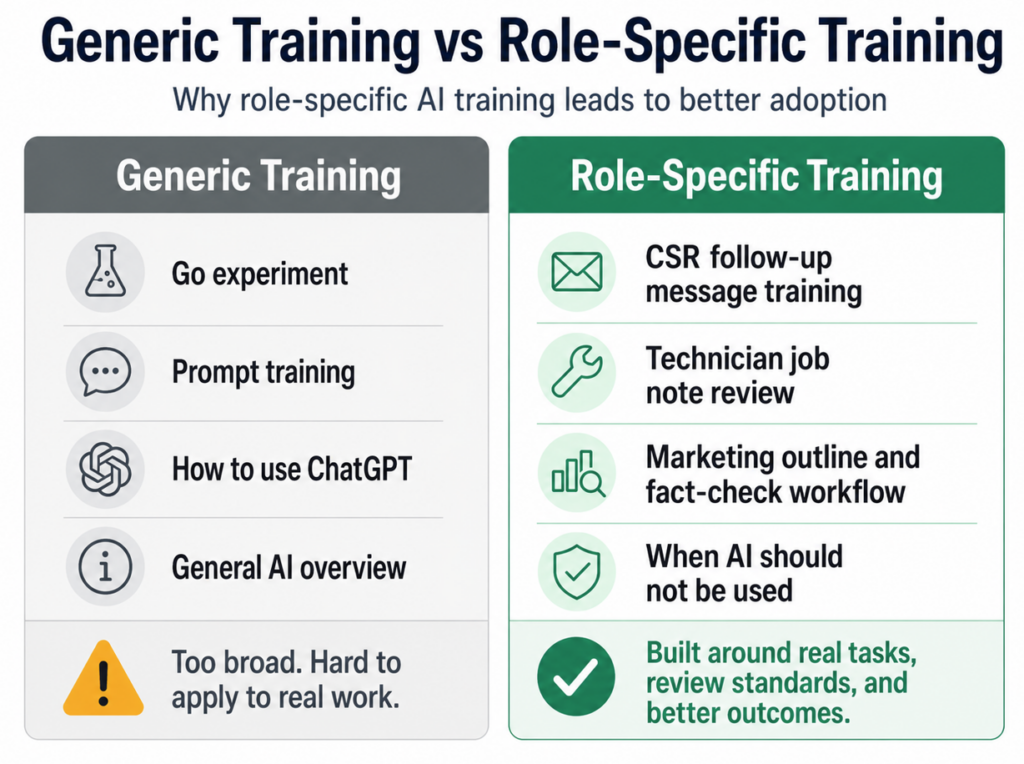
The Problem With Generic AI Training
Generic AI training usually covers the basics. It might explain what generative AI is, how tools like ChatGPT or Copilot work, how to write a prompt, how to summarize text, and how to ask for drafts or ideas.
That kind of training can be useful as an introduction, but it is rarely enough for real adoption.
The reason is simple: employees do not work in generic roles.
A customer service representative does not need the same AI training as a field technician. A marketing writer does not need the same examples as a finance manager. An attorney does not need the same guardrails as a restaurant manager. A dental office front desk employee does not need the same workflow as a sales director.
When training stays generic, employees are left to figure out the hard part on their own.
They have to answer questions like:
- How does this apply to my job?
- Which tasks am I allowed to use AI for?
- What information can I enter?
- What output can I trust?
- What should I double-check?
- What does good AI-assisted work look like for my role?
- When should I avoid AI completely?
If training does not answer those questions, employees may feel confused, exposed, or unsupported. Some will avoid AI because they do not want to make a mistake. Others will use it too freely because the boundaries were never explained. Both outcomes are risky.
AI Training Should Teach Judgment, Not Just Prompting
A lot of AI training focuses too much on prompts.
Prompting matters, but it is not the whole skill. In many workplace settings, the more important skill is judgment.
Employees need to know when AI is useful, when it is risky, how to check the output, and when human expertise should take over.
For example, a technician using AI to clean up job notes does not need to become a prompt engineer. They need to know what job details must be included, what the AI should never invent, how to check the final note, and what information the office team needs after the job.
A customer service representative using AI to draft a follow-up email needs to know how to check tone, accuracy, pricing details, warranty language, and customer-specific concerns.
A marketing writer using AI for outlines needs to know how to spot generic recommendations, missing search intent, weak local context, and unsupported claims.
An attorney using AI for internal summaries needs to know that the output is not legal judgment. It is a draft or support tool that requires professional review.
In all of these cases, the real training need is not just “how to use AI.”
It is “how to use AI responsibly in this job.”
That is why role-specific training is so important.
Example: Role-Specific AI Training for an HVAC Company
Imagine an HVAC company wants to use AI to improve service documentation and customer follow-up.
If the company gives everyone the same generic AI training, it may sound like this:
“AI can help you write, summarize, and organize information. Here are some prompt examples. Try using it to save time.”
That is not enough.
The technicians, CSRs, dispatchers, service managers, and sales team all interact with the same workflow differently. They need different training.
Technicians may need training on how to turn job details into clear internal notes. They should know what information must be included, such as equipment type, symptoms, diagnosis, work performed, parts used, safety concerns, recommendations, and follow-up needs. They should also know that AI cannot invent details that were not documented.
CSRs may need training on how to turn approved job notes into customer-friendly follow-up messages. They should know how to check for tone, missing details, warranty issues, pricing accuracy, and customer concerns.
Dispatchers may need training on how AI can summarize scheduling notes or flag incomplete appointment information.
Service managers may need training on how to review AI-assisted notes for quality and consistency across technicians.
That is role-specific training.
Each group learns how AI fits their part of the workflow.
The company does not need everyone to become an AI expert. It needs each role to understand how AI can support their work without creating confusion, rework, or customer-facing mistakes.
Example: Role-Specific AI Training for a Dental Office
A dental office may want to use AI to help with patient communication, appointment reminders, intake instructions, and internal office documentation.
A generic training session might show the whole team how to ask AI to draft messages. But that could create problems if employees do not understand the boundaries.
Front desk staff may need training on using AI to draft appointment preparation messages from approved templates. They should know what information can be included, what should be reviewed, and what kinds of patient details should not be entered into unapproved AI tools.
Office managers may need training on using AI to organize frequently asked questions, create internal checklists, or draft staff reminders.
Clinical staff may need much stricter boundaries. AI should not be used casually for diagnosis, treatment recommendations, or personalized clinical advice without proper review and compliance processes.
The same AI tool can create very different risks depending on who is using it and for what purpose.
That is why role-specific training is not just about usefulness. It is also about safety, trust, and professional responsibility.
A dental office does not need a one-size-fits-all AI lesson. It needs training that matches the responsibilities and risks of each role.
Example: Role-Specific AI Training for a Marketing Agency
Marketing agencies are a good example because many employees may already be using AI informally. Writers, editors, SEO strategists, account managers, paid media specialists, designers, and project managers may all see different possibilities.
A generic AI training session might encourage everyone to use AI for faster content production. That can create quality issues fast.
Writers may start using AI to draft blogs, but the content may become generic or repetitive. Editors may spend extra time cleaning up weak drafts. SEO strategists may get keyword recommendations without enough judgment behind them. Account managers may use AI to summarize client calls, but the summaries may miss key expectations or action items.
Role-specific training helps avoid that.
Writers may be trained to use AI for outlines, section ideas, research organization, and alternate phrasing, while still owning originality, accuracy, and client-specific insight.
Editors may be trained to spot common AI problems, such as unsupported claims, vague recommendations, repeated phrasing, weak local details, or overconfident statements.
SEO strategists may be trained to use AI for clustering ideas or first-pass page structures, while still validating search intent, competitiveness, and business relevance.
Account managers may be trained to use AI for meeting summaries and follow-up drafts, while checking client commitments, deadlines, and strategic context.
The agency gets better adoption because employees are not being told, “Use AI for marketing.”
They are being shown how AI fits their actual responsibilities.
Example: Role-Specific AI Training for a Law Firm
In a law firm, role-specific AI training is not optional. The risks are too high.
Attorneys, paralegals, legal assistants, intake staff, and administrative employees may all interact with information differently. They need different guidance.
Attorneys may need training on using approved AI tools for internal document summaries, issue spotting support, or drafting internal outlines, while understanding that legal judgment, verification, and final responsibility remain human.
Paralegals may need training on summarizing discovery materials, organizing timelines, or preparing internal research notes, with clear review requirements.
Legal assistants may need training on drafting routine administrative communications or organizing scheduling information, with strict rules about confidential information.
Intake staff may need training on summarizing intake calls or categorizing inquiry types, while avoiding legal advice.
A generic “how to use AI” session does not address those differences.
A law firm needs to teach employees where AI can help, where it cannot be trusted, what information is allowed, what must be reviewed, and who is accountable for final work.
This is one of the clearest examples of why role-specific training matters. AI can support legal workflows, but only if the firm trains people around real responsibilities and real risks.
Example: Role-Specific AI Training for a Restaurant Group
A restaurant group may want to use AI for online review responses, social media captions, shift notes, hiring descriptions, inventory summaries, or internal communication.
Different roles need different training.
A location manager may use AI to draft responses to routine positive reviews, but they need clear rules about sensitive complaints. Food safety issues, discrimination claims, injuries, employee behavior complaints, refund disputes, and legal threats should not be handled casually with AI.
A marketing coordinator may use AI for social media ideas, but they need to understand brand voice, accuracy, promotional rules, and approval processes.
An HR manager may use AI to draft job descriptions or internal policies, but they need to review for legal compliance, fairness, and company-specific language.
A general manager may use AI to summarize shift notes or recurring operational issues, but they need to make sure the output does not distort what actually happened.
Generic training might make AI sound easy. Role-specific training makes it usable in a real restaurant operation.
Role-Specific Training Reduces the AI Cleanup Problem
One of the biggest hidden costs of AI adoption is cleanup work.
AI may create an output quickly, but someone has to review it. If the person using AI does not understand what good output looks like, bad work moves downstream.
A technician may create incomplete AI-assisted job notes, and the office team has to fix them.
A writer may generate a generic draft, and the editor has to rewrite it.
A salesperson may create a summary that misses the real customer concern, and the account manager has to clean it up later.
A manager may use AI to draft an internal announcement, but the message creates confusion because it does not answer the questions employees actually have.
This is where AI can become frustrating. It may save time for one person while creating work for someone else.
Role-specific training helps prevent that by teaching employees how their AI-assisted work affects the next person in the workflow.
For example, an HVAC technician should understand that job notes are not just for them. Those notes affect billing, customer service, warranties, future service calls, and management review. A marketing writer should understand that an AI-generated draft affects the editor, account manager, client, and final search performance. A customer service employee should understand that a bad AI-assisted response may create customer frustration that someone else has to handle.
Good training makes the downstream impact visible.
That is how AI starts improving the workflow instead of just moving work around.
Role-Specific Training Builds Employee Confidence
Many employees do not avoid AI because they hate technology. They avoid it because they are unsure.
They are unsure what is allowed. They are unsure whether the output is good. They are unsure whether they will be blamed for mistakes. They are unsure whether leadership really understands the work. They are unsure whether using AI will make them look less skilled.
Role-specific training reduces that uncertainty.
It gives employees examples that feel familiar. It lets them practice with tasks they actually recognize. It shows them how to review outputs in context. It helps them understand where their judgment still matters.
For example, a front desk employee at a dental office may feel nervous about using AI for patient messages. But if training shows them approved examples, privacy boundaries, review steps, and situations where AI should not be used, the tool becomes less intimidating.
A service technician may not care about abstract AI capabilities, but they may appreciate a simple process that helps them turn messy notes into clear documentation.
A marketing writer may not want to be told that AI will write for them, but they may find value in using AI to organize research or test alternate outlines.
Confidence grows when training is connected to real work.
Role-Specific Training Helps Leaders Set Better Expectations
Role-specific training is not only for employees. It also helps leaders understand what they are actually asking people to do.
Sometimes leadership assumes AI adoption is simple because the tool looks easy in a demo. But demos usually show ideal conditions. Real work is messier.
When leaders design role-specific training, they have to think through the actual expectations for each group.
- What should this role use AI for?
- What should this role avoid?
- What examples should they practice?
- What quality standard applies?
- What review process is required?
- What mistakes are likely?
- How will managers support the role after training?
These questions force leadership to move from general AI enthusiasm to operational clarity.
That clarity matters. If leaders cannot explain how AI should apply to a role, employees should not be expected to figure it out alone.
Generic Training Can Accidentally Increase Risk
Generic AI training can create a false sense of readiness.
Employees may leave the session thinking they are expected to use AI, but without understanding the limits. That can lead to risky behavior.
Someone may enter sensitive customer data into an unapproved tool. Someone may send an AI-generated message without reviewing it. Someone may rely on an AI summary that misses an important detail. Someone may use AI for a decision that should stay human-led. Someone may publish content with invented facts. Someone may assume that if leadership encouraged AI use, then the output must be acceptable.
This is why “go experiment” is not enough.
Experimentation needs boundaries.
Role-specific training should make clear what information can be used, what tools are approved, what tasks are allowed, what outputs require review, and when AI should not be used at all.
A company does not need to scare employees away from AI. It needs to make responsible use easier than careless use.
What Good Role-Specific AI Training Should Include
Good role-specific AI training should include several practical elements.
First, it should explain the approved use cases for that role. Employees should know what tasks AI can support and what tasks are outside the boundary.
Second, it should use examples from the employee’s actual work. A CSR should practice with customer messages. A technician should practice with job notes. A marketer should practice with briefs or outlines. A manager should practice with team updates or reporting summaries.
Third, it should teach output review. Employees need to know what to check before using AI-assisted work. Accuracy, tone, missing details, customer impact, policy fit, and compliance risks may all matter depending on the role.
Fourth, it should teach when not to use AI. This is often more important than teaching when to use it. Employees should understand where AI creates risk, where human judgment is required, and where the tool is not approved.
Fifth, it should include guided practice. Watching someone else use AI is not the same as using it in context. Employees need hands-on practice with feedback.
Sixth, it should explain how to report problems. If AI output is weak, confusing, biased, inaccurate, or creating extra work, employees should know how to raise that issue.
Seventh, it should connect AI use to quality standards. The goal is not just to produce something faster. The goal is to produce work that is useful, accurate, appropriate, and worth using.
This is the difference between training people on a tool and training people for adoption.
How to Build Role-Specific AI Training
A practical way to build role-specific AI training is to start with one role and one workflow.
Do not try to train the entire company on every possible AI use case at once. Pick a role where there is a clear workflow problem and a defined AI use case.
For example, start with CSRs drafting customer follow-up messages. Or technicians improving job notes. Or account managers summarizing client calls. Or office staff drafting routine appointment reminders.
Once the role and workflow are selected, create three to five realistic examples. Use the kind of inputs employees actually see. Show what a weak AI output looks like. Show what a stronger output looks like. Walk through the review process.
Then give employees practice. Let them use the tool with sample tasks. Ask them to identify problems in the output. Ask what they would change. Ask where the tool saves time and where it creates extra work.
After training, collect feedback. Do employees feel confident? Do they understand what is allowed? Do they know how to review outputs? Do they know when not to use AI? Do they think the use case will actually help?
That feedback should shape the next version of the training.
AI training should improve over time just like the AI workflow itself.
Example Training Plan for Customer Service Representatives
A company training customer service representatives on AI-assisted follow-up messages could structure the session like this.
Start by explaining the use case. AI will draft first-pass follow-up messages after completed service calls. CSRs will review every message before sending. AI should not change pricing, warranty details, safety recommendations, or complaint handling decisions.
Then show the workflow. Technician notes come in. AI creates a draft message. The CSR reviews the message for accuracy, tone, completeness, and customer context. The CSR edits and sends the final version.
Next, show examples. Give one good technician note, one incomplete note, and one complaint-related note. Show how AI handles each. Discuss what the CSR should accept, edit, or reject.
Then practice. Have CSRs review AI-generated drafts and identify what needs to be fixed.
Finally, define success. The company may measure whether follow-up messages are sent faster, whether CSRs spend less time on routine drafting, whether fewer details are missed, and whether CSRs trust the drafts enough to keep using the process.
That is much more useful than a generic session on prompt writing.
Example Training Plan for Managers
Managers need their own AI training because they are responsible for coaching, reviewing, and measuring adoption.
A manager training session should focus less on how to generate outputs and more on how to support responsible use.
Managers should learn how to evaluate whether AI is improving the workflow or creating hidden rework. They should know how to review AI-assisted outputs, how to spot adoption problems, how to respond when employees are worried, and how to collect feedback without making employees feel punished.
For example, a service manager in a home services company may need to review whether AI-assisted job notes are improving documentation quality. A marketing manager may need to evaluate whether AI-assisted outlines are helping writers or creating generic content. An operations manager may need to track whether AI-generated reports are saving time after corrections are included.
Managers should also be trained not to measure adoption only by usage. High usage does not always mean high value. If employees use AI constantly but spend extra time fixing mistakes, the process may not be working.
This is where role-specific training connects directly to adoption and trust measurement.
Managers need to know what good adoption looks like.
Role-Specific Training Should Include “When Not to Use AI”
One of the most useful parts of AI training is teaching employees when not to use it.
This is often left out because leaders want people to feel excited. But clear limits actually build trust.
Employees should know when AI is not appropriate because of privacy, accuracy, legal risk, customer sensitivity, brand risk, safety, or professional judgment.
For example, a customer service employee should not use AI to invent refund policies or respond to a serious complaint without review. A dental office employee should not use AI to give clinical advice. A law firm employee should not use AI to produce final legal conclusions without attorney review. A financial professional should not use AI to provide personalized advice without proper review. A marketer should not use AI to invent statistics, testimonials, or product claims.
Knowing when not to use AI makes employees safer and more confident.
It also prevents the organization from creating accidental risk through overuse.
How Role-Specific Training Fits Into PFAIF
In PFAIF, role-specific training comes after workflow assessment, use case definition, and change communication. That order matters.
Leaders first need to understand the workflow. Then they define the AI use case. Then they communicate what is changing. After that, training can be built around the actual role and task.
If a company skips those earlier steps, training becomes generic because there is nothing specific to train around.
The PFAIF assessment treats role-specific training as a core readiness area. The assessment items ask whether employees receive AI training specific to their role, whether training uses examples from actual work, whether employees are taught how to review AI outputs, whether they have guided practice, and whether they are taught when AI should not be used.
That last point is important. Role-specific training is not only about increasing use. It is about improving responsible use.
The goal is not to get every employee using AI as much as possible.
The goal is to help employees use AI where it fits, review it properly, avoid misuse, and improve real work.
Practical Checklist: Role-Specific AI Training
Before training employees on AI, leaders should be able to answer these questions:
- Which role are we training?
- What workflow does this role perform?
- What specific AI use case applies to this role?
- What examples from their actual work will be used?
- What output should AI create?
- What does good AI-assisted work look like?
- What must employees check before using the output?
- What should AI not be used for in this role?
- What information should not be entered into the tool?
- Who owns final approval?
- Will employees get guided practice?
- How will we know whether training worked?
- How will employees give feedback after training?
If those questions are not clear, the training is probably not ready.
That does not mean the company should stop AI adoption. It means the training needs to get closer to the work.
Common Mistakes in AI Training
- The first mistake is training everyone the same way. This may be efficient for scheduling, but it is not always effective for adoption.
- The second mistake is focusing only on prompts. Prompts are useful, but employees also need judgment, review standards, boundaries, and examples from their actual jobs.
- The third mistake is skipping practice. Watching a demo is not enough. Employees need to try the process, review outputs, and receive feedback.
- The fourth mistake is ignoring managers. Managers need training on how to support adoption, evaluate quality, and respond to employee concerns.
- The fifth mistake is failing to teach when not to use AI. Without boundaries, employees may either overuse AI or avoid it completely.
- The sixth mistake is treating training as a one-time event. AI workflows will change. Training should be updated as the company learns what works and what does not.
Generic AI training may introduce the tool, but role-specific AI training is what turns AI into something employees can actually use.
Employees do not need vague encouragement to “use AI more.” They need practical examples, clear boundaries, guided practice, review standards, and honest guidance about when AI is helpful and when it is not.
For business leaders, the lesson is simple: train people for the work they actually do.
That is how AI becomes less intimidating, less chaotic, and more useful.
That is also how organizations reduce resistance, improve quality, and build trust.
Take the PFAIF Readiness Assessment
The PFAIF Readiness Assessment helps organizations evaluate people-first AI readiness across workflow assessment, use case definition, change communication, role-specific training, quality standards, pilot testing, adoption and trust measurement, and feedback loops.
Use it to identify where your organization is strongest and where more support may be needed before scaling AI.
Take the PFAIF Readiness Assessment
Learn more about the People-First AI Implementation Framework
Watch the recorded PFAIF webinar
FAQ
What is role-specific AI training?
Role-specific AI training teaches employees how to use AI in the context of their actual job responsibilities. It uses real examples from their work, explains approved use cases, teaches output review, defines boundaries, and shows when AI should not be used.
Why is generic AI training not enough?
Generic AI training is not enough because employees need to know how AI applies to their specific tasks, workflows, risks, and quality standards. A broad session on prompts or AI basics may create awareness, but it often does not lead to confident or responsible adoption.
What should AI training for employees include?
AI training for employees should include role-specific use cases, examples from actual work, hands-on practice, output review standards, data and privacy boundaries, examples of when not to use AI, and a clear way to report problems or ask questions.
How does role-specific AI training reduce resistance?
Role-specific AI training reduces resistance by making AI feel practical instead of vague or threatening. Employees are more likely to trust AI when they understand how it fits their work, what remains human-led, and how they are expected to review outputs.
What is an example of role-specific AI training?
For a customer service team, role-specific AI training might teach employees how to use AI to draft first-pass follow-up messages after service calls. The training would include approved examples, review standards, tone checks, accuracy checks, and situations where AI should not be used.
How does role-specific training fit into PFAIF?
In the People-First AI Implementation Framework, Role-Specific Training is one of the eight readiness areas. It focuses on whether employees receive training tied to their role, actual work examples, output review, guided practice, and clear boundaries for when AI should not be used.