Defining AI use cases before choosing tools means clearly identifying the business problem, workflow, user, expected output, review process, success criteria, and risk boundaries before selecting an AI platform. Instead of asking, “What AI tool should we buy?” leaders should first ask, “What specific work problem are we trying to solve, and what would a successful AI-assisted process look like?” In the People-First AI Implementation Framework, or PFAIF™, use case definition is one of the most important readiness steps because employees are more likely to trust and use AI when they understand exactly what the tool is for and how it fits their work.
This is where many AI rollouts start to go wrong.
A company sees a demo. The tool looks impressive. It can write, summarize, analyze, automate, classify, generate, and answer questions. Leadership gets excited. Someone says, “We should be using this.” A few licenses get purchased. A few people experiment. Then the organization tries to figure out where the tool fits.
That order feels natural, but it is risky.
AI implementation works better when the use case comes before the tool. Otherwise, teams may end up with software that looks powerful but does not solve a real problem. Employees may be told to “use AI” without knowing when, why, or how. Managers may measure activity instead of value. The business may spend money on a platform while the actual workflow problem remains unchanged.
A good AI use case creates focus. It tells the organization what AI is supposed to do, who it is supposed to help, what output it should create, what human review is required, and how success will be measured.
Without that clarity, AI adoption becomes guesswork.
Why AI Use Case Definition Is Critical
AI tools are flexible. That is part of what makes them useful. It is also part of what makes them dangerous from an implementation standpoint.
If a tool can do many things, people may use it in many different ways. One employee may use it to draft emails. Another may use it to summarize notes. Another may use it to make decisions they should not be outsourcing. Another may avoid it completely because they are not sure what is allowed.
That inconsistency creates confusion.
Use case definition helps prevent that by narrowing the purpose. It turns vague AI enthusiasm into a practical implementation plan.
For example, “We want to use AI for customer service” is not a strong use case. Customer service includes many different tasks: answering questions, summarizing calls, writing follow-up messages, categorizing complaints, updating records, scheduling appointments, and escalating urgent issues.
A stronger use case would be:
“Use AI to summarize customer service calls into structured notes for internal review before they are added to the CRM.”
That use case is much clearer. It identifies the task, the output, the user, the system, and the review step.
This does not mean the company can never expand the use case later. It means the company is starting with a specific use case that can be tested, trained, measured, and improved.
That is how responsible AI implementation usually begins.
A Weak AI Use Case vs. a Strong AI Use Case
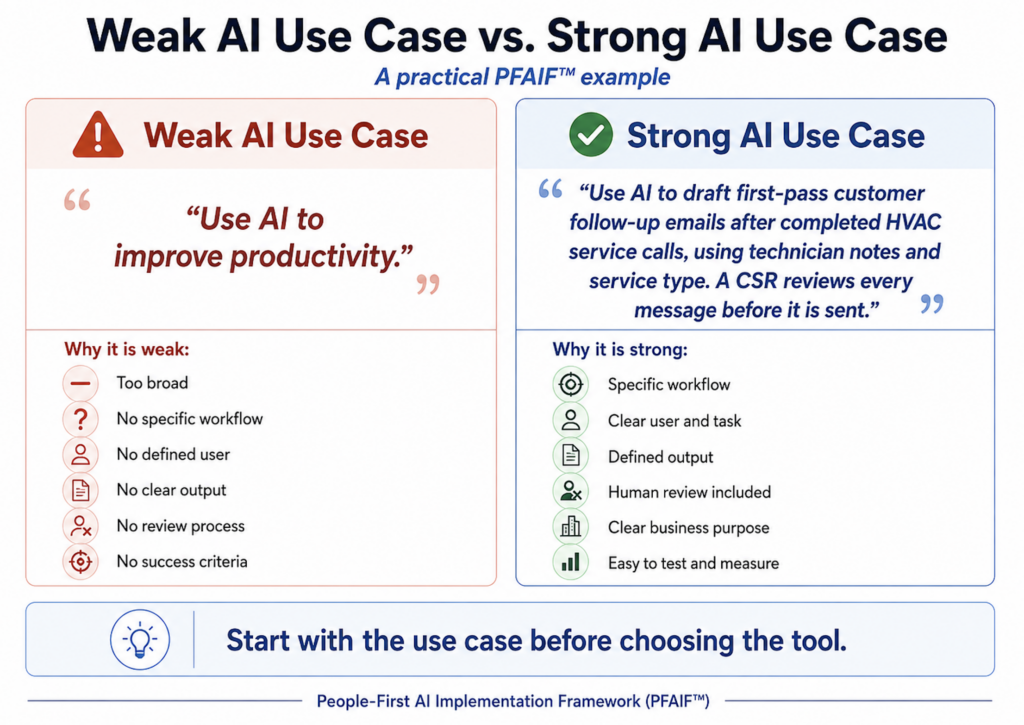
A weak AI use case is broad, vague, and hard to measure.
Examples of weak AI use cases include:
- Use AI to improve productivity.
- Use AI for marketing.
- Use AI to help customer service.
- Use AI to make operations more efficient.
- Use AI to save time.
Those statements may describe good intentions, but they are not implementation plans. They do not tell employees what to do. They do not tell managers what to measure. They do not define who owns the outcome. They do not explain what quality standard applies.
A strong AI use case is specific, practical, and tied to a real workflow.
For example:
- Use AI to draft first-pass customer follow-up messages after completed HVAC service calls, using technician notes and job type, with CSR review before sending.
- Use AI to summarize long internal meeting transcripts into action items, owners, and deadlines, with manager review before distribution.
- Use AI to turn approved blog briefs into first-draft outlines for a marketing team, with a human editor responsible for accuracy, brand voice, and final recommendations.
- Use AI to help front desk staff at a dental office draft appointment reminder language based on approved templates, with no patient diagnosis or protected health information entered into the tool.
- Use AI to classify incoming support tickets by issue type so the operations team can route them faster, with manual review during the pilot period.
These use cases are not perfect, but they are much stronger because they create boundaries. They make it easier to train employees, define quality standards, test the process, and measure whether AI helped.
The Core Parts of a Good AI Use Case
A good AI use case should answer seven practical questions.
First, what problem are we trying to solve? The use case should start with a real business or workflow problem. If there is no clear problem, AI may become a novelty instead of a solution.
Second, who will use the AI? A use case should identify the role, team, or department involved. A customer service team, technician, attorney, office manager, marketing writer, salesperson, or HR coordinator may all need different instructions.
Third, what task will AI support? The task should be specific. Summarizing call notes is different from writing customer replies. Drafting a first-pass outline is different from publishing final content. Classifying support tickets is different from deciding how to respond.
Fourth, what output should AI produce? Leaders should define the expected output. Is it a summary, draft, checklist, classification, recommendation, report, email, job note, or internal answer?
Fifth, what human review is required? This is one of the most important parts. AI-assisted work still needs ownership. Someone should know what must be checked and who approves final use.
Sixth, what should AI not do? Every use case needs boundaries. Employees should know what information should not be entered, what decisions should remain human-led, and when AI is not appropriate.
Seventh, how will success be measured? The company needs to define what improvement means. It could be faster turnaround, fewer missing details, reduced rework, better documentation, more consistent responses, or improved employee confidence.
If a proposed AI use case cannot answer these questions, it is probably not ready to scale.
Example: Defining an AI Use Case in an HVAC Company
Imagine an HVAC company wants to use AI to improve service follow-up.
The vague version of the use case might be:
“We want to use AI to help with customer communication.”
That sounds fine, but it does not give the team enough direction. Customer communication could mean appointment reminders, job updates, review requests, sales follow-ups, maintenance plan emails, or complaint responses.
A clearer use case might be:
“We will use AI to draft first-pass follow-up messages after completed service calls. The AI will use technician notes, service type, and approved company language to create a draft. A CSR will review the message for accuracy, tone, pricing, warranty details, and customer-specific concerns before it is sent.”
Now the use case is practical. It tells the team what AI will do and what it will not do. It also makes the review process clear.
This helps avoid a common problem in field service businesses: AI output that sounds good but includes wrong or incomplete information. For example, an AI-generated message may accidentally imply that a repair is under warranty, leave out an important recommendation, or use a tone that feels too generic for a frustrated customer.
The use case should also define success. The company might measure whether follow-up messages are sent faster, whether CSRs spend less time drafting routine messages, whether fewer customer details are missed, and whether employees trust the AI drafts enough to keep using the process.
That is a real AI use case.
It is specific enough to test.
Example: Defining an AI Use Case in a Dental Office
A dental office may want to use AI because the front desk is overloaded. The vague use case might be:
“We want AI to help with patient communication.”
Again, that is too broad.
Patient communication could involve appointment reminders, insurance questions, post-treatment instructions, billing questions, new patient intake, or missed appointment follow-up.
A more useful use case might be:
“We will use AI to draft plain-language appointment preparation messages based on approved templates. Front desk staff will review and send the message. AI will not be used to provide diagnosis, treatment recommendations, or personalized clinical advice.”
That use case creates boundaries. It also protects the practice from using AI in ways that create unnecessary risk.
The office could measure success by looking at whether patients arrive with the right forms, whether front desk staff spend less time repeating routine instructions, and whether fewer appointments are delayed because patients were not prepared.
In this example, AI is not being treated as a replacement for staff. It is being used to support a narrow communication task that already exists in the workflow.
That is the kind of use case definition that makes adoption easier.
Example: Defining an AI Use Case in a Marketing Agency
A marketing agency may want to use AI to increase content production. The vague use case is obvious:
“We want to use AI to write content faster.”
That sounds productive, but it can quickly create quality problems. AI-generated content may be generic, repetitive, inaccurate, off-brand, or too similar across clients. Editors may spend more time fixing poor drafts than they would have spent writing from a stronger brief.
A better use case might be:
“We will use AI to turn approved keyword research and client notes into first-pass blog outlines. Writers will use those outlines as planning support, not final content. Editors will review outlines for search intent, brand fit, accuracy, local relevance, and missing sections before drafting begins.”
This use case avoids the common trap of using AI as a volume machine. Instead, AI supports a specific part of the workflow: outline development.
The agency could measure whether outlines are created faster, whether writers find them useful, whether editors make fewer structural changes later, and whether content quality remains strong.
Another use case might be:
“We will use AI to summarize client source materials into internal research notes before writing begins. AI summaries will not be copied directly into client content.”
That is also useful because it reduces research friction while preserving human judgment.
The key is to define where AI fits in the workflow instead of telling the team to use it anywhere.
Example: Defining an AI Use Case in a Law Firm
A law firm needs especially careful use case definition because risk, confidentiality, and professional judgment matter.
A vague use case like “Use AI for legal research” is not enough. That could mean too many things, and some of them may be inappropriate depending on the tool, data, jurisdiction, client requirements, and firm policies.
A clearer use case might be:
“We will use an approved AI tool to create internal first-pass summaries of uploaded case documents. Attorneys will verify all summaries before relying on them. AI output will not be used directly in client-facing documents, court filings, or legal conclusions without attorney review.”
This use case defines the role of AI as support, not authority. It also makes accountability clear.
The firm may decide to test this with one type of document first, such as deposition transcripts or discovery materials. It may measure whether summaries help attorneys identify relevant sections faster, whether important details are missed, and whether the time saved justifies the review process.
In a law firm, the right use case definition can be the difference between helpful internal support and serious professional risk.
Example: Defining an AI Use Case in an Accounting Firm
An accounting firm may be tempted to use AI broadly during tax season. The vague version might be:
“We want to use AI to help with tax work.”
That is not specific enough. Tax work includes document requests, client communication, data entry, review, planning, research, and filing support.
A more practical use case might be:
“We will use AI to draft plain-language explanations of common document requests for administrative staff to review before sending to clients.”
That is a safer and clearer place to begin. AI is not making tax decisions. It is helping explain routine requests in a clearer way.
For example, clients often get confused when asked for forms, receipts, year-end statements, business expense details, or missing documentation. AI could help staff draft a friendly explanation of what is needed and why, based on approved firm language.
The firm could measure whether staff spend less time writing repetitive explanations, whether clients submit documents more completely, and whether fewer follow-up emails are needed.
That is a useful AI use case because it reduces friction without handing judgment to the tool.
Example: Defining an AI Use Case in a Restaurant Group
A restaurant group with several locations may want to use AI for customer reviews. The vague use case might be:
“Use AI to respond to reviews.”
That is too open-ended. Reviews can be positive, negative, sensitive, inaccurate, emotional, or related to health and safety. A careless AI response can make the business look robotic or dismissive.
A stronger use case might be:
“We will use AI to draft first-pass responses to routine positive reviews and basic service feedback. Managers will review every response before posting. AI will not respond automatically to complaints involving food safety, discrimination, employee behavior, injuries, refunds, or legal concerns.”
This gives the team a practical starting point while protecting the business from obvious risks.
The restaurant group could measure whether managers respond to more reviews, whether response time improves, whether tone remains consistent, and whether sensitive reviews are escalated properly.
Again, the use case is not just “AI for reviews.” It is a specific process with clear boundaries.
Why Use Case Definition Reduces Employee Confusion
Employees are more likely to use AI when they know what it is for.
If leadership says, “Everyone should start using AI,” employees may feel confused, pressured, or skeptical. Some may overuse it. Some may avoid it. Some may use it in risky ways. Some may assume leadership wants speed at the expense of quality.
Clear use cases reduce that confusion. They tell employees:
- This is the task AI can support.
- This is the type of output we want.
- This is how you should review it.
- This is when you should not use it.
- This is who owns the final result.
- This is how we will know whether it helped.
That level of clarity matters because AI changes how people work. It affects confidence, judgment, accountability, and trust. Employees do not just need access to AI. They need to understand how AI fits into their actual responsibilities.
A clear use case makes AI feel less like a vague mandate and more like a defined work support.
Why Use Case Definition Helps Prevent Wasted AI Spend
AI software costs can add up quickly, especially when companies buy licenses before they understand who will use them and why.
A small business may think a monthly AI subscription is cheap, but the real cost is not just the subscription. The real cost includes employee time, manager time, training time, workflow disruption, cleanup work, and the opportunity cost of focusing on the wrong problem.
For example, a company may buy a broad AI platform for the entire team. After three months, only a few employees use it regularly. Some use it for basic writing help. Others do not touch it. Managers cannot tell whether it improved anything. The company now has activity, but not a clear return.
That does not mean the tool is bad. It means the use cases were not defined.
A better approach is to define one or two specific use cases first, then choose the tool that fits those use cases. The company may discover it needs a writing assistant, a call summarization tool, a CRM-integrated workflow tool, an internal knowledge base, or no new tool at all.
Use case definition protects the business from buying technology before it understands the job.
Use Cases Should Be Built Around Real Work, Not Tool Features
One of the most common AI implementation mistakes is building around features instead of work.
A vendor may say the tool can summarize, generate, analyze, classify, translate, and automate. Those features may be impressive, but features do not automatically equal business value.
The better question is how those capabilities fit into real work.
For example, “summarization” is a feature. A use case would be: “Summarize customer call transcripts into CRM-ready notes for account manager review.”
“Content generation” is a feature. A use case would be: “Draft first-pass service page outlines based on approved keyword research and brand guidelines.”
“Classification” is a feature. A use case would be: “Classify incoming maintenance requests by urgency so the operations team can prioritize same-day issues.”
“Automation” is a feature. A use case would be: “Route completed inspection forms to the correct manager based on location, service type, and flagged issues.”
Features describe what the tool can do. Use cases describe how the organization will use that capability to improve work.
That distinction is critical.
What to Include in an AI Use Case Statement
A simple AI use case statement can follow this format:
“We will use AI to [specific task] for [specific user or team] so that [intended outcome]. The AI output will be [type of output], reviewed by [person or role], and success will be measured by [specific metric or outcome].”
Here are a few examples.
“We will use AI to draft first-pass customer follow-up emails for the CSR team so that routine follow-up messages can be prepared faster. The AI output will be reviewed by a CSR before sending, and success will be measured by response time, accuracy, and employee feedback.”
“We will use AI to summarize sales call transcripts for account managers so that follow-up tasks are easier to identify. The AI output will be reviewed by the account manager, and success will be measured by follow-up speed, missed task reduction, and CRM completeness.”
“We will use AI to create first-pass blog outlines for the content team so that writers can start from a more structured brief. The AI output will be reviewed by an editor, and success will be measured by planning time, editorial revision needs, and content quality.”
“We will use AI to categorize inbound support tickets for the operations team so that urgent issues can be routed faster. The AI output will be reviewed during the pilot, and success will be measured by routing accuracy and resolution time.”
This format forces clarity before the tool is chosen.
How Use Case Definition Fits Into PFAIF
In PFAIF, use case definition comes after workflow assessment because the use case should be grounded in the actual work. The framework treats AI implementation as a people-first change process, not just a technical deployment. The assessment itself includes specific use case definition items, such as whether each AI use case has a clearly defined problem, intended outcome, responsible person or team, and success criteria before expansion.
That matters because every later step depends on use case clarity.
Communication is easier when the use case is clear.
Training is easier when employees know the task.
Quality standards are easier when the expected output is defined.
Pilot testing is easier when success criteria are known.
Trust measurement is easier when employees can judge whether AI is helping with a specific process.
Feedback loops are easier when the organization knows what it is trying to improve.
If the use case is vague, the entire rollout becomes harder.
That is why “Use AI to improve productivity” is not enough. Productivity is an outcome, not a use case.
Questions Leaders Should Ask Before Approving an AI Use Case
Before approving an AI use case, leaders should be able to answer the following questions:
- What workflow does this use case support?
- What specific problem are we trying to solve?
- Who will use the AI tool?
- What task will AI perform?
- What output should AI create?
- What information will AI need?
- What information should not be entered?
- Who reviews the AI output?
- Who owns the final decision or final work?
- What risks need to be managed?
- What does success look like?
- How will we know whether AI saved time or created more cleanup work?
- What would cause us to stop or revise the use case?
These questions help turn AI from a broad idea into a manageable implementation plan.
Common Mistakes When Defining AI Use Cases
The first mistake is defining the use case too broadly. “AI for operations” or “AI for marketing” is not specific enough. Leaders should narrow the use case to a task, workflow, output, and user.
The second mistake is ignoring human review. AI-assisted work needs accountability. A use case should explain who checks the output and what they are responsible for verifying.
The third mistake is confusing tool capability with business value. Just because a tool can do something does not mean it should be used in that workflow.
The fourth mistake is choosing use cases that employees do not actually need. Leaders may choose something that sounds impressive while employees are struggling with a different problem entirely.
The fifth mistake is failing to define success. If success means “people used the tool,” the bar is too low. Better success measures include time saved after review, fewer errors, better documentation, faster response times, reduced rework, or improved employee confidence.
The sixth mistake is expanding too quickly. A use case should show value in a limited setting before it becomes a company-wide expectation.
How to Define Your First AI Use Case
A simple way to define your first AI use case is to start small.
Choose one workflow where the business already feels friction. This could be customer follow-up, call summaries, internal reporting, service documentation, onboarding, content planning, support ticket routing, invoice follow-up, or meeting notes.
Talk to the employees closest to the work. Ask what slows them down, what they repeat often, what information is usually missing, and where errors create extra work.
Then define one narrow AI task that could help. Avoid trying to transform the whole department at once. Start with one task that is repetitive enough to benefit from AI but important enough to matter.
Next, define the expected output. If AI is summarizing, what should the summary include? If AI is drafting, what tone and information should be included? If AI is classifying, what categories should it use?
Then define the review process. Who checks the output? What must be verified? What should happen when AI is wrong?
Finally, define success. Decide what you will measure before the use case expands.
This does not need to be complicated. It needs to be clear.
A Simple AI Use Case Template
You can use this template before choosing an AI tool:
Use Case Name:
What do we call this use case?
Workflow Supported:
What process does this fit into?
Business Problem:
What problem are we trying to solve?
Primary Users:
Who will use the AI?
AI Task:
What will AI do?
Expected Output:
What should AI produce?
Human Review:
Who checks the output and what must they verify?
Boundaries:
What should AI not do?
Data or Input Rules:
What information can and cannot be used?
Success Criteria:
How will we know whether this worked?
Pilot Plan:
Where will we test this before scaling?
Even a one-page version of this template can prevent a lot of confusion.
AI adoption should not begin with a software purchase. It should begin with a clearly defined use case. A good use case gives the organization focus. It helps employees understand what AI is for. It helps managers train and measure properly. It helps leaders choose tools based on actual work instead of vendor excitement. It also helps prevent one of the biggest AI implementation problems: buying technology before the organization knows what problem it is trying to solve.
The goal is not to use AI everywhere. The goal is to use AI where it improves real work. That starts with defining the use case before choosing the tool.
Take the PFAIF Readiness Assessment
The PFAIF Readiness Assessment helps organizations evaluate people-first AI readiness across workflow assessment, use case definition, change communication, role-specific training, quality standards, pilot testing, adoption and trust measurement, and feedback loops.
Use it to identify where your organization is strongest and where more support may be needed before scaling AI.
Take the PFAIF Readiness Assessment
Learn more about the People-First AI Implementation Framework
Watch the recorded PFAIF webinar
FAQ
What is an AI use case?
An AI use case is a specific task, workflow, or business problem where AI is applied to produce a defined outcome. A strong AI use case identifies who will use AI, what AI will do, what output it should create, what human review is required, and how success will be measured.
Why should companies define AI use cases before choosing tools?
Companies should define AI use cases before choosing tools because tool selection should be based on real business needs. Without a clear use case, organizations may buy AI software that looks impressive but does not solve the actual workflow problem.
What is an example of a good AI use case?
A good AI use case might be: “Use AI to summarize customer call transcripts into structured CRM notes for account manager review.” This is stronger than “use AI for customer service” because it defines the task, user, output, review process, and workflow.
What makes an AI use case too vague?
An AI use case is too vague when it does not define the specific task, user, output, review process, or success criteria. Phrases like “use AI to improve productivity” or “use AI for marketing” are too broad to guide implementation.
How does use case definition reduce employee resistance?
Use case definition reduces employee resistance by making AI expectations clearer. Employees are more likely to trust and use AI when they understand what the tool is for, when it should be used, how output should be reviewed, and what remains human-led.
How does use case definition fit into PFAIF?
In the People-First AI Implementation Framework, use case definition is one of the eight readiness areas. It helps organizations clarify the problem AI is meant to solve, the intended outcome, ownership, and success criteria before AI use is expanded.