Workflow assessment in AI implementation is the process of understanding how work actually gets done before choosing, testing, or scaling an AI tool. It helps leaders identify where work is slow, repetitive, inconsistent, expensive, frustrating, or error-prone so AI can be applied to a real business problem instead of being forced into a process it does not fit. In the People-First AI Implementation Framework, or PFAIF™, workflow assessment is the first step because responsible AI adoption should start with the work, not the software.
This matters because many businesses are approaching AI backwards. They hear about a tool, see a demo, buy a subscription, and then try to find a place to use it. That can create excitement at first, but it often leads to weak adoption later. Employees may not understand when to use the tool. Managers may not know what success looks like. AI may speed up one task while creating extra cleanup work somewhere else.
A good workflow assessment slows things down just enough to ask a better question: Where can AI actually improve the way work happens inside this organization?
That question is much more useful than asking, “What AI tool should we buy?”
Why Workflow Assessment Should Come Before AI Tool Selection
AI tools are powerful, but they are not magic. They work best when they are matched to a specific workflow, task, decision, or bottleneck. If leaders do not understand the workflow first, they may buy the wrong tool, solve the wrong problem, or make an existing process more complicated.
Think about a small HVAC company. The owner wants to use AI to improve customer service. At first, the obvious idea may be to buy an AI writing tool so the customer service team can draft better emails and follow-up messages. That sounds reasonable. But after looking closely at the workflow, the owner may discover that writing is not the real issue.
The real problem may be that technician notes are incomplete, dispatch handoffs are inconsistent, and customer service representatives do not always know what happened on the job. In that case, the better AI opportunity may be summarizing job notes, standardizing service visit documentation, or helping the office team turn technician updates into clear customer follow-ups.
Without workflow assessment, the business might buy a tool that makes emails sound better while the real communication problem remains untouched.
The same thing happens in many industries. A dental office may think it needs AI for marketing, but the bigger workflow problem may be appointment reminders, insurance follow-ups, or patient intake forms. A law firm may think it needs AI for drafting, but the better first use case may be summarizing long documents for internal review. A restaurant group may think it needs AI for social media, but the more valuable workflow may be responding to customer reviews across multiple locations.
Workflow assessment helps leaders see the difference between an exciting AI use case and a useful one.
What Workflow Assessment Actually Looks Like
Workflow assessment does not need to be complicated. Leaders do not need a massive consulting project to start. In many small and mid-sized businesses, the first useful workflow assessment can be done with a whiteboard, a few employee conversations, and a willingness to look honestly at where work breaks down.
The goal is to map a process from beginning to end. Start with one workflow, not the whole business. That workflow could be customer intake, service scheduling, estimate creation, invoice follow-up, content production, sales handoff, onboarding, reporting, or internal documentation.
For example, a plumbing company may choose to assess its service follow-up process. The leader would look at what happens after a technician finishes a job. Who records the job details? Where are those notes stored? Who contacts the customer? What information does the office team need? How often are details missing? Where does rework happen? What mistakes create customer frustration?
Once the process is visible, AI opportunities become easier to identify. Maybe AI can help turn technician notes into customer-friendly summaries. Maybe it can flag missing information before the job is closed. Maybe it can draft a follow-up message that a person reviews before sending. Or maybe AI is not the first thing the company needs. Maybe the real issue is that the current job note template is unclear.
That last point matters. Workflow assessment may reveal that AI is useful, but it may also reveal that the process needs to be cleaned up first.
That is not a failure. That is the point.
The Main Questions Leaders Should Ask During Workflow Assessment
A strong AI workflow assessment should answer a few practical questions before any major rollout begins.
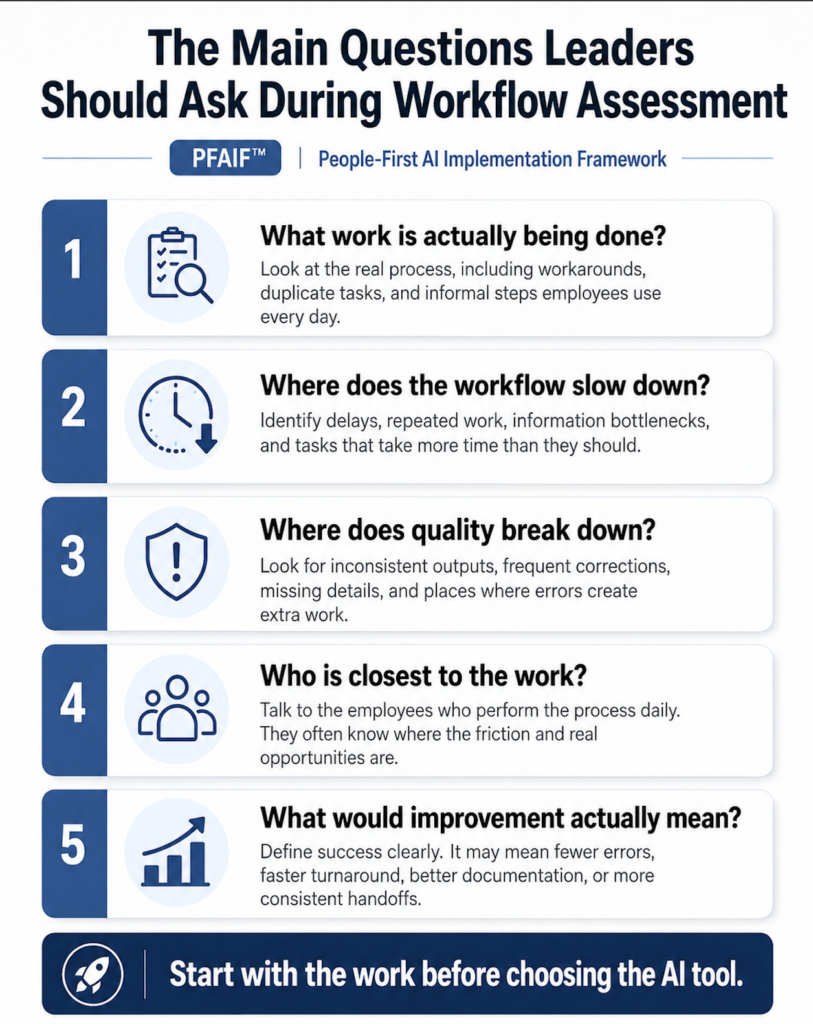
First, what work is actually being done? Leaders should avoid relying only on how the process is supposed to work on paper. The real workflow is what employees actually do during a normal day. That includes workarounds, manual fixes, duplicate entry, Slack messages, spreadsheet updates, phone calls, sticky notes, and anything else people use to get the job done.
Second, where does the workflow slow down? Delays often reveal good AI opportunities. If employees are waiting on information, rewriting the same message repeatedly, searching through old records, or manually summarizing information, there may be a potential use case.
Third, where does quality break down? AI can support quality, but it can also create quality problems if used carelessly. Leaders should look for areas where work is inconsistent, incomplete, or frequently corrected.
Fourth, who is closest to the work? Employees who perform the workflow every day usually know where the problems are. If leadership designs an AI rollout without talking to the people who do the work, they are likely to miss important details.
Fifth, what would improvement actually mean? Faster is not always better. In some workflows, the goal may be fewer errors. In others, it may be better documentation, less repetitive work, faster customer response, or more consistent handoffs.
These questions help leaders move from vague AI enthusiasm to practical AI implementation.
Example: Workflow Assessment in a Home Services Business
Home services companies are a great example because their workflows often involve field teams, office teams, customer service teams, managers, and customers. A single bad handoff can create a frustrating customer experience.
Imagine an HVAC company wants to use AI to improve job documentation. Before buying a tool, the company maps the workflow.
A customer calls in with an issue. The CSR creates the appointment. Dispatch assigns the technician. The technician diagnoses the problem. The technician enters notes after the job. The office team uses those notes for billing, follow-up, warranties, and future service history.
That seems simple until the company looks closer. Some technicians write detailed notes. Others write a few words. Some use abbreviations the office does not understand. Some leave out model numbers or follow-up recommendations. The customer service team then has to call the technician later for clarification. Billing may be delayed. Customers may receive vague follow-up messages. Managers may not have clean information for quality review.
In this case, AI may be useful, but only if the workflow is understood first. The company may decide to use AI to structure technician notes into a standard format. It may create a checklist for required information. It may use AI to draft a customer-friendly summary, but require office review before sending.
That is a much stronger AI implementation than simply telling technicians, “Start using AI for notes.”
The workflow assessment reveals what the AI needs to support, where human review belongs, and how success should be measured.
Example: Workflow Assessment in a Dental Office
A dental office may want to use AI because the front desk is overwhelmed. The owner may assume the solution is an AI chatbot or automated phone tool. But a workflow assessment may reveal a different picture.
The office maps the patient intake process. A new patient calls or submits a form. Staff collect insurance information. The patient gets scheduled. Forms are sent. Insurance is verified. The patient receives reminders. The clinical team prepares for the visit.
The assessment may show that the biggest issue is not answering questions. It may be incomplete intake forms, slow insurance verification, or patients not understanding what documents they need to bring. Staff may be spending too much time repeating the same instructions over the phone.
AI could help, but the use case should match the workflow. The office might use AI to draft plain-language patient instructions, create internal checklists for new patient intake, or summarize common insurance questions for staff review. A chatbot may still be useful, but only after the office understands where the bottleneck really is.
This is exactly why workflow assessment matters. It keeps leaders from buying the most impressive tool before they understand the most important problem.
Example: Workflow Assessment in a Marketing Agency
A marketing agency may want to use AI to speed up content production. That sounds like an obvious use case. But “content production” is not one workflow. It is usually a chain of smaller workflows.
There may be keyword research, content briefs, client approvals, drafting, editing, SEO review, internal linking, image selection, publishing, and performance tracking. If leadership simply says, “Use AI to write blogs faster,” the agency may create more problems than it solves.
The workflow assessment may reveal that drafting is not actually the slowest step. Maybe the bottleneck is client approvals. Maybe content briefs are inconsistent. Maybe writers spend too much time searching for service details. Maybe editors spend too much time fixing generic AI output that does not match the client’s voice.
Once the workflow is mapped, the agency may find better AI use cases. AI might help turn keyword research into structured briefs. It might help create first-pass outlines. It might summarize client source material. It might help editors check for missing sections. But the agency may decide that final writing, local expertise, and client-specific recommendations still need strong human involvement.
That is a healthier AI strategy because it improves the workflow instead of flooding the team with generic AI drafts.
Example: Workflow Assessment in a Law Firm
A law firm has higher-risk workflows, so workflow assessment is even more important. AI may be helpful, but careless implementation can create confidentiality, accuracy, and accountability concerns.
Suppose a small law firm wants to use AI to summarize case documents. That may be a reasonable internal use case, but the firm needs to understand the workflow first. Who selects the documents? What information can be entered into the tool? Who reviews the summary? Can the summary be used in client-facing work? What happens if the AI misses a key detail? Who is accountable for final interpretation?
The workflow assessment may show that AI can support early review, but not replace legal judgment. The firm may create a process where AI-generated summaries are clearly labeled as drafts, reviewed by an attorney, and never used as final work product without verification.
In this example, workflow assessment is not just about efficiency. It is about risk management, quality control, and professional responsibility.
The same principle applies in accounting, healthcare, insurance, financial services, and any business where mistakes can have serious consequences.
How Workflow Assessment Reduces Employee Resistance
One of the most overlooked benefits of workflow assessment is that it can reduce employee resistance.
Employees are often more open to AI when they see that leadership understands the work. They are less open when AI feels like something being forced onto them by people who do not understand their day-to-day reality.
For example, if a manager tells customer service employees, “This AI tool will make your job easier,” but the tool creates inaccurate drafts that employees have to fix, trust drops quickly. The employees may conclude that leadership does not understand the work and does not care about the cleanup burden.
But if leadership starts by asking employees where the workflow is painful, what slows them down, what they wish they did not have to repeat, and where mistakes happen, the conversation changes. AI becomes less of a mandate and more of a possible support tool.
That does not mean every employee will immediately trust AI. It does mean they are more likely to believe the implementation is being handled responsibly.
Workflow assessment gives employees a voice before the tool is selected. That matters because employees closest to the work often know which AI ideas are realistic and which ones will create problems.
Workflow Assessment Helps Prevent the AI Cleanup Problem
One of the biggest hidden costs of AI adoption is cleanup work.
AI may produce an output quickly, but someone still has to check it. If the output is weak, incomplete, inaccurate, or off-brand, the person reviewing it may spend more time fixing it than they would have spent doing the task manually.
This happens in many businesses. A manager asks AI to draft a customer response, but an employee has to rewrite it because the tone is wrong. A salesperson uses AI to summarize a call, but the summary misses key details. A technician uses AI to create notes, but the office has to clean them up. A marketing team uses AI to write content, but editors spend hours removing generic language.
Workflow assessment helps prevent this by identifying where review belongs in the process. It also helps leaders ask whether AI is truly saving time after review and correction are included.
That is the real test. AI is not helping if it only moves work from one person to another.
A people-first AI implementation should reduce friction across the workflow, not just create the appearance of speed at one step.
Common Mistakes Leaders Make Without Workflow Assessment
The first common mistake is starting with the tool. A leader sees an impressive AI demo and immediately starts thinking about where to use it. The better approach is to identify the workflow problem first and then decide whether AI is the right solution.
The second mistake is assuming leadership understands the workflow. In many businesses, the official process and the real process are not the same. Employees often use workarounds that managers do not see. Those workarounds matter because they reveal where the process is broken.
The third mistake is measuring speed but ignoring quality. AI may make a task faster, but if the output creates errors, rework, customer confusion, or compliance risk, the business has not improved the workflow.
The fourth mistake is excluding employees from the assessment. If employees are expected to use AI, they should be involved before the tool is rolled out. Their input can prevent bad use cases and improve adoption.
The fifth mistake is trying to assess too much at once. Leaders do not need to map every process in the company before using AI. It is better to choose one workflow, study it carefully, test a specific use case, and learn from the result.
How to Run a Simple AI Workflow Assessment
A simple AI workflow assessment can be done in five steps.
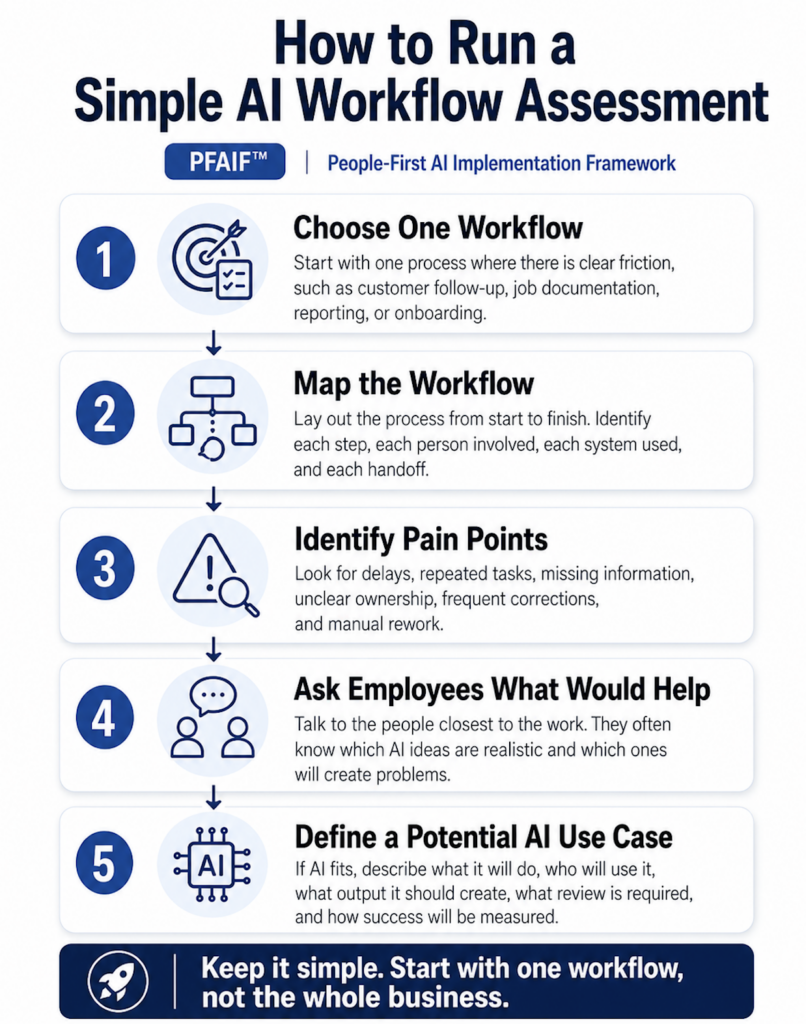
First, choose one workflow. Do not start with “the whole business.” Pick one process where there is clear friction, such as customer follow-up, sales handoff, employee onboarding, job documentation, reporting, or content production.
Second, map the workflow from start to finish. Identify each step, each person involved, each system used, and each handoff. Pay attention to where information is created, transferred, changed, or reviewed.
Third, identify pain points. Look for delays, repeated tasks, missing information, inconsistent outputs, manual copying, unclear ownership, and frequent corrections.
Fourth, ask employees what would actually help. This is where leaders often get the best information. Employees may point out that the obvious AI idea is not the most useful one.
Fifth, define a potential AI use case. If AI appears to fit the workflow, describe exactly what it will do, who will use it, what output it should create, what review is required, and how success will be measured.
This process does not need to be fancy. It just needs to be honest.
What Good Workflow Assessment Reveals
A strong workflow assessment should reveal more than where AI could be used. It should reveal whether AI should be used.
Sometimes the answer will be yes. AI may be a strong fit for summarizing information, drafting internal documents, organizing data, generating first-pass content, classifying requests, or helping employees move faster through repetitive tasks.
Sometimes the answer will be “not yet.” The workflow may be too messy, the data may be too inconsistent, or the quality risks may be too high.
Sometimes the answer will be no. AI may add unnecessary complexity to a process that could be improved through a better form, checklist, template, training process, or handoff rule.
That is why workflow assessment is valuable. It prevents AI from becoming the default answer to every operational problem.
The goal is not to use AI everywhere. The goal is to use AI where it makes work better.
How Workflow Assessment Fits Into PFAIF
In the People-First AI Implementation Framework, workflow assessment is the first readiness area because it shapes everything that comes after it.
A clear workflow makes it easier to define the use case. A clear use case makes communication easier. Better communication makes training more relevant. Relevant training supports better quality standards. Stronger quality standards make pilots safer. Pilot results help leaders measure trust and usefulness. Feedback loops improve the workflow after launch.
If workflow assessment is weak, every later step becomes harder.
The organization may train employees on the wrong thing. It may measure the wrong outcome. It may pilot a use case that does not matter. It may mistake tool activity for business value.
Workflow assessment is not the whole AI implementation process, but it is the foundation.
Practical Checklist: Workflow Assessment Before AI Implementation
Before choosing or scaling an AI tool, leaders should be able to answer these questions:
- What workflow are we trying to improve?
- Who performs this workflow today?
- What steps are involved from beginning to end?
- Where does the process slow down?
- Where does information get lost or distorted?
- Where do employees repeat the same work?
- Where does quality break down?
- What workarounds are employees already using?
- What would improvement actually mean?
- Could AI help this workflow, or does the process need to be fixed first?
- Who will review AI-assisted output?
- How will we know whether AI improved the workflow?
If these questions cannot be answered clearly, the organization is probably not ready to scale AI in that workflow yet. Workflow assessment is one of the most important parts of responsible AI implementation because it keeps leaders focused on real work instead of tool hype.
AI should not be adopted just because it is available, popular, or impressive in a demo. It should be adopted because it helps solve a real workflow problem in a way employees can understand, trust, and use.
For small and mid-sized businesses, this is especially important. Time, money, employee attention, and customer trust are limited. A poorly matched AI rollout can waste all four. A well-matched AI rollout can reduce repetitive work, improve consistency, support employees, and make the business more efficient.
The first step is not choosing the tool.
The first step is understanding the work.
That is workflow assessment.
Take the PFAIF Readiness Assessment
The PFAIF Readiness Assessment helps organizations evaluate people-first AI readiness across workflow assessment, use case definition, change communication, role-specific training, quality standards, pilot testing, adoption and trust measurement, and feedback loops.
Use it to identify where your organization is strongest and where more support may be needed before scaling AI.
Take the PFAIF Readiness Assessment
Learn more about the People-First AI Implementation Framework
Watch the recorded PFAIF webinar
FAQ
What is workflow assessment in AI implementation?
Workflow assessment in AI implementation is the process of mapping how work actually gets done before choosing or scaling an AI tool. It helps leaders identify bottlenecks, repetitive tasks, handoff issues, quality problems, and places where AI may improve the workflow.
Why is workflow assessment important before using AI?
Workflow assessment is important because AI should be matched to real business problems. Without it, companies may buy AI tools that seem impressive but do not solve the actual workflow issue. This can lead to wasted money, weak adoption, employee frustration, and extra cleanup work.
What is an example of workflow assessment for AI?
An HVAC company might assess its service follow-up workflow before using AI. The company may discover that customer follow-up problems are caused by incomplete technician notes, not poor email writing. In that case, AI may be better used to structure job notes than to simply draft customer emails.
Who should be involved in an AI workflow assessment?
Leaders, managers, and employees closest to the work should all be involved. Employees often understand the real workflow better than leadership because they see the bottlenecks, workarounds, handoff problems, and quality issues every day.
How does workflow assessment reduce AI resistance?
Workflow assessment reduces AI resistance by showing employees that leadership understands the work before introducing new tools. When employees are asked where AI could actually help, they are more likely to trust the process and less likely to see AI as a disconnected mandate.
Does workflow assessment mean AI is always the answer?
No. A good workflow assessment may show that AI is useful, but it may also show that the process needs better documentation, templates, training, or handoff rules first. The goal is not to force AI into every workflow. The goal is to improve the work.