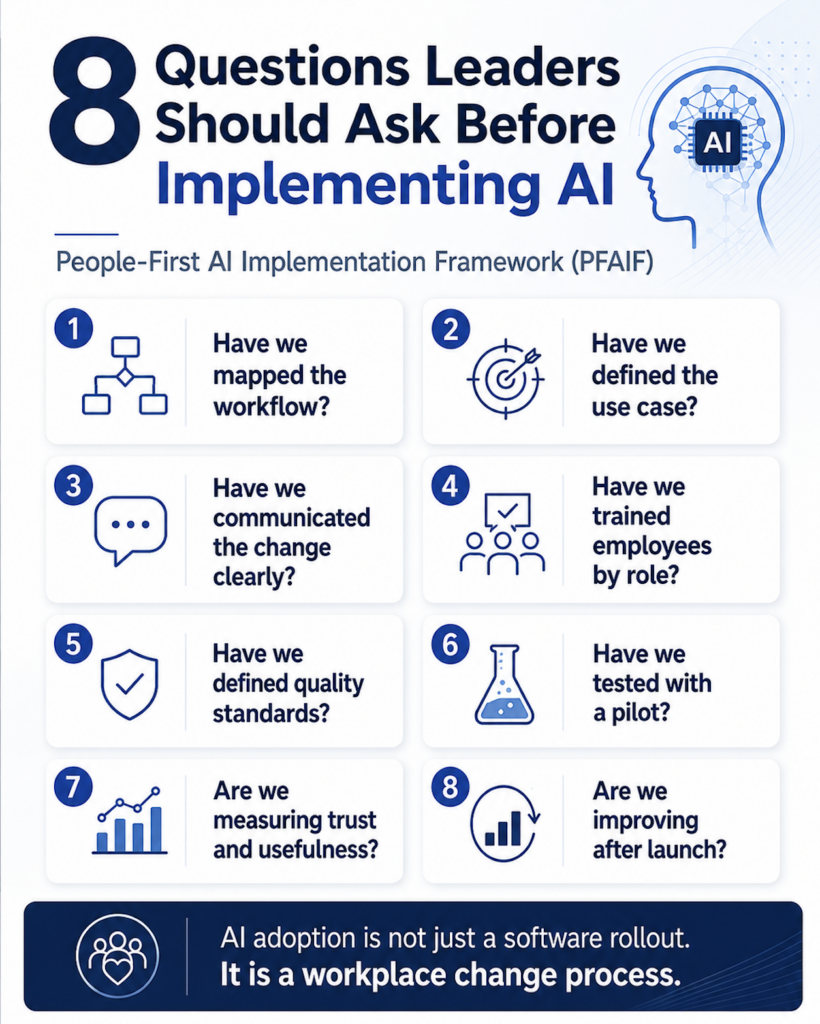
What questions should leaders ask before implementing AI at work? Before rolling out AI, leaders should ask whether they have mapped the workflow, defined the use case, communicated the change clearly, trained employees by role, created quality standards, tested with a pilot, measured trust and usefulness, and built a process for improving after launch. These eight questions form the practical foundation of the People-First AI Implementation Framework, or PFAIF™, which helps organizations implement AI in ways employees can understand, trust, and actually use.
AI adoption is moving fast, but moving fast is not the same thing as moving well.
A business can buy AI tools, give employees access, hold a training session, and still end up with weak adoption. Employees may avoid the tool. Managers may not know how to measure success. The tool may create extra cleanup work. Customers may get inconsistent outputs. Leadership may think AI is helping, while employees quietly feel confused, frustrated, or unsupported.
This is why AI implementation should not start with the tool. It should start with cultural and employee readiness.
AI adoption is not just a software rollout. It is a workplace change process. The companies that do this well will not be the ones that simply buy the most tools. They will be the ones that understand the work, prepare their people, define quality standards, measure trust, and improve over time.
Below are eight questions every leader should ask before implementing AI at work.
1. Have We Mapped the Workflow?
Before implementing AI, leaders should understand the workflow they are trying to improve.
This sounds basic, but it is one of the most common mistakes companies make. They start with the AI tool instead of the actual work. They see a platform that can write, summarize, automate, analyze, or generate content, and they immediately start looking for somewhere to use it.
That is quite backwards. AI should be matched to real workflow friction. Leaders should ask:
- Where is work slow?
- Where are employees repeating the same task over and over?
- Where do handoffs break down?
- Where are customers waiting too long?
- Where is quality inconsistent?
- Where are employees already frustrated?
For example, imagine a small HVAC company wants to use AI to improve customer service. Leadership may think the company needs a tool that writes better customer emails. But after mapping the workflow, they may realize the real problem is not email writing. The real problem is that dispatch notes are inconsistent, technicians are not documenting job details the same way, and customer service representatives do not always have the information they need for follow-up calls.
In that case, an AI writing tool may not solve the problem. The better AI use case might be summarizing technician notes, structuring job details, or helping customer service teams prepare accurate follow-up messages.
The same applies to a dental office. The owner may want to use AI for marketing, but the bigger bottleneck might be patient intake, appointment reminders, insurance questions, or post-visit instructions. Without mapping the workflow, the practice may invest in a tool that feels exciting but does not fix the most painful part of the business.
AI should not be forced into a workflow that has not been clearly understood. A good first step is simple: pick one process and map it from start to finish. Identify who touches it, where information moves, where delays happen, and where quality breaks down. Then ask where AI could actually help.
2. Have We Defined the Use Case?
Once the workflow is clear, leaders need to define the specific AI use case.
A weak AI use case sounds like this:
“We want to use AI to improve productivity.”
That may sound good in a leadership meeting, but it is too vague to guide implementation.
A stronger use case sounds like this:
“We want to use AI to summarize customer call transcripts into structured notes so account managers can follow up faster, with human review before the summary is added to the CRM.”
See the difference? It explains:
- What AI will do
- Who will use it
- What output it should create
- What business problem it supports
- What human review is required
- How success will be judged
This matters because vague AI use cases create confusion. Employees do not know when to use the tool. Managers do not know what success looks like. Teams use the same tool in inconsistent ways. Leadership cannot tell whether AI is helping or just creating activity.
Consider a small law firm. “Use AI to help with legal work” is not a good use case. That is too broad and risky. A better use case might be: “Use AI to create a first-pass summary of long discovery documents for internal review only, with attorney verification before any client-facing use.”
That use case is clearer because it defines the task, the boundary, and the review process.
Or think about a local accounting firm. “Use AI for tax season” is too vague. A better use case might be: “Use AI to draft plain-language explanations of common tax document requests for administrative staff to review before sending to clients.”
That is specific, limited, and easier to train around.
Before implementing AI, leaders should define the use case in plain language. Everyone involved should understand what the tool is for, what it is not for, and what outcome it is supposed to improve.
3. Have We Communicated the Change Clearly?
Employees are not wrong to be nervous about AI. Many people have seen headlines about automation, layoffs, surveillance, and job disruption. They see a future dominated by LLMs and are understandably freaked out.
When leadership introduces AI without clear communication, employees may simply assume the worst. That does not mean employees are anti-innovation. It means they are human. Leaders should explain why AI is being introduced, how it will affect the work, what expectations are changing, and what remains human-led.
A vague message like “We are embracing AI to increase efficiency” is not enough. That phrasing will leave employees sitting there wondering:
- Is this here to help me or replace me?
- Am I expected to use this every day?
- Will my performance be judged by AI output?
- Who is responsible if the AI makes a mistake?
- Will this make my job easier or create more cleanup work?
- Can I give feedback if the tool does not work?
For example, imagine a home services company introduces AI-generated customer responses. If leadership simply tells the office team to “start using AI for customer communication,” employees may worry that speed is now more important than accuracy or empathy.
A better communication approach would be:
“We are testing AI to help draft first-pass customer responses. The goal is to reduce repetitive writing, not remove human judgment. Every message still needs review before it is sent. We will collect feedback from the customer service team after two weeks and adjust the process based on what works and what does not.”
That message is clearer, more honest, and more likely to build trust.
A marketing agency could do the same thing. Instead of telling writers, “We are using AI for content now,” leadership could say:
“We are testing AI for outlines, research organization, and first-draft support. Final strategy, editing, originality, and client judgment remain human responsibilities.”
The distinction matters! AI communication should be specific enough that employees understand the purpose, the limits, and their role in the process.
4. Have We Trained Employees by Role?
At this point in societal AI adoption, generic AI training is not enough. A one-hour session on prompt engineering may introduce the tool, but it rarely creates meaningful adoption across a business. Different employees need different examples, different guardrails, and different review standards.
Role-specific training is one of the most important parts of people-first AI implementation.
A customer service employee needs different AI training than a technician. A salesperson needs different examples than a bookkeeper. A manager needs different guidance than an entry-level employee.
For example, an HVAC technician probably does not need a long lesson on advanced prompt engineering. They may need a simple process for turning job notes into a clear service summary. They need to know what information must be included, what should be checked, and what should never be guessed by AI.
A CSR at the same company may need training on how to use AI to draft follow-up messages, summarize customer issues, or prepare call notes. Their risks are different. Their workflow is different. Their examples should be different.
A small medical practice may train front desk staff to use AI for drafting appointment reminder language, but clinical staff would need stricter rules around patient information, review, and what AI should never be used for.
A real estate office may train agents to use AI for listing descriptions, neighborhood summaries, and email drafts, but still require human review for fair housing language, accuracy, and compliance.
We should not be teaching employees how to get an AI output. We should be teaching judgment on when and how to use the tools for their specific circumstance.
Employees need to know:
- When to use AI
- When not to use AI
- How to review the output
- How to spot weak or generic answers
- What information should not be entered
- Who approves final work
- How to ask for help
AI training should be connected to the work employees actually do. Otherwise, employees may leave training thinking, “That was interesting, but I still do not know how this applies to my job.”
5. Have We Defined Quality Standards?
We’ve all seen it. Garbage AI content that is incorrect, but looks deceivingly correct. AI can produce work that looks polished, but is still wrong. That is one of the biggest risks of AI implementation.
Remember, LLMs are statistically powered tools that use a strong algorithm to predict the next best word to use. There is no “fact-based checking” that happens (at least not yet). A response can sound confident but include inaccurate information. A summary can look clean but miss an important detail. A recommendation can seem reasonable but fail to account for the customer, the policy, the job history, or the business context.
That is why quality standards matter. Before implementing AI, leaders should define what good AI-assisted work looks like.
They should ask:
- What must be checked?
- Who owns final approval?
- What information needs verification?
- What kinds of work require human review?
- When should AI not be used?
- How will mistakes be caught?
- How will rework be tracked?
For example, a plumbing company might use AI to draft customer follow-up messages after a service visit. Without quality standards, AI may create a message that sounds professional but gives the wrong maintenance advice or misses an important warranty issue.
A quality standard could require that any AI-assisted customer message must be checked for job details, pricing accuracy, warranty language, and tone before it is sent.
A financial advisory firm may use AI to summarize meeting notes. But the firm should clearly define that AI-generated summaries cannot be treated as final records until reviewed by a licensed professional.
A marketing agency may use AI to draft blog outlines. But the agency still needs standards for originality, brand voice, factual accuracy, internal linking, client-specific details, and final editorial review.
AI should assist the work, not remove accountability. A simple rule for leaders is this: AI can help create, organize, summarize, or suggest. But a person still owns the final judgment. Without quality standards, AI may appear to save time while quietly creating more correction work later.
6. Have We Tested With a Pilot?
AI should be tested before it is scaled. A pilot gives leaders a safe way to learn what works, what breaks, and what needs to change before the entire organization is expected to adopt the tool.
A good pilot is not just a small rollout. It is a structured learning process. Leaders should define:
- Who is part of the pilot
- What use case is being tested
- What success looks like
- What risks need to be monitored
- How feedback will be collected
- What happens after the pilot ends
For example, a home services company may want to use AI to help summarize inbound calls. Instead of rolling it out to every location, the company could test it with one customer service team for 30 days.
During the pilot, leaders could track whether summaries are accurate, whether CSRs find them useful, whether managers trust the output, and whether the summaries reduce follow-up confusion.
A restaurant group might test AI for responding to online reviews. Before letting every location use it, the company could pilot the process with one manager, review the tone and accuracy of responses, and create a standard for what types of reviews need human-only responses.
A small e-commerce company might test AI for product descriptions. The pilot could measure whether AI-assisted descriptions improve speed without creating inaccurate claims, duplicate language, or brand voice problems.
The most important part of a pilot is the willingness to change course. Some AI use cases should expand. Some need more training. Some need better data. Some should stop entirely.
A responsible AI rollout does not force every pilot to become permanent. It uses pilots to learn before mistakes become expensive.
7. Are We Measuring Trust and Usefulness?
Usage is not the same as value. This is another mistake leaders make when implementing AI at work. They measure logins, licenses, prompt counts, or training completion and assume they are measuring adoption. Those numbers can be useful, but they do not prove AI is helping.
Employees may be using AI because they were told to. They may be using it only for low-risk tasks. They may be trying it once and then going back to the old way. They may use it often but spend extra time fixing the output. Leaders should measure trust and usefulness, not just activity.
They should ask employees:
- Do you trust the AI output?
- Does AI help you do your work better?
- Does it save time after review is included?
- Does it create extra cleanup work?
- Do you feel confident using it?
- Do you know when not to use it?
- Would you keep using it if it were optional?
For example, a small insurance agency may see that employees are using AI to draft client emails. But if employees say they do not trust the output, or they spend more time editing than they would have spent writing from scratch, the tool may not be creating real value.
A consulting firm may see high AI usage among analysts. But if senior consultants are spending extra time correcting AI-generated work, the company has not saved time. It has shifted the workload.
A service business may use AI to write job summaries. But if office staff do not trust the summaries and still have to call technicians for clarification, the adoption is shallow.
Trust should be measured directly. Not assumed. AI adoption works better when employees believe the tool is useful, accurate enough for the task, and supported by clear review standards.
8. Are We Improving After Launch?
AI implementation does not end when the tool goes live.
In many companies, the rollout gets the most attention. There is an announcement, a training session, maybe a pilot, and then everyone moves on. But the real work starts after launch.
That is when employees discover edge cases. That is when quality issues show up. That is when workflows need adjustment. That is when managers learn whether the tool is actually helping or just creating noise.
Leaders need feedback loops. A feedback loop is simply a process for learning from real use and improving over time. It can include:
- Employee feedback forms
- Monthly team discussions
- Manager check-ins
- Updated training examples
- A shared list of approved use cases
- A process for reporting bad outputs
- Documentation of what works
- A decision process for stopping weak use cases
For example, a small retail business might use AI to generate product descriptions. After launch, employees may notice that AI descriptions are too generic or occasionally inaccurate. A feedback loop would allow the team to collect those issues, update the prompt templates, improve the review checklist, and decide which product categories are not a good fit for AI assistance.
A construction company might use AI to summarize project updates. After launch, project managers may find that certain details are consistently missed. A feedback loop would help refine the process before bad summaries create confusion across teams.
A marketing department might use AI for first drafts. After launch, editors may notice that AI output is creating repetitive language or off-brand messaging. Feedback loops help turn those observations into better training and better standards. AI adoption should be treated as an ongoing change process. Not a one-time tool rollout.
Why These 8 Questions Matter
These eight questions are part of the People-First AI Implementation Framework, or PFAIF. The framework is built around a simple idea: AI works better when organizations prepare the people, workflows, training, quality standards, trust systems, and feedback loops around the tool.
The goal is not maximum AI usage. The goal is useful, trusted, sustainable AI adoption.
Business leaders should care about these questions because they help prevent common AI implementation problems:
- Buying tools before understanding the work
- Launching AI without clear use cases
- Creating employee fear through vague communication
- Providing generic training that does not stick
- Allowing low-quality AI output to reach customers
- Scaling too quickly without testing
- Measuring usage instead of trust and value
- Failing to improve after launch
For small and mid-sized businesses, these mistakes are especially costly. A large enterprise may be able to absorb a failed pilot, wasted software spend, or messy rollout. A smaller business often cannot. Every tool, training hour, process change, and employee frustration matters.
Before implementing AI at work, leaders should slow down just enough to ask the right questions.
Quick Checklist: 8 Questions Before Implementing AI at Work
Use this checklist before rolling out an AI tool:
- Have we mapped the workflow?
- Have we defined the use case?
- Have we communicated the change clearly?
- Have we trained employees by role?
- Have we defined quality standards?
- Have we tested with a pilot?
- Are we measuring trust and usefulness?
- Are we improving after launch?
If the answer to several of these questions is no, the organization may not be ready to scale AI yet. That does not mean AI should be avoided. It means the foundation needs to be stronger. AI is already changing the workplace. Pandora’s box is open, and businesses are going to keep looking for ways to use AI to improve productivity, service, operations, marketing, decision-making, and customer experience.
But responsible AI adoption requires more than buying tools. It requires leadership, communication, training, trust, and a willingness to listen to the employees who actually have to use the technology. The businesses that succeed with AI will not be the ones that force it into every workflow as quickly as possible. They will be the ones that ask better questions before implementation, support their employees through the change, and build AI adoption around real work.
That is the purpose of the People-First AI Implementation Framework. AI adoption is not just a software rollout. It is a workplace change process.
Take the PFAIF Readiness Assessment
The PFAIF Readiness Assessment helps organizations identify where they are strongest and where more support may be needed before scaling AI.
Use it to evaluate your organization’s people-first AI readiness across workflow assessment, use case definition, communication, training, quality standards, pilot testing, trust measurement, and feedback loops.
Take the PFAIF Readiness Assessment
Learn more about the People-First AI Implementation Framework
Watch the recorded PFAIF webinar
FAQ
What questions should leaders ask before implementing AI at work?
Leaders should ask whether they have mapped the workflow, defined the AI use case, communicated the change clearly, trained employees by role, defined quality standards, tested with a pilot, measured trust and usefulness, and created a process for improving after launch.
Why should companies map workflows before using AI?
Companies should map workflows before using AI because AI should be matched to real work problems. Without workflow mapping, leaders may buy tools that seem useful but do not solve the actual bottleneck, handoff issue, quality problem, or employee pain point.
Why is role-specific AI training important?
Role-specific AI training is important because employees need examples, practice, and review standards tied to their actual jobs. Generic AI training may introduce the tool, but it often does not help employees apply AI responsibly in their day-to-day work.
What is the People-First AI Implementation Framework?
The People-First AI Implementation Framework, or PFAIF, is a framework for helping organizations implement AI at work in ways employees can understand, trust, and use effectively. It focuses on workflows, use cases, communication, training, quality standards, pilot testing, trust measurement, and feedback loops.
What is the goal of people-first AI adoption?
The goal of people-first AI adoption is not maximum AI usage. The goal is useful, trusted, sustainable AI adoption that improves real work without creating unnecessary fear, confusion, rework, or employee resistance.
PFAIF™ and the People-First AI Implementation Framework™ are trademarks of Jason Karaman.